Technical Tip: Blocking communication to external proxy using the FortiGate explicit proxy
Description
This article explains how to block access to external proxies such as Tinyproxy or Ultrasurf, but without excluding FortiGate Explicit Proxy legitimate traffic. This applies where an explicit proxy is configured on the FortiGate unit.
Scope
Block access to external proxy without blocking FortiGate Explicit Proxy.
Solution
Add the following Custom Signature on the FortiGate:
config application custom
edit "1"
set comment ''
set signature "F-SBID( --attack_id 2046; --name \"Proxy.WWW.Custom\"; --protocol tcp; --app_cat 6; --service HTTP; --flow from_client; --pattern \" \"; --context uri; --within 9,context; --pattern www.; --context uri; --no_case; --within 4; )"
set category 6
next
edit "2"
set comment ''
set signature "F-SBID( --attack_id 3869; --name \"Proxy.IP.Custom\"; --protocol tcp; --app_cat 6; --service HTTP; --flow from_client; --pattern \" \"; --context uri; --within 9,context; --pattern .; --context uri; --no_case; --within 4; --pattern .; --context uri; --no_case; --within 4; --pattern .; --context uri; --no_case; --within 4; --pattern :; --context uri; --no_case; --within 4; )"
set category 6
next
edit "3"
set comment ''
set signature "F-SBID( --attack_id 4187; --name \"Proxy.HTTP.Custom\"; --protocol tcp; --app_cat 6; --service HTTP; --flow from_client; --pattern \" \"; --context uri; --within 9,context; --pattern http://; --context uri; --no_case; --within 7; --context uri; --no_case; )"
set category 6
next
end
edit "1"
set comment ''
set signature "F-SBID( --attack_id 2046; --name \"Proxy.WWW.Custom\"; --protocol tcp; --app_cat 6; --service HTTP; --flow from_client; --pattern \" \"; --context uri; --within 9,context; --pattern www.; --context uri; --no_case; --within 4; )"
set category 6
next
edit "2"
set comment ''
set signature "F-SBID( --attack_id 3869; --name \"Proxy.IP.Custom\"; --protocol tcp; --app_cat 6; --service HTTP; --flow from_client; --pattern \" \"; --context uri; --within 9,context; --pattern .; --context uri; --no_case; --within 4; --pattern .; --context uri; --no_case; --within 4; --pattern .; --context uri; --no_case; --within 4; --pattern :; --context uri; --no_case; --within 4; )"
set category 6
next
edit "3"
set comment ''
set signature "F-SBID( --attack_id 4187; --name \"Proxy.HTTP.Custom\"; --protocol tcp; --app_cat 6; --service HTTP; --flow from_client; --pattern \" \"; --context uri; --within 9,context; --pattern http://; --context uri; --no_case; --within 7; --context uri; --no_case; )"
set category 6
next
end
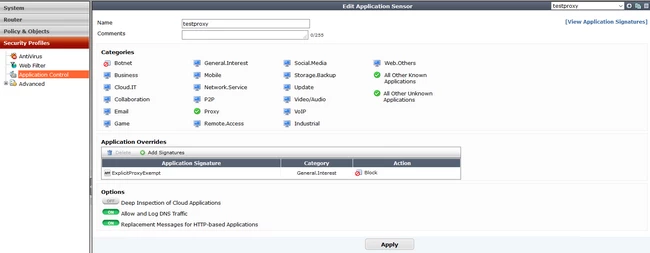
Add them to an application control profile:
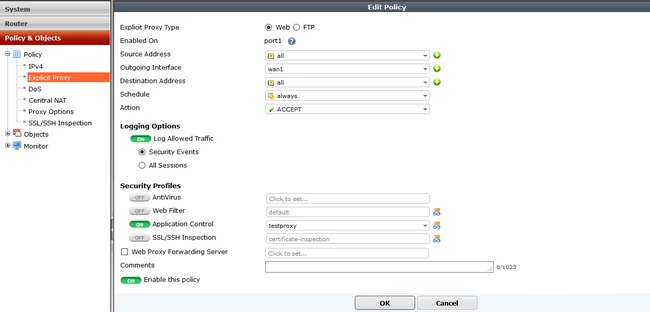
Create an explicit proxy policy that uses this application control profile: