


Technical Tip: Application Control with Explicit Proxy policy error
Description
If you are working with explicit proxy and you want to use application control you can do it, but if you tried to block some applications (proxies) you might get a error: Input value is invalid or -651, discard the setting Command fail. Return code -651.
This happen because you are using proxy and you want to block your communication that it is through a proxy.
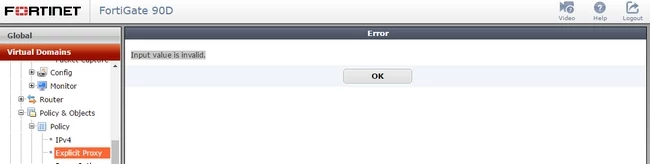
This article gives a solution on how to block proxies applications and not get an error.
This happen because you are using proxy and you want to block your communication that it is through a proxy.
This article gives a solution on how to block proxies applications and not get an error.
Solution
The solution to this problem is that in the profile that is being used for application control, proxy.http must not be blocked. It is possible to block everything but we need to permit proxy.http.
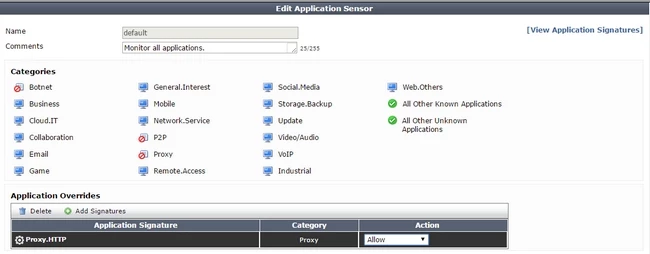
If we do this, we can block the other Proxy Applications

So we cannot block all proxy application because we are using proxy. We need to allow proxy.http
If we do this, we can block the other Proxy Applications
So we cannot block all proxy application because we are using proxy. We need to allow proxy.http
Related Articles
Technical Note : FortiGate Wan Optimization and Explicit Proxy FAQs
Technical Note: Blocking communication to external proxy using the FortiGate explicit proxy
Technical Note: How FortiGate can block Duolingo in different ways. Blocks web application.
Wireless client load balancing
Technical Note: 'Deny: DNS error' and 'Deny: IP connection error'

