Technical Note : Blocking Facebook games when accessed via HTTPS
Description
Scope
Solution
This article explains how to block Facebook games when Facebook is accessed via HTTPS.
Scope
FortiGate
Solution
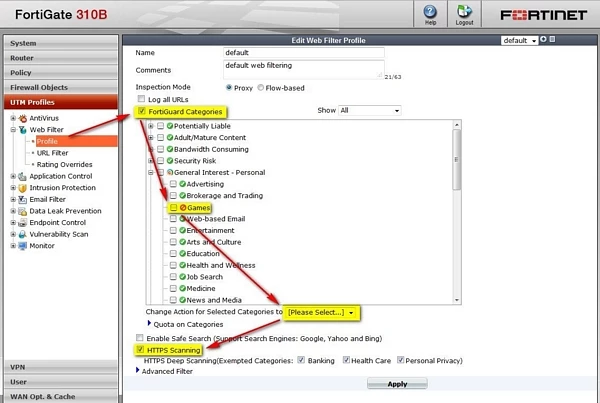
Facebook Games can be blocked using FortiGuard Web Filtering as follows:
1. Update FortiGuard AV DB to the latest version.
2. Enable FortiGuard Categories > expand General Interest - Personal > Block the Games category.
3. Check the HTTPS Scanning checkbox.
4. Apply to the Web Filter profile to the corresponding firewall policy.
1. Update FortiGuard AV DB to the latest version.
2. Enable FortiGuard Categories > expand General Interest - Personal > Block the Games category.
3. Check the HTTPS Scanning checkbox.
4. Apply to the Web Filter profile to the corresponding firewall policy.