Khidzir_MN
Staff
Staff
March 2, 2026

Technical Tip: How to block HTTP request with empty value for specific HTTP header

  • March 2, 2026
  • 0 replies
  • 75 views
Description This article describes how to block HTTP requests with an empty value for a specific HTTP Header.
Scope FortiAppSec Cloud WAF.
Solution

There is a requirement to block HTTP requests with an empty value for a specific HTTP Header


For this article example, the requirement is to block HTTP requests with an empty value for the User-Agent HTTP Header.


Step 1: Go to WAF -> Applications (select the respective Applications) -> Advanced Applications -> Custom Rule.
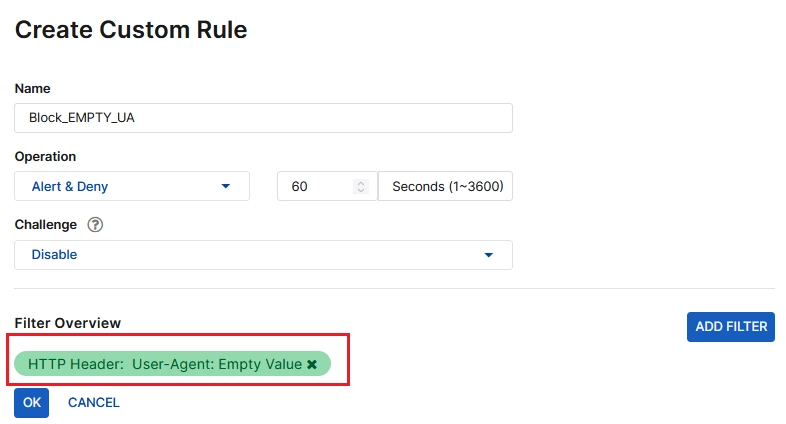
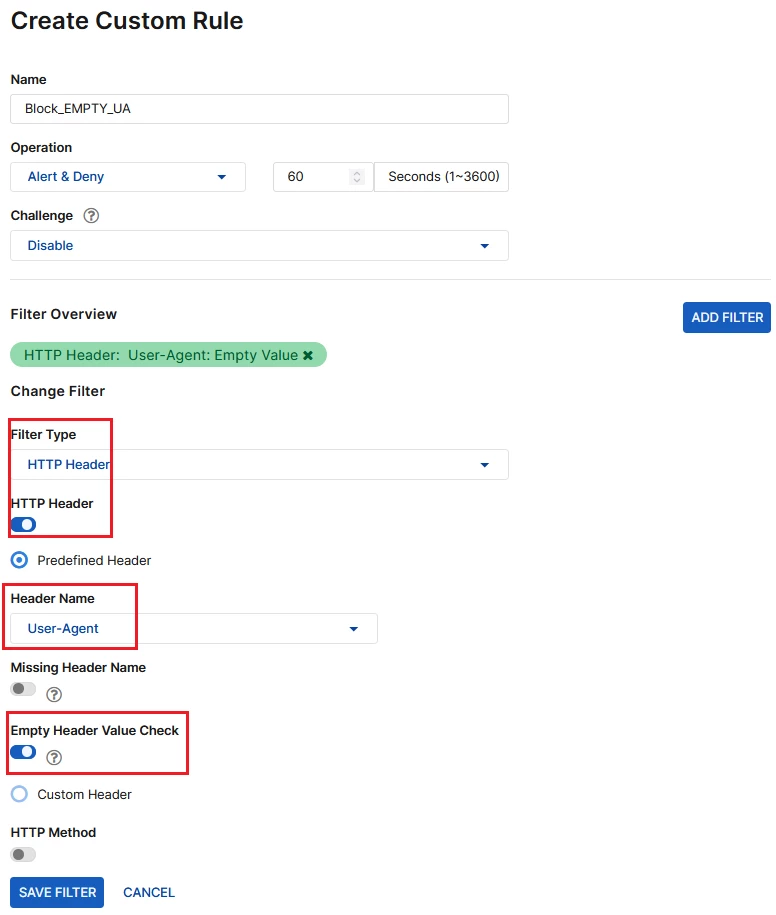
Step 2: Create a new Custom Rule as below:


custom_rule.png


filter_empty_header.png


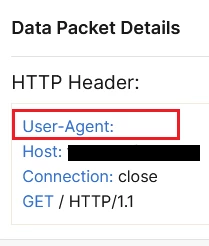
Step 3: Review the respective Attack Logs (Threat Analytics -> Attack Logs). The User-Agents HTTP Header shown in the Data Packet Details has no value (empty), and the request was blocked.


alog.png


packet.png


Related documents:
Custom Rule

Thought Leadership Security Summit. Outpace New Threats with AI - enhanced defense. Tuesday, Septmeber 15, 8:30 AM - 2:30 PM PT. The Golf Club at Newcastle, WA.
Virtual event | September 2026. SASE summit. The age of autonomous trust. Register here!