Description
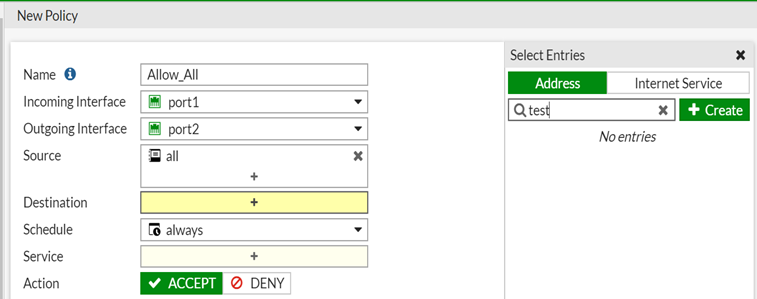
This article provides a solution for cases where the user is not able to select the address object in the policy.
Scope
FortiGate.
Solution
From the GUI:
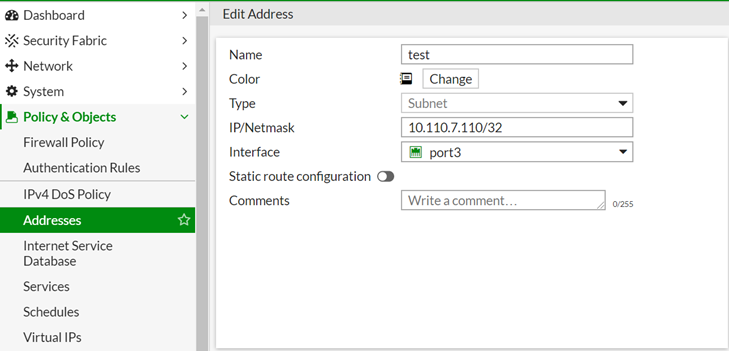
Go to Policy & Objects ->Addresses and navigate to the corresponding object.
Verify if there is interface reference.
Ensure the selected interface is the same as the destination interface, or 'any', as per policy requirements.
In the test object, the selected interface is 'port3'.
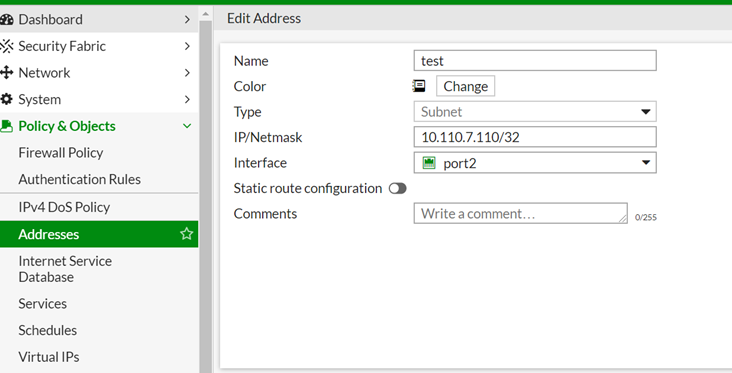
Change it to port2 or 'any' as required.
After the change, the user will be able to select the address object in the policy.
From the CLI:
Change the associated-interface as per the policy configured.
config firewall address
edit "test"
set uuid a62ac3ba-8bb1-51ea-6cf5-d31b1879bf3c
set associated-interface "port3"
set subnet 10.110.7.110 255.255.255.255
next
end
It may be easier to create an address object with any interface set.
It will then be possible to use it in a policy with any interfaces.
It may be more convenient to create an address object with the interface set to 'any', which will allow it to be used in a policy with any interfaces.
For example:
To create an address object in the FortiGate GUI:

To add the address object to the policy GUI:

To create an address object in the FortiGate CLI:
config firewall address
edit "8.8.8.8"
set subnet 8.8.8.8 255.255.255.255
next
end
To add the address object to the policy CLI:
config firewall policy
edit 2
set dstaddr "8.8.8.8"
next
end