




Technical Tip: Local user authentication
Description
Solution
From GUI.
1) To create a local user/group by the below steps.
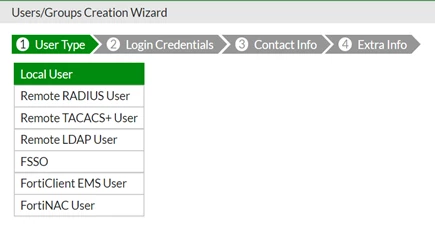
Local users are defined on the FortiGate in User & Device -> User -> User Definition-> Create new -> Local User, enter the login Credentials,the contant infoand select 'Enable'.
This article describes how to configure local user authentication by creating a local user/group.
Solution
From GUI.
1) To create a local user/group by the below steps.
Local users are defined on the FortiGate in User & Device -> User -> User Definition-> Create new -> Local User, enter the login Credentials,the contant infoand select 'Enable'.

