Description
This article describes how to block malicious websites.
In recent network implementations, it is a minimum security requirement to block users from accessing malicious websites such as phishing websites.
Scope
FortiGate.
Solution
On UTM units like FortiGate, it is very easy to block users from accessing malicious websites in one go using the web filter feature.
Here are simple steps to achieve it.
Method One:
- Go to the Security profile -> Web Filter, select 'Create New' or edit an existing web filter profile.
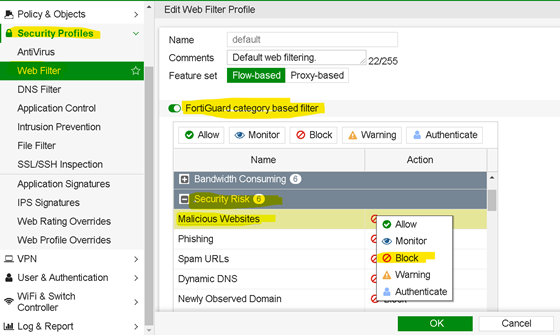
Navigate to the option called 'FortiGuard category based filter', expand 'Security Risk' category, and then find the sub-category 'Malicious Websites', select it, and select the option as 'Block'.
-
Now, map this Web filter profile to the security policies.
Go to Policy and Object -> IPv4 Policy and select 'Create New'.
Select the respective incoming, outgoing interface, and source subnets and destination as ALL (as the destination is the Internet).
Make sure to select the SSL certificate inspection as an SSL deep inspection profile to inspect the HTTPS header properly.
Refer to the following as an example:

Method Two:
Use static URL filtering for specific sites:
- Go to Security Profiles -> Web Filter and select Create New.
- Create a new profile or edit an existing one.
- Scroll to the Static URL Filter section and select Create New.
- In the dialog box, set the URL to the address that needs to be blocked (e.g., malicious-site.com or *.malicious-site.com/*).
- Set the Type to Simple for exact matches or Wildcard for patterns.
- Set the Action to Block and Status to Enable.
- Select OK.
- Apply this Web Filter profile to the firewall policy.
Method Three:
Block by IP address using Internet Service Database (ISDB).
- Go to Policy & Objects -> Internet Service Database -> Internet Services.
- Use the search function to find and verify if a malicious IP address is part of a predefined service.
- Go to the firewall policy and add the malicious IP address or the associated Internet Service as a destination.
- Set the policy to deny.
- Ensure the FortiGate has an active subscription for FortiGuard services to get the latest ISDB information.
Test for accessing any malicious website from the user's browser.