Everstay
New Member
March 25, 2024
Solved

SSL for HTTPS

  • March 25, 2024
  • 1 reply
  • 5837 views

Hi all,


I'm having some issues with port forwarding. I'm running fortinet v7.0.5. I have a Windows Server running Tomcat 8.5 which is running my website. I've succesfully managed to import my SSL certificates into tomcat (on my windows server, going into https://localhost:8443/ i can see the certificate (shows as error, because the domain doesnt match, but all of the information about the CA etc is there, so its working okay). But when i go through https://domain.com:8443/ i get Unable to connect - An error occurred during a connection to domain.com. If i go to https://domain.com (without the port) i get The connection has timed out - An error occurred during a connection to


Now i have a public ip on my fortinet wan, which is used mostly just for ssl-vpn to remote into my workspace when im at home.


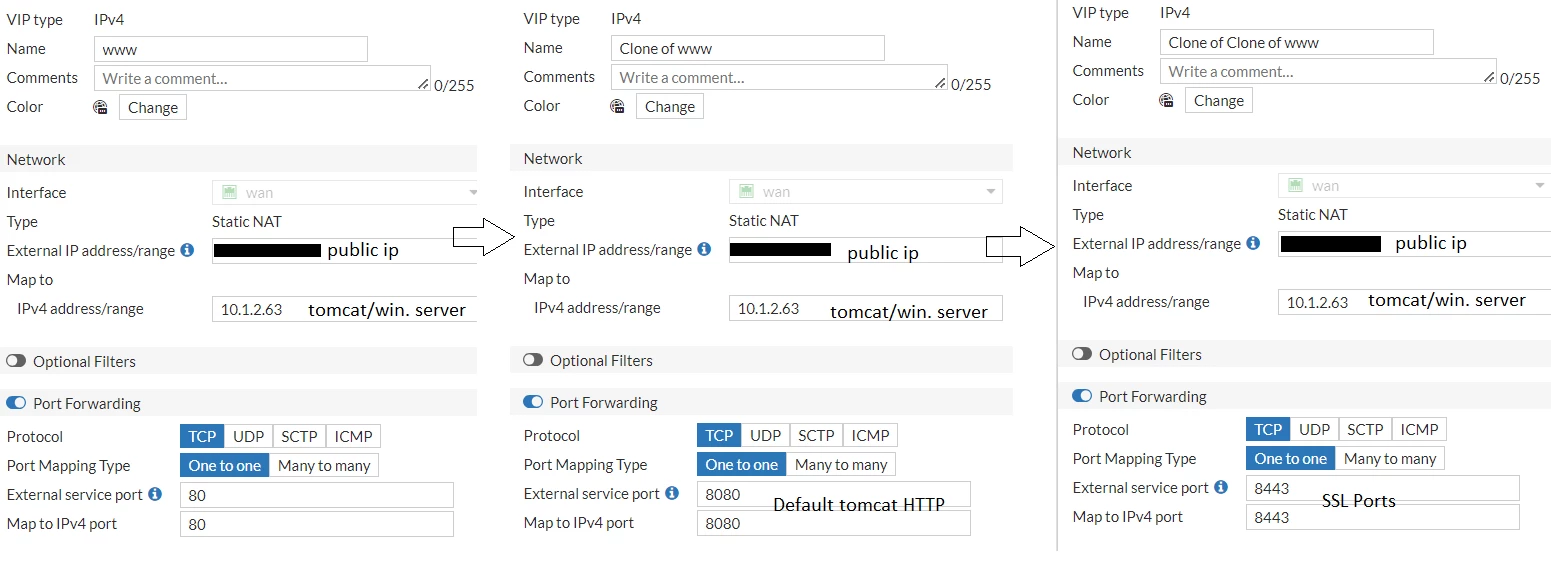
I've added 2 VIP's one for port 80 and one for port 8443(https) - port 8443 seems to get hits, but cant load, and port 8443 reports as closed when using tools to check for open ports.


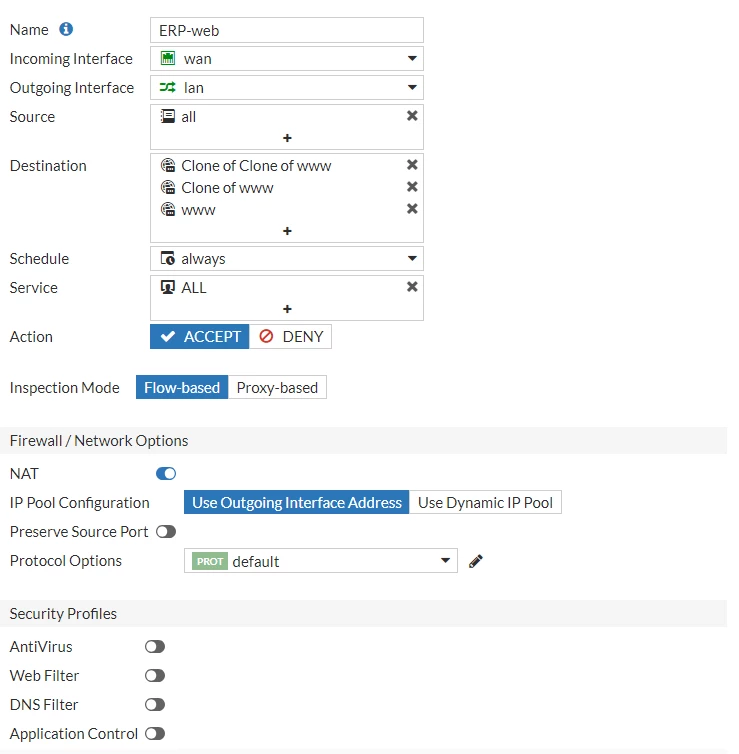
I've attached some screenshots of my vip's and firewall policies (im guessing the issue might be within the firewall rules, as im a complete newbie at this).


I've attached 2 screenshots - 1 of the vip settings, and other of the firewall rule. I would greatly appreciate if someone more experienced could point be to the right direction, i've fought this for 3 days without any luck.


If you require any more information, please do say and i will provide them!


Many thanks!


screenshots:vips2.png

firewall.pngvip.png

Best answer by pminarik

Look at this single flow (which repeats throughout the capture):


2024-03-25 08:23:57.044783 wan in PUBLIC_IP.114.53929 -> PUBLIC_IP.110.8443: syn 800780839
2024-03-25 08:23:57.044848 vlan99 out 10.1.99.30.53929 -> 10.1.2.63.8443: syn 800780839
2024-03-25 08:23:57.044853 lan out 10.1.99.30.53929 -> 10.1.2.63.8443: syn 800780839
2024-03-25 08:23:57.045227 vlan99 in 10.1.2.63.8443 -> 10.1.99.30.53929: rst 0 ack 800780840
2024-03-25 08:23:57.045249 wan out PUBLIC_IP.110.8443 -> PUBLIC_IP.114.53929: rst 0 ack 800780840


Or in short:

-> SYN

<- RST


This is very much an explicit rejection of the attempt to communicate by 10.1.2.63 (or whoever else may be acting on its behalf, such as another firewall, on the path, on the server, etc.).


From the FortiGate's point of view, the important thing to notice is that the SYN packet goes through, i.e. the packet/session was allowed to pass.

1 reply

pminarik
Staff
Staff
March 25, 2024

At a glance the setup looks OK. Here's a list of semi-random points that may be worth checking:

  • Does "domain.com" resolve to the WAN interface IP, exclusively? (not resolving to two IPs, or giving multiple results rotated in round-robin fashion)
  • Is the mapped-ip 10.1.2.63 actually reachable via the "lan" interface? (is "lan" in the same subnet? Or does it at least have a route towards the IP via another router?)
  • You wrote "localhost:8443". Is the server configured correctly? A) is it listening on its ethernet interface connected to the 10.1.2.63/xx subnet? B) Is the local firewall (if any is enabled) on the server allowing incoming traffic to TCP/8443?
  • Is the server application configured with any source-ip restrictions for incoming connections? (less likely to be relevant with SNAT enabled in the FGT firewall policy, but it may become more relevant later)

If all else fails, start with basics and make a packet capture and check the packet flow:

diag sniffer packet any "port 8443" 4 0 a

(CTRL+C when done)

Everstay
EverstayAuthor
New Member
March 25, 2024

Hi and thanks for your pointers.

  • The domain.com is our main website hosted via a hosting providers, we've  created a subdomain for our main domain. Said subdomain has an A record pointing to the public fortinet WAN ip address which i failed to mention; so to answer your question, i guess yes it does
  • The mapped address is reachable, there's no issue with this. I can easily access the website using my subdomain, but without the https port (i can only access it using port 80 or port 8080 (which is default non ssl for tomcat)
  • Im 90% certain server-wise everything is correct. Is there any commands i can run on the windows server that would tell me if there is something blocking it from reaching the outside world using the ssl  port?
  • I dont think so, we never had anything similar done on our network, so if it hasn't came by default, its not there.


Here's a glance at the sniffer command. I've changed most parts of the public ip to PUBLIC_IP leaving .114 and .110 which is the ends of that WAN ip address. Is there something you see that i dont?


Many thanks!

pminarik
Staff
Staff
March 25, 2024

Looks like the sniffer output wasn't attached, can you retry?