Technical Tip: Delete option grayed out for Loopback interface
| Description | This article describes the essential measures to take when dealing with loopback interfaces, especially since the delete option is not available for them. |
| Scope | FortiGate. |
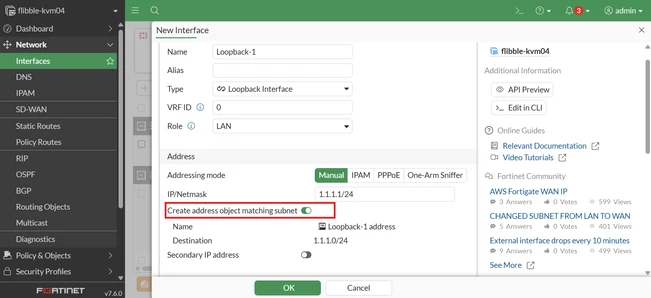
| Solution | When creating a Loopback interface, enabling the 'Create address object matching subnet' option triggers the automatic generation of an address object that corresponds to the specified subnet.
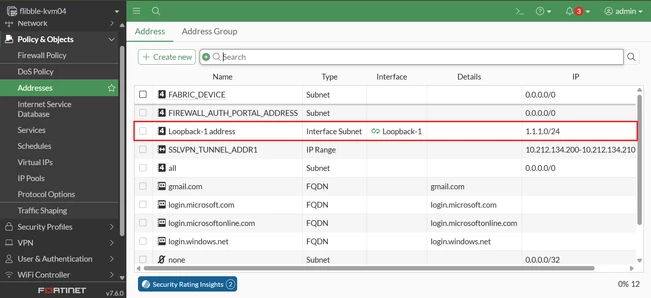
This address object can be accessed and verified under the Policy & Objects section, specifically within the Addresses tab.
It is crucial to understand that the presence of this address object restricts the deletion of the Loopback interface.
In order to successfully delete the Loopback interface, it is necessary to first remove the associated address object. Failure to do so will result in an inability to delete the Loopback interface, as the system requires that all dependencies be resolved beforehand. Therefore, the proper sequence of actions is to locate and delete the relevant address object before attempting to remove the Loopback interface itself.
The CLI commands below can also be used to verify and trace interface-related objects that must be removed before deleting a specific interface; in this example, a loopback interface:
diagnose sys cmdb refcnt show <path.object.mkey>
Or:
show full-configuration | grep -f Loopback-1 |