PixoPuro
New Member
Nov 27, 2023 7:54 PM UTC
Solved

SSL Deep Inspection - Google Chrome

Hi, is anyone else having a problem doing deep inspection using Google Chrome?


Google Chrome version:  119.0.6045.160 (Versão oficial) 64 bits


Fortigate 200F, 7.4.1.
config sys global
set admin-https-ssl-versions tlsv1-2 tlsv1-3

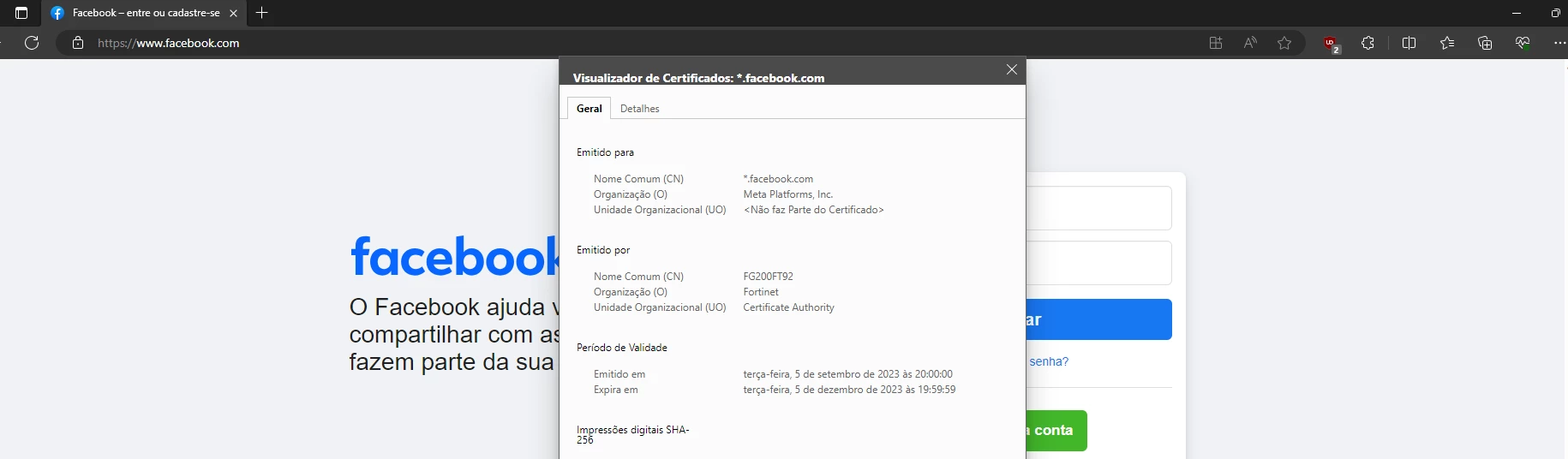
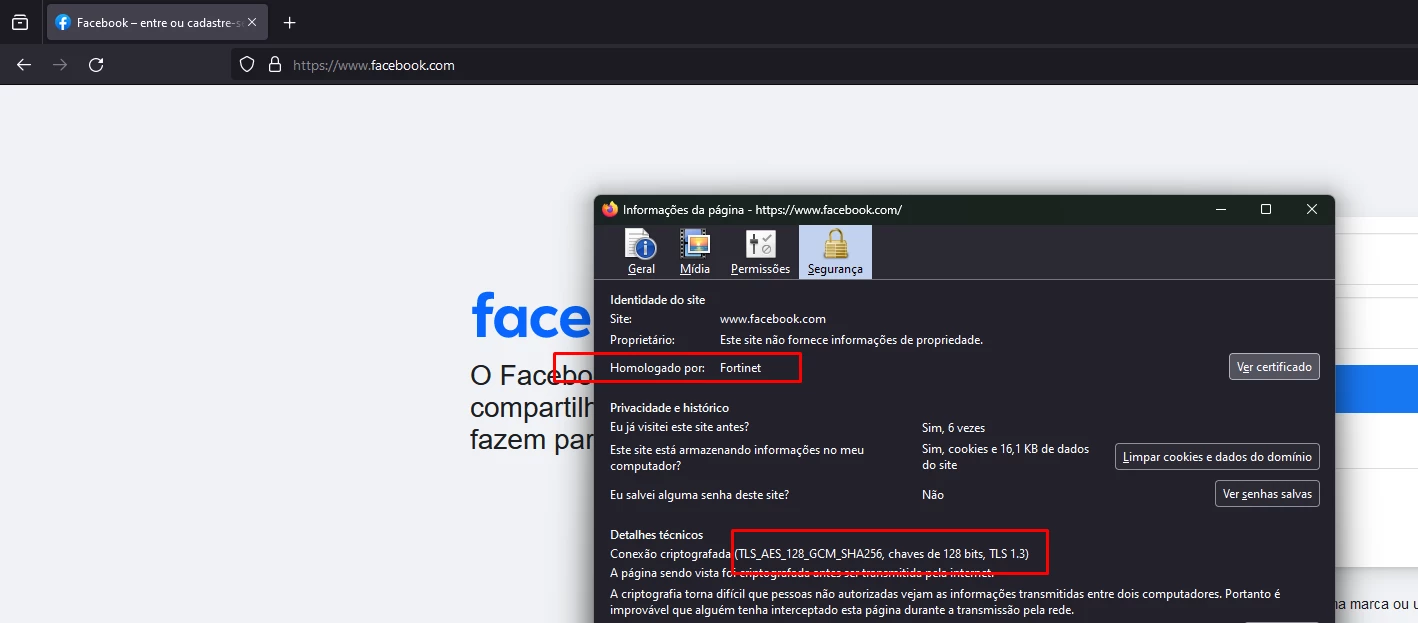
google same policy/ssl profile from prints below.
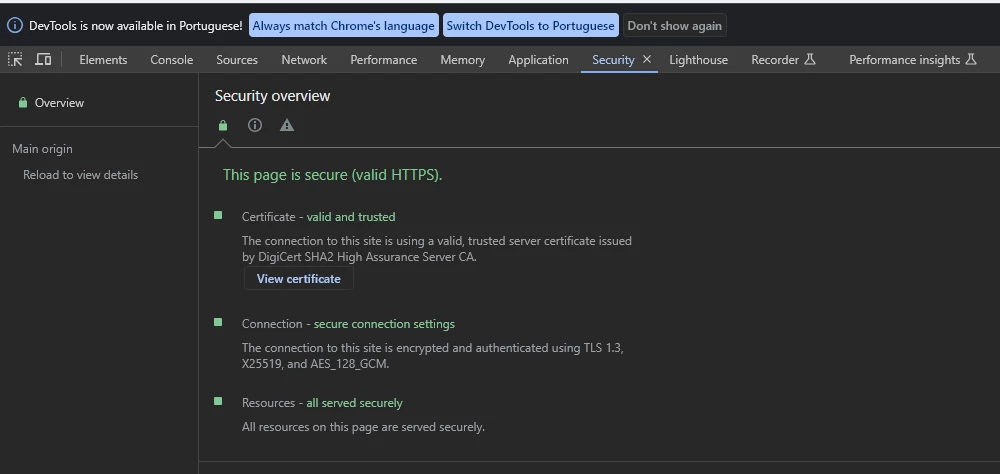
facebook.com_chrome.png


 same policy ID from above - EGDE

facebook.com_edge.png


  same policy ID from abobe - firefox

faceook.com_firefox.png


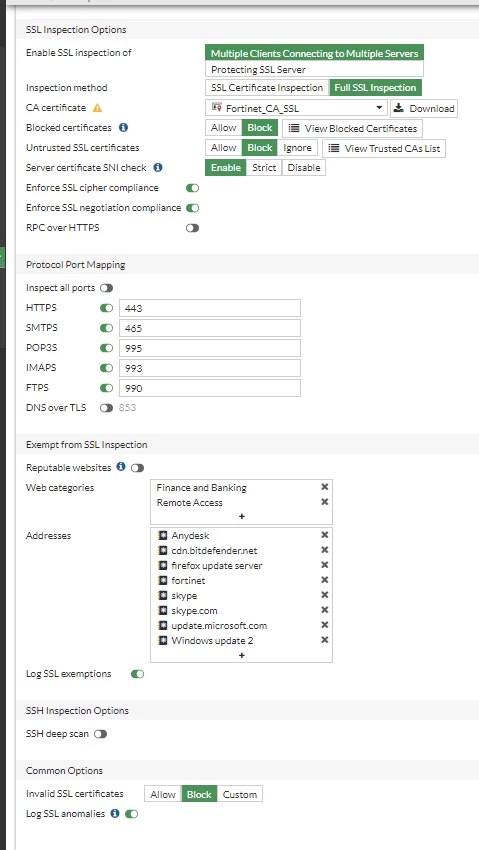
 SSL Profile:


SSL_profile.png


Do you guys have some advices?
TY


smaruvala
smaruvalaAnswer
Staff
Nov 28, 2023 8:54 AM UTC

Hi,


- I suspect the issue is seen due to Kyber Support introduced by chrome for TLS1.3 version.

- Check the chrome flags the configuration of the same. You can use "chrome://flags/#enable-tls13-kyber" check the configuration in chrome.

- Try to disable the option and check if the issue gets fixed. If yes then we can confirm the issue matches to a reported issue for which fixes will be coming soon.


Regards,

Shiva

18 replies

smaruvala
Staff
Staff
Nov 28, 2023 8:01 AM UTC

Hi,


- The command "set admin-https-ssl-versions" is used for GUI access of the Firewall. 

- I tried to check using the same chrome version. I didn't face any issue in which I saw the DigiCert CA certificate instead of the Fortigate certificate.

- Was the issue not seen when chrome version was older? 

- Is the issue seen in every or multiple users behind the Firewall?

- I don't see the page you are accessing in the chrome. Is it the facebook URL as well?


Regards,

Shiva

DarioP
Visitor III
Nov 28, 2023 8:33 AM UTC

Hi, the same issue with 400F, 7.0.13. WebFilter doesn't work too. But on some stations with Google Chrome 119.0.6045.160/64 deep inspection and WebFilter work fine. Interesting...

Regards

DarioP


smaruvala
Staff
smaruvalaAnswer
Staff
Nov 28, 2023 8:54 AM UTC

Hi,


- I suspect the issue is seen due to Kyber Support introduced by chrome for TLS1.3 version.

- Check the chrome flags the configuration of the same. You can use "chrome://flags/#enable-tls13-kyber" check the configuration in chrome.

- Try to disable the option and check if the issue gets fixed. If yes then we can confirm the issue matches to a reported issue for which fixes will be coming soon.


Regards,

Shiva

PixoPuro
PixoPuroAuthor
New Member
Nov 28, 2023 12:58 PM UTC

Thank you, I was able to use deep inspection in Chrome with your tip. 

DarioP
Visitor III
Nov 28, 2023 9:34 AM UTC

Hi again,

It works for me. After disabling "TLS 1.3 hybridized Kyber support"  in Chrome everything looks fine.


Regards,

DarioP

smaruvala
Staff
Staff
Nov 28, 2023 10:02 AM UTC

Hi @DarioP ,


Great, Then it would be matching the same issue. Current IPS Engine is not supporting this. So the fixes will be coming soon.


Regards,

Shiva

- Have you found a solution? Then give your helper a "Kudos" and mark the solution.


tuan2tech
Explorer
Dec 7, 2023 12:21 AM UTC

Hi you

I disabled Kyber in Chrome and it worked. But why does it only fail on a few clients?

smaruvala
Staff
Staff
Dec 7, 2023 11:48 AM UTC

Hi,


I am assuming these updates in chrome is coming as staged update. Basically if we see 25519KyberDraft in the supported groups in the client hello packet then the Firewall will not support it. This will cause this issue. You may have to compare the working and non-working capture in the client and look for the supported groups extension header in the Client hello packet.


Regards,

Shiva

tuan2tech
Explorer
Apr 22, 2024 3:43 AM UTC

Hi you

Does Fortinet have an update with this error? Recently I encountered this error with other browsers like Edge, Firefox and I had to disable Kyber

minheplus
New Member
Apr 22, 2024 10:51 AM UTC

Hardware 401F (Firmware 7.4.3), If web filter is turn on, Chrome cannot access website. Disable TLS 1.3 hybridized Kyber, problem is resolved. When Fortinet fix this issue?

tuan2tech
Explorer
Apr 23, 2024 12:59 AM UTC

I'm also having a hard time turning off Kyber for each computer. Our company has more than 100 pc

PixoPuro
PixoPuroAuthor
New Member
Apr 25, 2024 6:40 PM UTC

stop using chatgpt

gperezarsoft
Explorer
May 15, 2024 3:15 PM UTC

We're having the same issue.

Only solution was to disable TLS1.3 kyber support on chromium based browsers or disable ssl-inspection (Which would be stupid since that's one of the security measures of the product).

After inspecting the issue further we discovered that we were having fragmentation issues with this kind of tls handshake, check this out. https://community.fortinet.com/t5/Support-Forum/Fortigates-with-PPPoE-WAN-suddenly-need-TCP-MSS-1452-on-INSIDE/td-p/310961

Seems that the only way to keep SSL INSPECTION and TLS 1.3 kyber support in browsers is to set the tcp-mss value to the correct size. Since we're using PPPoE ours is 1452, yours might be different. Once the tcp-mss is set, everything works... or does it?

Which surprises me is that fortigate hasn't said anything about it...

tuan2tech
Explorer
May 16, 2024 1:51 AM UTC

Why doesn't fortinet have an update to fix this problem? I also encountered an error of not being able to load SD-WAN rules with firmware 7.4.3

Thought Leadership. Security Summit. Thursday, November 12th, PGA National Resort, Palm Beach Gardens, FL.
Security Operations Summit: Modernize SecOps. Operate AI-Native.AMER: November 4 | 9:00 AM PST. India and SAARC: November 5 | 10:00 AM IST. EMEA: November 5 | 10:30 AM CET. APAC: November 5 | 11:00 AM SGT