
sstm
New Member
November 28, 2024
Question

Problem with DUP! ping

Hello,

I have a FortiGate 60F in transparent mode, behind a MikroTik router. I use port3 as external - connected to the mikrotik router and port4 as internal, which is connected to a mikrotik switch.

I followed the official documentation to set the FortiGate in transparent mode, and after that, because I have 12 VLANs set on my MikroTik router, I followed this technical note to setup the VLANs and forwarding domains.


I configured the forwarding domains, because without that, as soon I plugged the fortigate into the network, it created a loop.

Now with this configuration everything seems to be working fine, but when I try to run a ping from the fortigate, or from the MikroTik to the fortigate's management IP, I get DUP! packets:
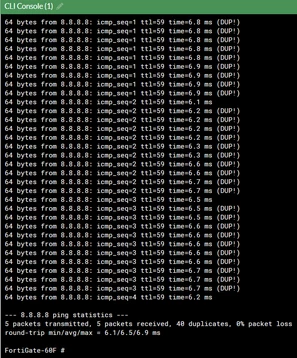
 

Screenshot 2024-11-28 082648.png


It is my first time working with a fortinet device, I've read through a lot of the documentation, but I couldn't figure out what the issue is.
Thank you in advance for any input.


13 replies

dingjerry_FTNT
Staff
Staff
November 28, 2024

Hi @sstm ,


Please share the outputs with the following CLI commands:


get sys status

show system setting   

show router static


I hope that you have no VDOM enabled.

sstm
sstmAuthor
New Member
November 28, 2024

Hello,

Here is the output:


FortiGate-60F # get sys status Version: FortiGate-60F v7.2.10,build1706,240918 (GA.M) Security Level: 1 Firmware Signature: certified Virus-DB: 92.09125(2024-11-27 22:26) Extended DB: 92.09125(2024-11-27 22:25) AV AI/ML Model: 3.01931(2024-11-27 22:45) IPS-DB: 29.00911(2024-11-27 01:12) IPS-ETDB: 0.00000(2001-01-01 00:00) APP-DB: 29.00910(2024-11-26 01:06) FMWP-DB: 24.00111(2024-11-06 13:21) INDUSTRIAL-DB: 6.00741(2015-12-01 02:30) IPS Malicious URL Database: 5.00247(2024-11-27 10:03) IoT-Detect: 0.00000(2022-08-17 17:31) Serial-Number: BIOS version: 05000006 System Part-Number: P24286-03 Log hard disk: Not available Hostname: FortiGate-60F Private Encryption: Disable Operation Mode: Transparent Current virtual domain: root Max number of virtual domains: 10 Virtual domains status: 0 in NAT mode, 1 in TP mode Virtual domain configuration: disable FIPS-CC mode: disable Current HA mode: standalone Branch point: 1706 Release Version Information: GA System time: Thu Nov 28 09:26:26 2024 Last reboot reason: warm reboot  FortiGate-60F # show system setting config system settings     set opmode transparent     set manageip 10.0.99.50/255.255.255.0 end  FortiGate-60F # show router static config router static     edit 1         set gateway 10.0.99.1     next end
funkylicious
SuperUser
SuperUser
November 28, 2024

Hi,

Try setting the gateway under the system settings instead.

config system settings     set opmode transparent     set manageip 10.0.99.50/255.255.255.0     set gateway 10.0.99.1 end


"jack of all trades, master of none"
sstm
sstmAuthor
New Member
November 28, 2024

Hello,

I get the following error when I try to do that:


# config system settings # set opmode transparent # set manageip 10.0.99.50/255.255.255.0 # set gateway 10.0.99.1  command parse error before 'gateway' Command fail. Return code -61


sjoshi
Staff
Staff
November 28, 2024

Hi,


To address the issue of duplicate packets when pinging the FortiGate's management IP from the Mikrotik router, ensure that the VLAN configurations and forwarding domains are correctly set up on both devices. Verify that there are no misconfigurations causing packet duplication, such as overlapping VLAN IDs or incorrect forwarding domain assignments. Double-check the network paths and configurations to eliminate any potential loops or misrouting that could lead to duplicate packets during communication between the FortiGate and the Mikrotik devices.

Thanks, Salon
sstm
sstmAuthor
New Member
November 28, 2024

Hello, 

There are no overlapping VLAN IDs on the mikrotik, on the fortigate each VLAN has the same ID on the external and internal interfaces, but that's how it was written in the technical note i posted in the first post.

sjoshi
Staff
Staff
November 28, 2024

Hi,


The DUP packets indicate that the ping command has received replies from the same IP address but with different MAC addresses.


Further it better to take 6  0 l packet capture to verify the reply MAC address there.

For your ref:-

https://community.fortinet.com/t5/FortiGate/Technical-Tip-How-to-capture-the-whole-packets-when-Packet-size/ta-p/212657

https://community.fortinet.com/t5/FortiGate/Troubleshooting-Tip-Packet-Capture-on-FortiOS-GUI/ta-p/194444

Thanks, Salon
Thought Leadership. Security Summit. Thursday, November 12th, PGA National Resort, Palm Beach Gardens, FL.
Thought Leadership. Security Summit. Thursday, October 8th. Disney's Grand Californian Hotel & SPA, Anaheim, CA.
Security Operations Summit: Modernize SecOps. Operate AI-Native.AMER: November 4 | 9:00 AM PST. India and SAARC: November 5 | 10:00 AM IST. EMEA: November 5 | 10:30 AM CET. APAC: November 5 | 11:00 AM SGT
