rcpdkc
Explorer II
February 9, 2024
Solved

Fortinac Mschap2 Connection

I have SSID verification on fortigate firewall with Fortinac radius. I have a problem like this. Although there is mschapv2 in the radius settings, a user in the domain joins the network without any problems, while the user I created as a guest in the Fortinac interface Credentials Invalid (MSCHAP2) error, what is the reason for this?


 

1.PNG2.PNG

ebilcari
ebilcariAnswer
Staff
February 23, 2024

There have been some recent changes about this request and if you run the latest version of FNAC in 9.4 or 7.2 now it is possible.

The feature is disabled by default but it can be enabled from CLI running the following command:

> globaloptiontool -name "localRadiusServer.mschapV2LocalUserAuth" -set true

(In case of FNAC-F first run # execute enter)


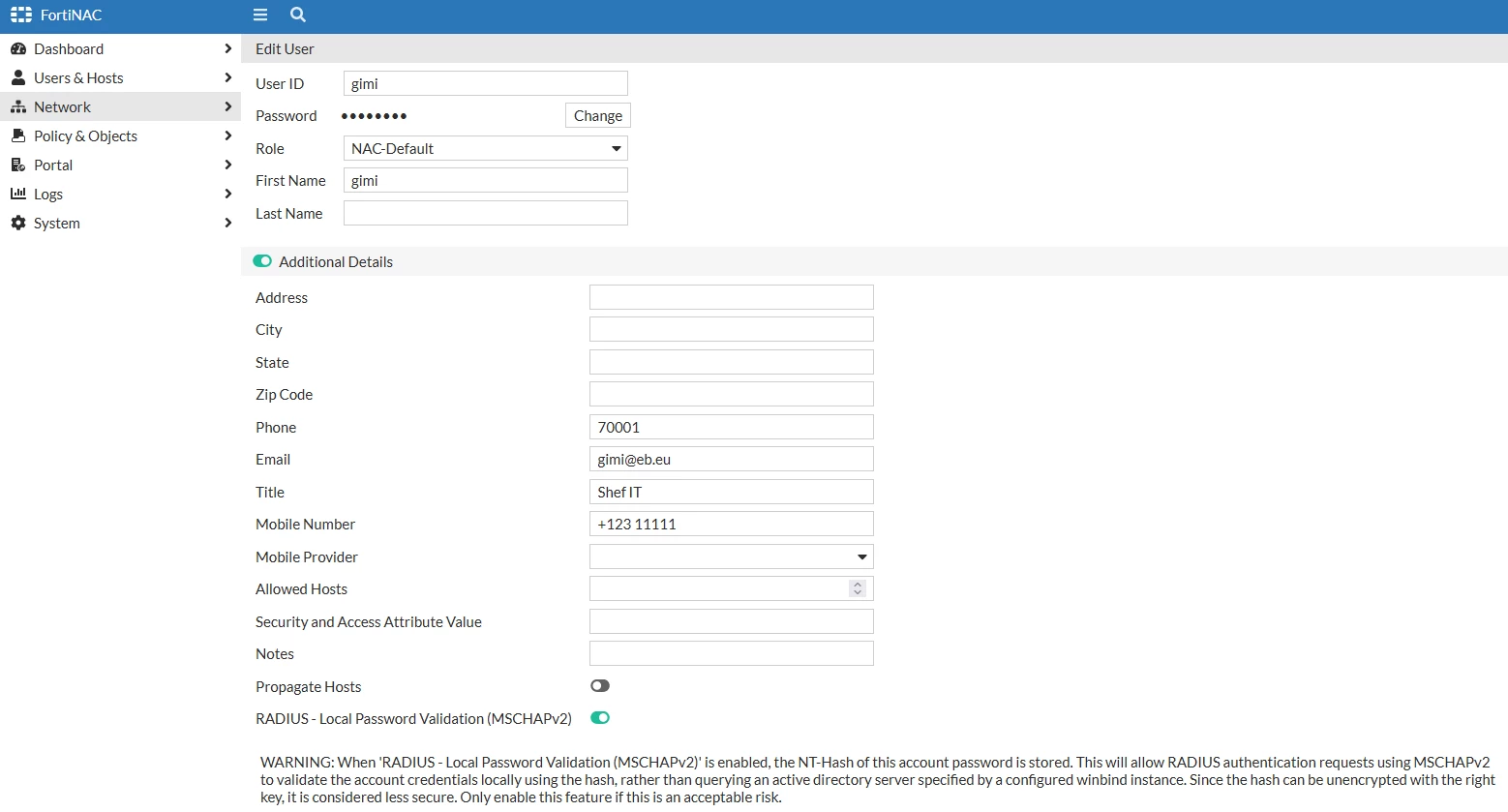
This will add a control in the Add/Edit user view (Under Additional Details) that can be enabled for specific users: "RADIUS - Local Password Validation (MSCHAPv2)"

mschaplocal.PNG

Emirjon

11 replies

Hatibi
Staff & Editor
Staff & Editor
February 9, 2024

Hi rcpdkc,


have you performed the domain join and enabled winbind?

Winbind is needed in order to perform mschapv2 authentication.


Please double-check the steps in the guide and KB below

https://docs.fortinet.com/document/fortinac/9.4.0/administration-guide/670285/local-winbind-configuration

https://community.fortinet.com/t5/FortiNAC/Technical-Tip-MSCHAPv2-authentication-join-FortiNAC-in-domain/ta-p/274198


Regards

rcpdkc
rcpdkcAuthor
Explorer II
February 9, 2024

@Hatibi wrote:

Hi rcpdkc,


have you performed the domain join and enabled winbind?

Winbind is needed in order to perform mschapv2 authentication.


Please double-check the steps in the guide and KB below

https://docs.fortinet.com/document/fortinac/9.4.0/administration-guide/670285/local-winbind-configuration

https://community.fortinet.com/t5/FortiNAC/Technical-Tip-MSCHAPv2-authentication-join-FortiNAC-in-domain/ta-p/274198


Regards


In fact, when you make the authentication type TTLS on android devices, fortinac local users are included in the network. However, I could not find how to use TTLS instead of mschap when connecting to a wpa2 network on the ios side.

ebilcari
Staff
Staff
February 12, 2024

Since MSCHAPv2 uses challenges instead of passwords, FNAC uses Winbind to check these challenges with Active directory. The guest accounts are local accounts in FNAC and there is no procedure in place to check these challenges for the local accounts. It is doable but because this is not a common use case it is not included in FNAC.

EAP-TTLS will use PAP (password) instead of challenges and that's explain why the authentication succeeds in this case.

Since you are manually creating this guest accounts (more like contractors) and you want to use PEAP, than the easiest way is to include these accounts in your AD and limit their privileges.

Emirjon
AEK
SuperUser
SuperUser
February 9, 2024

@rcpdkc , I deployed FNAC several times  but honestly I never thought that any company may use WPA2 Enterprise for guests (probably companies that I know don't have this need).

In fact those companies usually have one SSID for Corp users with WPA2 Enterprise,  and another SSID for guests: WPA2, followed by FNAC portal, or even not controlled by FNAC since usually they don't want consume license for guests. In fact by definition for me I don't think guests really need WPA2 Enterprise.

However now as I read your question I think this may exist and should exist. I'll advise if I find something about that.

AEK
rcpdkc
rcpdkcAuthor
Explorer II
February 9, 2024

Actually, what you say is true. It doesn't make sense to consume the licence in this way. Apart from Fortinac, how do you think I can verify? Is there any software or device you can recommend for user registration and login process?

Thought Leadership. Security Summit. Thursday, November 12th, PGA National Resort, Palm Beach Gardens, FL.
Security Operations Summit: Modernize SecOps. Operate AI-Native.AMER: November 4 | 9:00 AM PST. India and SAARC: November 5 | 10:00 AM IST. EMEA: November 5 | 10:30 AM CET. APAC: November 5 | 11:00 AM SGT