| FortiWeb sends attack and traffic logs to FortiAnalyzer using OFTP for centralized monitoring, reporting, and analysis. This allows administrators to view attacks, system events, and traffic information from one place. When the OFTP connection is not working, FortiWeb may appear as disconnected in FortiAnalyzer. As a result, logs are not forwarded, reports become incomplete, and important attack events may be missed. This can happen due to network issues, internal process problems, or connection failures between FortiWeb and FortiAnalyzer. Connectivity test: execute ping <faz-ip>
execute telnettest <faz-ip>:514 FortiWeb must be able to reach FortiAnalyzer at port 514. If the TCP handshake is not complete, perform a network sniffer to understand the traffic flow. diagnose network sniffer any “host <faz-ip>:514” 4 Log Forwarding & OFTP connection status can be verified in FortiWeb by turning on debugging. diagnose debug app logd 7
diagnose debug enable Sample output: [Logd][01-20-09:15:55][INFO][log_need_format_faz][2345]: Need format faz
[Logd][01-20-09:15:55][INFO][log_format_srv_msg][2747]: Need format faz
[Logd][01-20-09:15:55][INFO][log_format_faz_msg][1861]: FAZ Detail = date=2026-01-20 time=09:15:55 log_id=30001000 msg_id=000000116327 device_id=FVVM020000XXXXXX eventtime=1768871755638908328 vd="root" timezone="(GMT+8:00)Kuala Lumpur,Singapore" timezone_dayst="GMTc-8" type=traffic subtype="https" pri=notice proto=tcp service=https/tls1.2 status=success reason=none policy="FWB_Tool" original_src=10.111.XX.XX src=10.111.XX.XX src_port=50038 dst=10.100.3.77 dst_port=8080 http_request_time=1 http_response_time=1 http_request_bytes=833 http_response_bytes=39021 http_method=get http_url="/static/icons/fedr.png" http_agent="Mozilla/5.0 (Windows NT 10.0; Win64; x64) AppleWebKit/537.36 (KHTML, like Gecko) Chrome/144.0.0.0 Safari/537.36" http_retcode=200 msg="HTTPS get request from 10.111.XX.XX:50038 to 10.100.XX.XX:8080" original_srccountry="Reserved" srccountry="Reserved" content_switch_name="none" server_pool_name="Pool" http_host="domain.com" user_name="Unknown" http_refer="https://domain.com/" http_version="1.x" dev_id=9A8F5EB534C4813CE5712B209FEE6B7C163F cipher_suite="TLS_ECDHE_RSA_WITH_AES_256_GCM_SHA384" x509_cert_subject="none" [Logd][01-20-09:15:55][INFO][log_send_oftp][289]: Begin to send log to faz, policy: TEST, status: 1, serverity: 6, priority: 5
[Logd][01-20-09:15:55][INFO][log_send_oftp][295]: Global send, TEST
[Logd][01-20-09:15:55][WARNING!][oftp_log][1032]: Server[10.47.XX.XX] not ready[0xffffffff], queue it first, len:1104 diagnose debug app oftp 7
diagnose debug enable Sample output: [OFTP][INFO](oftp_async.c:272): Gen system info:
Version: FortiWeb-KVM 7.4.8,build0694(GA.M),250403
Serial-Number: FVVM020000XXXXXX
Operation Mode: Reverse Proxy
Current HA mode: standalone
Current HA group: HA-CLUSTER-0 [OFTP][DEBUG](oftp_async.c:388): oftp_auth_send: auth send done fd=18...
[OFTP][DEBUG](oftp_async.c:422): oftp_auth_recv: fd=18, buf_pos=0,buf_len=12
[OFTP][DEBUG](oftp_async.c:440): oftp_auth_recv: read again : errno=Resource temporarily unavailable
[OFTP][INFO](log_oftp.c:794): continue status 0x14, fd=18, want_events=5
[OFTP][INFO](log_oftp.c:782): try connect[10.47.19.67]: fd=18, oftp.status=0x14
[OFTP][DEBUG](oftp_async.c:422): oftp_auth_recv: fd=18, buf_pos=0,buf_len=12
[OFTP][DEBUG](oftp_async.c:440): oftp_auth_recv: read again : errno=Resource temporarily unavailable
[OFTP][INFO](log_oftp.c:794): continue status 0x14, fd=18, want_events=5
[OFTP][INFO](log_oftp.c:782): try connect[10.47.XX.XX]: fd=18, oftp.status=0x14
[OFTP][DEBUG](oftp_async.c:422): oftp_auth_recv: fd=18, buf_pos=0,buf_len=12
[OFTP][DEBUG](oftp_async.c:460): oftp_auth_recv: buf_pos=12, buf_len=12, num=12
[OFTP][DEBUG](oftp_async.c:482): oftp_auth_recv: should read: buf_len=39
[OFTP][INFO](log_oftp.c:794): continue status 0x14, fd=18, want_events=5
[OFTP][INFO](log_oftp.c:782): try connect[10.47.XX.XX]: fd=18, oftp.status=0x14
[OFTP][DEBUG](oftp_async.c:422): oftp_auth_recv: fd=18, buf_pos=12,buf_len=39
[OFTP][DEBUG](oftp_async.c:460): oftp_auth_recv: buf_pos=39, buf_len=39, num=27
[OFTP][DEBUG](oftp_async.c:488): oftp_auth_recv: read end
[OFTP][INFO](log_oftp.c:788): login failed: -12
[OFTP][INFO](log_oftp.c:317): stop server 10.47.XX.XX... OFTP connection debug can also be done at the FortiAnalyzer side. diagnose debug app oftpd 8
diagnose debug enable Sample output: [T1967:oftps.c:302] SSLv3/TLS read client certificate
[T1967:oftps.c:302] SSLv3/TLS read certificate verify
[T1967:oftps.c:302] SSLv3/TLS read finished
[T1967:oftps.c:302] SSLv3/TLS write session ticket
[T1967:oftps.c:302] SSLv3/TLS write session ticket
[T1967:oftps.c:1631 :10.47.XX.XX] ssl verify peer cert
[T1967:oftps.c:1653 :10.47.XX.XX] Peer is using a fortinet certificate. ON=Fortinet
[T1967:oftps.c:1666 :10.47.XX.XX] Peer cert info, CommonName(CN=FortiWeb).
[T1967:oftps.c:1933 :10.47.XX.XX] SSL_accept one client SUCCESS [ protocol : (772) TLS 1.3 ]
[T1967:oftps.c:1965 :10.47.XX.XX] SSL socket[21] pid[1531] ssl[0x562134df45e0] SSL_accepted
[T1965:oftps.c:2023 :10.47.XX.XX] SSL socket[21] pid[1531] ssl[0x562134df45e0] received [330] bytes:
[T1965:main.c:4824 :10.47.XX.XX] handle LOGIN_REQUEST_LEGACY
[T1971:login.c:3360 :10.47.XX.XX] host = 'FortiWeb'
[T1971:login.c:3406 :10.47.XX.XX] Version: FortiWeb-KVM 7.4.8,build0694(GA.M),250403
Serial-Number: FVVM020000XXXXXX
Operation Mode: Reverse Proxy
Current HA mode: standalone
Current HA group: HA-CLUSTER-0 [T1971:login.c:345 :10.47.XX.XX] os_type(5) os_ver(7) mr(4) patch(8) build(694) beta(-1)
[T1971:login.c:395 :10.47.XX.XX] ha_group_name:HA-CLUSTER-0, ha_mode:0.
[T1971:login.c:3365 :10.47.XX.XX] vdom = 0
[T1971:login.c:3871 :10.47.XX.XX] Error No legal SN found in cert and legacy auth mode disabled
[T1971:oftps.c:2089 :10.47.XX.XX] SSL socket[21] pid[1531] ssl[0x562134df45e0] sent [39] bytes:
[T1971:main.c:4623 :10.47.XX.XX] LOGIN_REQUEST_LEGACY error: [handle_login_legacy():3934] invalid device id <-- Legacy auth method issue (common issue 2). Create a Technical Support ticket and submit the debugging outputs for issue investigation. Common issues:
- The traffic log is not forwarded.
Ensure log level is Information and higher.
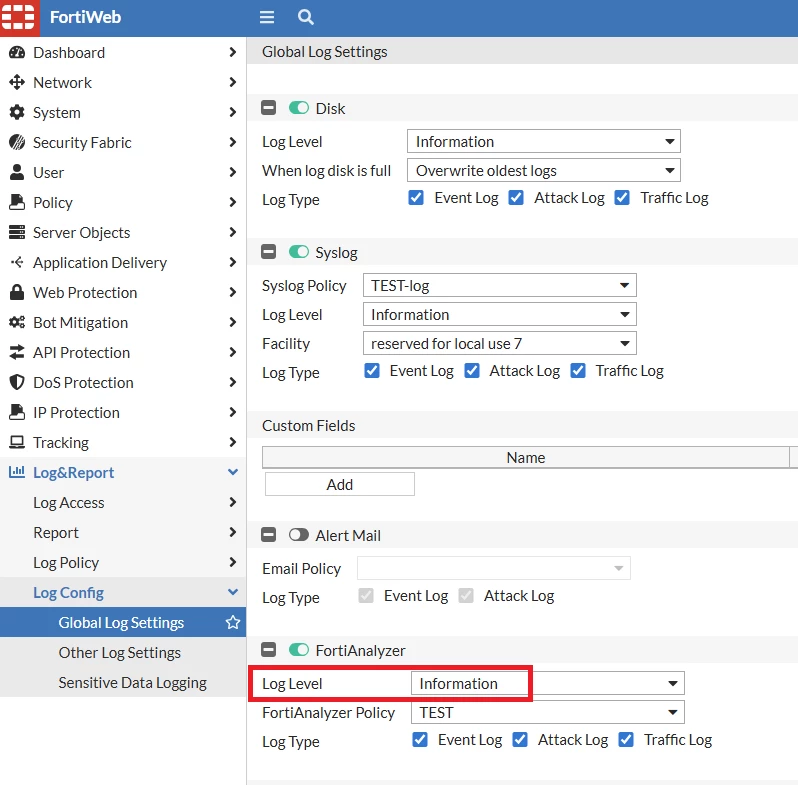
-
The FortiWeb device shows as down in FortiAnalyzer. Special Notices: legacy-auth-mode command added:
Release Notes
FortiAnalyzer requires FortiWeb to use its serial number in the certificate CN. Upgrade to FortiWeb v7.2.12/v7.4.9/v7.6.5 and later. Workaround: Disable legacy auth mode in FortiAnalyzer.
config system log settings
set legacy-auth-mode enable
end
-
FortiAnalyzer device manager HA grouping.
By default, FortiAnalyzer uses the device HA group ID to automatically group them in Device Manager. Use a unique HA group ID if there are multiple FortiWeb HA clusters managed by FortiAnalyzer. -
Logs forwarding does not resume after FortiAnalyzer reboot or FortiWeb HA failover. OFTP connection handling enhanced in v7.4.12/v7.6.7/v8.0.3: Resolved Issues Workaround: Navigate to Log & Report -> Log Config -> Global Log Settings -> Toggle FortiAnalyzer button off and on. Note: Queued logs will not be forwarded when disabling and re-enabling the FortiAnalyzer log policy. Related document:
Logs Cannot Be Displayed on FortiAnalyzer | 



