Troubleshooting Tip: GeoIP address matching algorithm when using a local-in policy
| Description | This article describes the behavior of the GeoIP address matching algorithm when using the local-in policy. |
| Scope | FortiGate. |
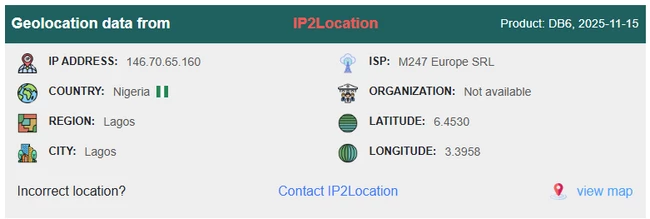
| Solution | In this example, the goal is to block local-in traffic from IP 146.70.65.160.
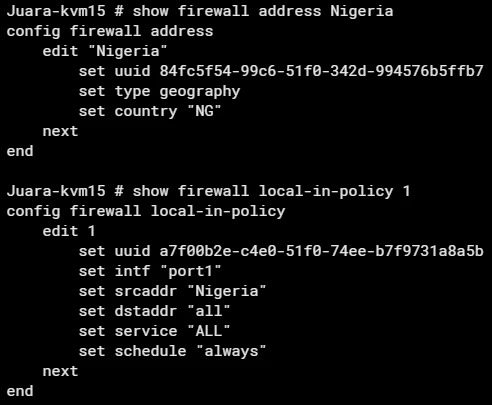
A local-in policy is configured with action 'deny' for traffic originating from the country 'Nigeria / NG'.
Note that the default action of the local-in policy is deny, and it will not show on the regular 'show' command. Use 'show full-configuration local-in-policy' to show default and non-default parameters. The expected result is a denial; however, it fails because the physical location of the IP is originating from Spain/'ES', not Nigeria/'NG'. 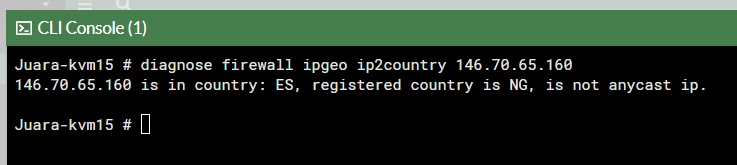 The default GeoIP matching when configuring local-in policy and a regular firewall policy uses the physical location and not the registered location in the geography IP database.
This method is not supported when configuring local-in policy. config firewall policy edit 1 set name "policy_id_1" set srcintf "wan2" set dstintf "wan1" set srcaddr "all" set dstaddr "test-geoip-CA" set action accept set schedule "always" set service "ALL" set geoip-match registered-location set logtraffic all set auto-asic-offload disable set nat enable next end
|