


Technical Tip: Session-based proxy authentication
Description
This article describes how session-based proxy authentication works.
Scope
FortiGate, Explicit Proxy.
Solution
There may be a requirement where multiple clients will be logging into the same PC for internet access:
Scenario:
- 4 users:
UserA, UserB, UserC, and UserD take the RDP access of one of the servers, for suppose, 192.168.10.1, to access the internet.
In that case, all the internet traffic to the FortiGate comes from one source, 192.168.10.1. There may be a requirement to get the details of all the users who have authenticated through the server 192.168.10.1 to access the internet.
For authentication in an explicit proxy, it is necessary to use an authentication scheme and authentication rules under the authentication rule to disable IP-based authentication. So now, it will use session-based authentication.
If an IP-based authentication is used, then it will only show an authentication prompt to the first user, and after that, all other 3 users can access the internet without authentication:
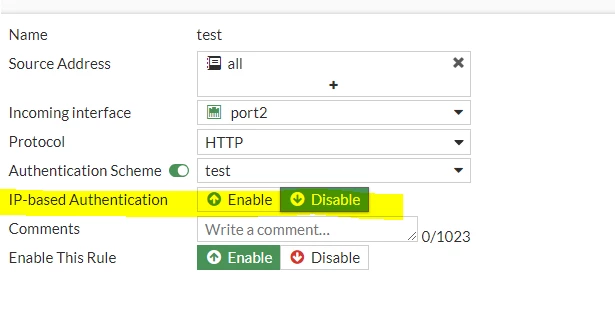
Session-based authentication works on an HTTP session. It can filter out multiple clients behind the same source IP address.
To verify the authentication list from the CLI:
diagnose wad user list
Note:
In the case of switching existing authentication rule from IP-based to session-based, the change will apply to logged-in users only after the global proxy-auth-timeout runs out:
config system global
set proxy-auth-timeout <minutes> <----- Enter an integer value from <1> to <300> (default = <10>).
end
Or by clearing the user from the authentication list, which can be done from the GUI under Dashboard -> User Monitor and 'deauthenticate' the selected user, or from CLI:
diagnose wad user clear
Usage:
diagnose wad user clear <----- Clear all proxy users.
diagnose wad user clear <ID> <IP|IPv6> <VDOM> <----- Clear a specified user.
Example:
diagnose wad user clear 1 10.1.1.1 root
Example:
diagnose wad user clear 1 2001::1 root.
Note: In the case of using multiple applications, session-based authentication will require users to enter credentials for each application. Also, as mentioned in this article, this requires applications to use an HTTP request to allow the FortiGate or the FortiProxy to detect the user's attempt to start an application.
Related document:

