


Technical Tip: Configuring SSL VPN with certificate authentication for specific user groups
Description
This article describes the procedure to configure certificate authentication for specific user groups rather than applying the requirement to all user groups globally through the GUI.
Scope
FortiGate.
Solution
Enabling 'Require Client Certificate' in the SSL VPN settings via GUI will result in enabling certificate authentication for all the SSL VPN portals and authentication rules.
Initial configuration for certificate-based authentication must be completed before enabling it for a specific user group. For details on the initial setup, refer to the SSL VPN with certificate authentication.
To enable certificate authentication for a particular user group only, enable 'client-cert' in the authentication rules of the SSL VPN settings, as shown below:
config vpn ssl settings
    config authentication-rule
        edit 1
            set groups "Cert-Auth-User"
            set portal "For Cert Auth"
            set client-cert enable
        next
        edit 2
            set users "test"
            set portal "full-access"
        next
end
Note:
This configuration does not require enabling the 'Require Client Certificate' option in the SSL VPN settings on the GUI.
To connect the client to SSL VPN using a certificate, select the certificate in the FortiClient application:
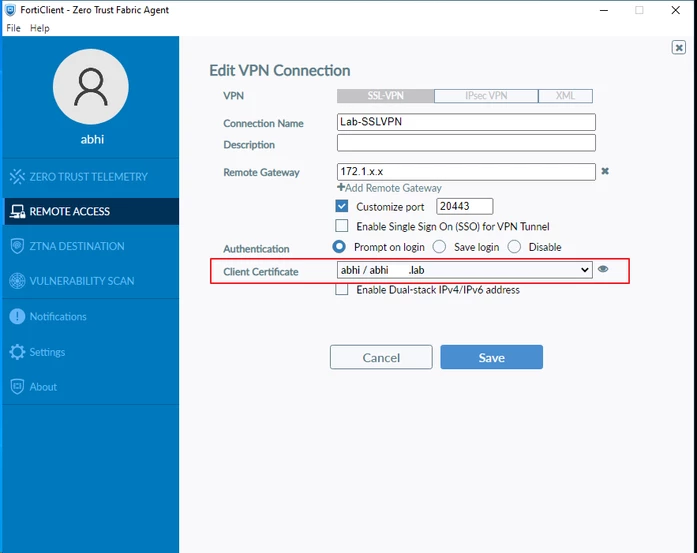
If the certificate is trusted, it should connect to the authentication rule ID 1.
Users who are not part of the user group 'Cert-Auth-User' should not match with the authentication rule ID 1 and do not need the certificate to authenticate for the SSL VPN connection.
To enforce Two-factor Authentication (2FA) globally for SSL VPN users, use the following commands. This setting is only applicable for certificate-based authentication.
config vpn ssl settings
    set force-two-factor-auth enable
end
Note: Starting from FortiOS v7.4, the SSL VPN settings will be hidden.
To enable SSL VPN web mode:
config system global
    set sslvpn-web-mode enable
end
To enable the VPN -> SSL-VPN GUI menus:
config system settings
    set gui-sslvpn enable
end
Starting with FortiOS v7.6.3, SSL VPN tunnel mode has been removed. Refer to this article for more information: Technical Tip: Changes on SSL VPN modes starting from v7.6.3.
Related documents:
Troubleshooting Tip: SSL VPN Troubleshooting
Troubleshooting Tip: Common SSL VPN problems and their solutions

