
rwilliames
New Member
Mar 2, 2015 1:19 AM UTC
Solved

Websites not rendering correctly behind 200D

Hi All,

I am having some issues with websites not rendering correctly behind a Fortigate 200D (5.0.7)

Basically the pages are screwed up with text over the top of other text and the layout of the page changing. I have attached an image of what I see for reference.  The only features that are turned on on the Fortigate are, WiFi and Switch Controller and Web Filter. I have tried disabling the web filter and this made no difference.


I'm hoping someone else has seen this behaviour and knows of a fix


Thanks

Rob
    Dave_Hall
    Dave_HallAnswer
    New Member
    Mar 2, 2015 3:55 AM UTC

    Hi Robert.


    I have seen something like this when certain page elements (e.g. style sheets, scripting) haven't fully loaded into the browser.  In those cases the the fgt was allowing access to the main page but not to underlining page elements that were pulled from another site (which was blocked).


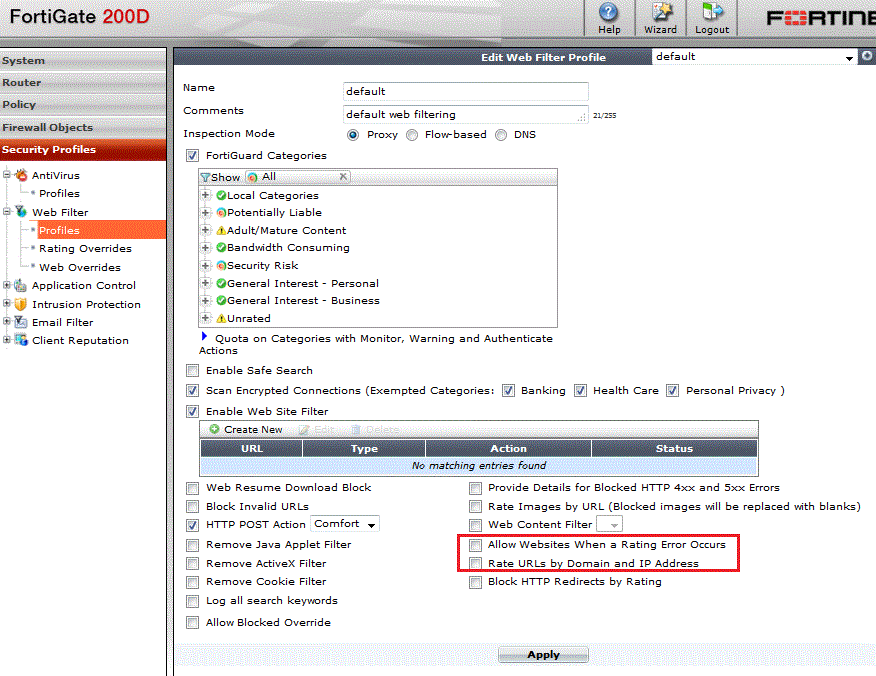
    I suggest in your Web Filter Profile, play around with the "Allow Websites When a Ratings Error Occurs" and uncheck "rate URLS by domain and IP Address".


    Even if you disabled the web filter on the Fortigate, the browser on the client computer may still be caching a copy of the page -- make sure you are clearing out the browser cache and/or forceing it to load a fresh copy of the page.


    Also to fully troubleshoot this issue, make sure you are testing 2 or 3 browsers (IE, Google, Chrome, etc.) on at least two different computers.  (I have also seen something similar to this happening on computers with a faulty NIC/switch/cable, etc.)


    Edit: just remembered I have also seen this happening on PPPoE connections where the MTU value wasn't set low enough.  But in those causes, it's usually the entire site wouldn't load.


    15 replies

    Itguy
    New Member
    Aug 25, 2016 3:19 PM UTC

    rwilliames wrote:

    Hi All,

    I am having some issues with websites not rendering correctly behind a Fortigate 200D (5.0.7)

    Basically the pages are screwed up with text over the top of other text and the layout of the page changing. I have attached an image of what I see for reference.  The only features that are turned on on the Fortigate are, WiFi and Switch Controller and Web Filter. I have tried disabling the web filter and this made no difference.


    I'm hoping someone else has seen this behaviour and knows of a fix


    Thanks

    Rob
     

    SSL scanning on? Disable it and try again. Verify no local system cache/dns issues. Flushdns on local system. Browse using Private Mode in the browser and try again.


    Edit: I see you solved this.. GUI error.. Thats another longstanding Fortinet issue. GUI shows feature disabled, CLI shows it on.. I really wish they'd fix these bugs.

    Thought Leadership. Security Summit. Thursday, November 12th, PGA National Resort, Palm Beach Gardens, FL.
    Security Operations Summit: Modernize SecOps. Operate AI-Native.AMER: November 4 | 9:00 AM PST. India and SAARC: November 5 | 10:00 AM IST. EMEA: November 5 | 10:30 AM CET. APAC: November 5 | 11:00 AM SGT

