Infotech22
Explorer III
Jan 17, 2024 8:24 AM UTC
Solved

Upgrades of Firmware / Automation

Hello forum,

I would like to know how many of you are dealing with upgrades of firmware from Fortinet Devices.
We have a range of Fortinet equipment, FortiGates, FortiAZ, FortiSwitches, FortiAPs.
We have them on multiple locations.

How you guys are dealing with upgrades, where to look if the upgrade is suitable for us, what type of automation you use, etc..

It's really hard to catch up with everything since I'm not just a Fortinet guy. I'm System Admin so I have a lot of other task's and its getting overwhelmed.. 

 

Jakob-AHHG
Explorer III
Jan 17, 2024 9:27 AM UTC

Hi @Infotech22 

We have 2 ways:

Manual (local or via FortiManager )

Automated via FortiManager.


We are on latest FMG (74.2), and there you find it under:
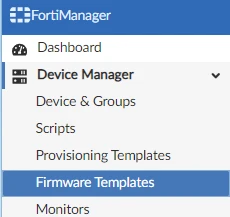
Device Manager: Firmware Templates:

FMG Firmware Templates.png
 
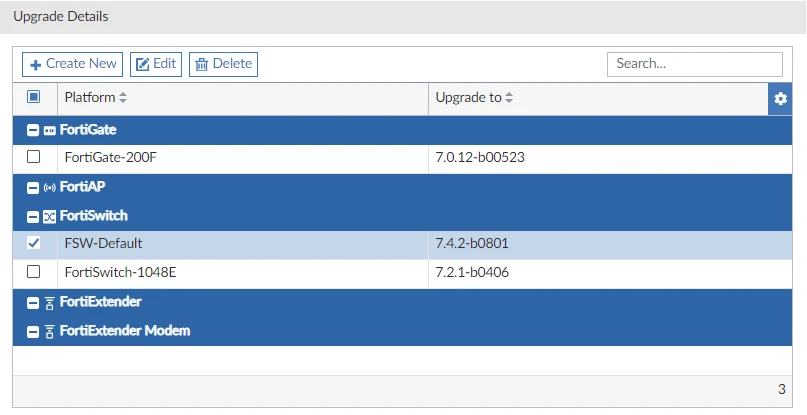
Create a Template, and assign desired FW versions to the products, either generic or specific:
 
FMG Firmware Templates Model details.png

You can then schedule the template run run as desired, or run it manually.


14 replies

Jakob-AHHG
Explorer III
Jan 17, 2024 9:27 AM UTC

Hi @Infotech22 

We have 2 ways:

Manual (local or via FortiManager )

Automated via FortiManager.


We are on latest FMG (74.2), and there you find it under:
Device Manager: Firmware Templates:

FMG Firmware Templates.png
 
Create a Template, and assign desired FW versions to the products, either generic or specific:
 
FMG Firmware Templates Model details.png

You can then schedule the template run run as desired, or run it manually.


Infotech22
Explorer III
Jan 17, 2024 9:45 AM UTC

Thank you @Jakob-AHHG,

We already have FortiManager but last external company didn't use it and suggest to us that we don't need it for 4 locations. But it's 8 Firewalls, 20+ switches, 20-30 AP's etc.

Firewall Policies can't be the same so we couldn't use the template but for upgrades is still really good to us then.

Jakob-AHHG
Explorer III
Jan 17, 2024 10:01 AM UTC

OK, we run 16 locations, and have them split in 3 Policy Groups for FW rules, and I currently have 4 FW Templates.


Granted, there are management stuff that is easier to do directly on a device, but when it's all in sync on FGM, you know what's going on, and it's easier to troubleshoot in tandem with FortiAnalyzer.


And if you then start to figure out Scripts, to do CLI config changes on multiple FortiGates, initiated from FGM, life becomes a lot less tedious.. ;) 

AEK
SuperUser
SuperUser
Jan 17, 2024 10:04 AM UTC

Hello

where to look if the upgrade is suitable for us

For me the rule is simple:

  • Always start with a mature/recommended version
  • Read release notes before update/upgrade, i.e.: known bugs, new features, ...
  • Typically update the firmware every time there is a new patch, e.g.: from 7.0.12 to 7.0.13
  • Do not upgrade unless there is a new feature that is required and/or until the new release is mature. E.g.: 6.4.x to 7.0.x
AEK
Infotech22
Explorer III
Jan 17, 2024 10:07 AM UTC

Hello @AEK,

At the moment we are on 7.0.12, and it's recommending for us to go to 7.0.13 which is also mature.

So in this example when 7.0.13 was new, it was not a good idea to immediately upgrade to that version unless I didn't need new feature from that version and only when then version becomes mature?

Thank you for the comment :)

AEK
SuperUser
SuperUser
Jan 17, 2024 10:13 AM UTC

Hello

Going from 7.0.12 to 7.0.13 is an update operation (patch, pug fix, security patch), and it doesn't contain any new feature. So actually it is recommended to update.

The new features are only in minor release and major release, e.g.: when you upgrade from 6.4.x to 7.0.x, or when you upgrade from 7.0.x to 7.2.x.

AEK
Risk and Resilience in the Age of AI. An OT Thought Leadership Summit for Houston's Critical Infrastructure Leaders. Date: Thursday, December 3, 2026. Time: 8:30 am - 1:30 pm (CT). Location: The Westin Houston, Memorial City | 945 Gessner Road, Houston, TX 77024