
Rino_B
Explorer III
Jun 2, 2025 7:48 AM UTC
Solved

SSL-VPN Web Portal breaks after 7.4.8 upgrade on 2GB models

Hi there,


On entry-level FortiGate models, the SSL-VPN web portal breaks after the update to FortiOS 7.4.8.
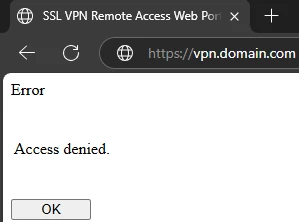
Screenshot 2025-06-02 093610.png


Update 2

diagnose debug console timestamp enable
diagnose debug application sslvpn -1
diagnose debug application fnbamd -1
diagnose debug enable


2025-06-05 11:17:43 [17810:root:4]fsv_check_path_passed:997 No access: check path failed /migadmin/rmt_index.html, /data/migadmin, /migadmin 2025-06-05 11:17:43 [17810:root:4]sslvpn_zip_handler:136 sslvpn check path failed. 2025-06-05 11:17:43 [17810:root:4]fsv_check_path_passed:997 No access: check path failed /migadmin/sslvpn/css/ssl_style.css, /data/migadmin/sslvpn/css, /migadmin/sslvpn/css 2025-06-05 11:17:43 [17810:root:4]sslvpn_zip_handler:136 sslvpn check path failed.


Update 3

The issue has been identified as BUG ID 1164811: https://docs.fortinet.com/document/fortigate/7.4.8/fortios-release-notes/236526/known-issues

37 replies

AEK
SuperUser
SuperUser
Jun 2, 2025 12:30 PM UTC

Hi Rino

What was your previous version on which it worked?

Translate
AEK
Rino_B
Rino_BAuthor
Explorer III
Jun 2, 2025 12:34 PM UTC

FortiOS 7.4.7

Translate
DennyS
New Member
Jun 2, 2025 3:38 PM UTC

I can confirm the same behavior on a 60F.
Downgrading to 7.4.7 is a workaround


Translate
Lennart
Visitor III
Jun 5, 2025 8:51 AM UTC

Downgrading to 7.4.7 for me makes webvpn work. But now i'm unable to manage the device, because my admin credentials have stopped working. 

Translate
Rino_B
Rino_BAuthor
Explorer III
Jun 5, 2025 8:55 AM UTC

Did you run the command below?


To enhance the security of system administrator passwords, FortiGate now uses PBKDF2 as the hashing scheme with randomized salts to hash and store the password.

To maintain downgrade support, a new command is introduced:

config system password-policy     set login-lockout-upon-downgrade {enable | disable} end

https://docs.fortinet.com/document/fortigate/7.4.8/fortios-release-notes/743723/new-features-or-enhancements

Translate
BillH_FTNT
Staff
Staff
Jun 2, 2025 5:15 PM UTC

Hi Rino_B 

What is your hardware ? Could you share your configuration to my official email bhoang@fortinet.com; I want to reproduce the issue in my lab. Thank you

Regards

Bill

Translate
Rino_B
Rino_BAuthor
Explorer III
Jun 3, 2025 8:43 AM UTC

I sent you an email with a sample config

Translate
BillH_FTNT
Staff
Staff
Jun 3, 2025 3:07 PM UTC

Hi Rino;

I got your configuration. Me or our colleagues will reproduce and investigate the issue in our labs. Thank you

Bill

Translate
GerryU
New Member
Jun 2, 2025 7:21 PM UTC

Hello all, same here

@BillH_FTNT can I send you my config file?
Working on a 60F

Funny enough, I have upgraded to 7.4.8 start of May, did work last time I checked, 3 weeks ago... This is the 1st I hear of this same issue.

Translate
BillH_FTNT
Staff
Staff
Jun 2, 2025 9:38 PM UTC

Hi GerryU

I am preparing the lab to reproduce and investigate your issue. I will share the results here . Thank you.

Bill

Translate
jweberhofer
Explorer
Jun 3, 2025 2:47 PM UTC

WE are having the same issue with a 60F since the update. Other similar models don't seem to have this issue. Here some lines from my client-log:

[info] Server init() port number is
[info] Fail to retrieve port number from file.
[info] Server init() port number is 37913
[info] Main process - Websocket open ws://127.0.0.1:37913/websocket
[info] WindowManager handlePossibleProtocolLauncherArgs argv=["/opt/forticlient/gui/FortiClient"]
[info] WindowManager handleCreateMainWindow
[info] MAIN MainWindow - createWindow Platform detected: fedora
[info] web-contents-created contents.id=1
[info] Saml - init
[info] Saml - listenSamlLoginRequest
[info] Server init() port number is 37913
[info] Renderer process - Websocket open ws://127.0.0.1:37913/websocket
[info] compliance configDir=/home/web/.config/FortiClient/config
[info] MAIN did-finish-load
[info] MAIN ready-to-show
[info] IPC_RENDERER_REQUEST.LOADED
[info] WindowManager handleWindowLoaded
[info] WindowManager handlePossibleProtocolLauncherArgs argv=["/opt/forticlient/gui/FortiClient"]
[info] WindowManager handleCreateMainWindow
[debug] Receive websocket type=FCT_VPN_DISCONNECTED
[debug] Receive websocket type=FCT_VPN_CONNECTING
[info] VpnHandler UNHANDLED {"isTrusted":true}
[debug] Receive websocket type=FCT_VPN_INVALID_CERTIFICATE
[info] VpnHandler UNHANDLED {"isTrusted":true}
[debug] Receive websocket type=FCT_VPN_DISCONNECTED
[debug] Receive websocket type=FCT_VPN_CONNECTING
[info] VpnHandler UNHANDLED {"isTrusted":true}
[debug] Receive websocket type=FCT_VPN_INVALID_CERTIFICATE
[info] VpnHandler UNHANDLED {"isTrusted":true}
[debug] Receive websocket type=FCT_VPN_DISCONNECTED

Translate
jweberhofer
Explorer
Jun 3, 2025 2:56 PM UTC

It's not only the portal, also the tunneling mode is broken.

Translate
Rino_B
Rino_BAuthor
Explorer III
Jun 3, 2025 3:11 PM UTC

We have no issues with Tunnel Mode but only with Web Mode.


Windows 11 24H2 26100.4061

FortiClient VPN 7.2.10.1217

Translate
KennethKarlsson
New Member
Jun 3, 2025 5:46 PM UTC

We have the same problem - kind of annoying ;) 


In the browser i see errors like "NS_ERROR_CORRUPTED_CONTENT" and "403 Forbidden" on the first screen. Clicking the OK button, gives me more of the same errors, and some "wrong mimetype" for CSS and JS files.


Translate
Rino_B
Rino_BAuthor
Explorer III
Jun 3, 2025 8:14 PM UTC

Microsoft Edge returns HTTP status code 403 Forbidden on many files. The HTTP 403 Forbidden client error response status code indicates that the server understood the request but refused to process it.


Screenshot 2025-06-03 220022.png

Translate
Snormans
New Member
Jun 4, 2025 6:32 AM UTC

Update: it was early, this article is not for 7.4.8. But I do know that 2GB model's stuff is being removed.
We also don't upgrade our install base of 2GB models to 7.4.x because we lose proxy support.
See article here
As part of improvements to enhance performance and optimize memory usage on FortiGate models with 2 GB RAM or less, starting from version 7.4.4, FortiOS no longer supports proxy-related features
----------------------------------------------------------------------------------------

They have removed support for SSL VPN for 2GB models, so unfortunately, that means you have to downgrade.

See Fortinet Release notes here:
https://docs.fortinet.com/document/fortigate/7.6.1/fortios-release-notes/877104/ssl-vpn-removed-from-2gb-ram-models-for-tunnel-and-web-mode

Translate
Rino_B
Rino_BAuthor
Explorer III
Jun 4, 2025 6:53 AM UTC
Snormans
New Member
Jun 4, 2025 6:56 AM UTC

I know, I already updated my post.
I got triggered because we also had an issue with 2GB models that proxy stuff is being removed. 

Translate
Lennart
Visitor III
Jun 4, 2025 11:26 AM UTC

Experiencing same issue, these are the related log messages: 

2025-06-02 11:56:23 [403:root:b]req: / 2025-06-02 11:56:23 [403:root:b]mza: 0x358f360 /rmt_index.html 2025-06-02 11:56:23 [403:root:b]fsv_check_path_passed:997 No access: check path failed /migadmin/rmt_index.html, /data/migadmin,  /migadmin 2025-06-02 11:56:23 [403:root:b]sslvpn_zip_handler:136 sslvpn check path failed. 2025-06-02 11:56:23 [403:root:b]req: /sslvpn/css/ssl_style.css 2025-06-02 11:56:23 [403:root:b]mza: 0x358f3a8 /sslvpn/css/ssl_style.css 2025-06-02 11:56:23 [403:root:b]fsv_check_path_passed:997 No access: check path failed /migadmin/sslvpn/css/ssl_style.css, /data /migadmin/sslvpn/css, /migadmin/sslvpn/css 2025-06-02 11:56:23 [403:root:b]sslvpn_zip_handler:136 sslvpn check path failed.


Translate
BillH_FTNT
Staff
Staff
Jun 4, 2025 3:22 PM UTC

Hi Lennart

We also want to check and reproduce your issue too. Could you please share all the logs, configuration to my email bhoang@fortinet.com; Many thanks

Bill

Translate
GerryU
New Member
Jun 4, 2025 3:21 PM UTC

Peeps,
Something broke recently, as I was saying,  May 5th is the date I updated the FG60F FW to 7.4.8. I tested the WebPortal and a few days then after it was working fine. It looks like June 2nd I started to get call pertaining to this issue. 

What log can I extract to see all Web portal access'?

Further, have you tested upgrading to 7.6.x? Can't wait to see how Agentless works.

Translate
GerryU
New Member
Jun 4, 2025 3:54 PM UTC

Awww Agentless will not be avail on the FGT-60F... :\


Translate
Risk and Resilience in the Age of AI. An OT Thought Leadership Summit for Houston's Critical Infrastructure Leaders. Date: Thursday, December 3, 2026. Time: 8:30 am - 1:30 pm (CT). Location: The Westin Houston, Memorial City | 945 Gessner Road, Houston, TX 77024
