
Listener
New Member
Oct 15, 2022 11:58 AM UTC
Question

Issues regarding Site to Site VPN with overlapping subnets

Hi.


We have two sites using the same subnets (192.168.0.0/24 -> restriction due to systems having built-in mechanism and are not freely configurable) and I followed the cookbook to configure the Site-to-Site VPN on Fortigate Firewall. The VPN Phase1 and Phase2 both are UP but I am unable to ping the devices from one site to other site, also unable to ping Local WAN interface IP on same device.


The rough network sketch:
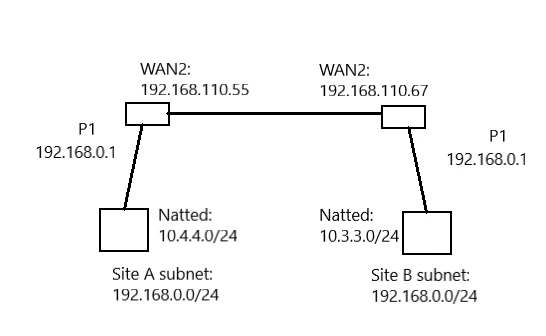
Listener_0-1665834776512.png

Kindly advise.


Additional info: Fortigate FGR60F Firewalls (FortiOS V6.2.9)

 

6 replies

anikolov
Staff
Staff
Oct 16, 2022 8:55 AM UTC

Hello,


Just to confirm, did you use the following KB? https://docs.fortinet.com/document/fortigate/6.4.5/administration-guide/426761/site-to-site-vpn-with-overlapping-subnets


What does the sniffer show, is the traffic received on both ends of the fortigates?


Regards,


Listener
ListenerAuthor
New Member
Oct 16, 2022 11:01 AM UTC

Hi Aleksandar,


Yes. I followed the above mentioned KB. I have done only ping test. The VPN is UP on both Phases but my local device LAN connection is unreachable to firewall WAN port by "ping" also. Can it be because of restriction from IPV4 rules (I created the same rules as in KB)? Can the sniffer be used to troubleshoot the communication between "local interface" and "WAN interface" on same firewall?

I am new to VPN configuration so please ignore any wrong semantics (if used).

Listener
ListenerAuthor
New Member
Oct 16, 2022 11:49 AM UTC

Please also note that I used the same subnet (192.168.110.XX) for Tunnel.
Is it mandatory to use the different subnet or same subnet can be used?

anikolov
Staff
Staff
Oct 16, 2022 1:56 PM UTC

No worries, we will ask you to explain in depth if we don't understand something, you are doing great :)

In your case from the fortigate itself you cannot do the test and it will not show anyway in the interesting traffic because we can ping only from a local interface, not local NAT address. To test the traffic please do the following sniffer:

diagnose sniffer packet any "host <NATed IP on the remote site>" 4
and initiate ping from local host. Do this on both sides and copy paste the output. Also, copy paste the related configuration for: policies, static route and phase2 on both sites. Thanks in advance.

Listener
ListenerAuthor
New Member
Oct 16, 2022 4:23 PM UTC

Noted :)
I am currently far away from network and firewalls. Will share the diagnostics once I get access.
Please find below the configuration.

Branch Firewall:

edit "PLC_Connect address"         set uuid 4d67ca4a-4a2a-51ed-1427-03d7d6cb4e94         set type interface-subnet         set subnet 192.168.0.1 255.255.255.0         set interface "PLC_Connect"     next     edit "SE_Interface address"         set uuid c6348242-4a2a-51ed-63fb-13ee83cb0741         set type interface-subnet         set subnet 192.168.110.55 255.255.255.0         set interface "SE_Interface"     next     edit "Branch-original"         set uuid 41827e0c-4bf4-51ed-6423-b56ccbb7de20         set associated-interface "PLC_Connect"         set subnet 192.168.0.0 255.255.255.0     next     edit "HQ-new"         set uuid 6b0db6d8-4bf4-51ed-9268-45a06552d534         set associated-interface "Branch_To_HQ"         set subnet 10.4.4.0 255.255.255.0     next
config firewall policy     edit 1         set uuid 044a0998-4a27-51ed-622a-da4d6233a658         set srcintf "internal"         set dstintf "wan1"         set srcaddr "all"         set dstaddr "all"         set action accept         set schedule "always"         set service "ALL"         set nat enable     next     edit 2         set name "From_Branch_To_HQ"         set uuid 9ce0d0e4-4bf6-51ed-7387-b74a6df7e19c         set srcintf "PLC_Connect"         set dstintf "Branch_To_HQ"         set srcaddr "Branch-original"         set dstaddr "HQ-new"         set action accept         set schedule "always"         set service "ALL"         set utm-status enable         set ssl-ssh-profile "certificate-inspection"         set av-profile "default"         set ippool enable         set poolname "Branch-new"         set nat enable     next     edit 3         set name "From_HQ_To_Branch"         set uuid f877e94c-4bf6-51ed-589c-d1aea7954a60         set srcintf "Branch_To_HQ"         set dstintf "PLC_Connect"         set srcaddr "HQ-new"         set dstaddr "Branch-new-to-original"         set action accept         set schedule "always"         set service "ALL"         set utm-status enable         set ssl-ssh-profile "certificate-inspection"         set av-profile "default"     next end
config router static     edit 1         set dst 10.4.4.0 255.255.255.0         set device "Branch_To_HQ"     next     edit 2         set dst 10.4.4.0 255.255.255.0         set distance 200         set blackhole enable     next end
config vpn ipsec phase2-interface     edit "Branch_To_HQ"         set phase1name "Branch_To_HQ"         set proposal aes256-sha256         set auto-negotiate enable         set src-subnet 10.3.3.0 255.255.255.0         set dst-subnet 10.4.4.0 255.255.255.0     next end
config firewall ippool     edit "Branch-new"         set type fixed-port-range         set startip 10.3.3.1         set endip 10.3.3.254         set source-startip 192.168.0.1         set source-endip 192.168.0.254     next end config firewall vip     edit "Branch-new-to-original"         set uuid 585a1468-4bf5-51ed-98b5-b1fd6588fffe         set extip 10.3.3.1-10.3.3.254         set extintf "Branch_To_HQ"         set mappedip "192.168.0.1-192.168.0.254"     next end


HQ Firewall:

edit "PLC_Connection address"         set uuid 5f760b2a-4a2f-51ed-30c1-17075918a656         set type interface-subnet         set subnet 192.168.0.1 255.255.255.0         set interface "PLC_Connection"     next     edit "SE_Interface address"         set uuid b9bc9180-4a2f-51ed-6d95-351d53eb9c3a         set type interface-subnet         set subnet 192.168.110.67 255.255.255.0         set interface "SE_Interface"     next     edit "HQ-original"         set uuid 7a754a3a-4c5f-51ed-6fd7-d76f84ca1243         set associated-interface "PLC_Connection"         set subnet 192.168.0.0 255.255.255.0     next     edit "Branch-new"         set uuid 9b1ba2d4-4c5f-51ed-79a4-dde0821989dd         set associated-interface "HQ_to_Branch"         set subnet 10.3.3.0 255.255.255.0     next end
config firewall policy     edit 1         set uuid 83a9e742-4a2e-51ed-656e-dc3d57841611         set srcintf "internal"         set dstintf "wan1"         set srcaddr "all"         set dstaddr "all"         set action accept         set schedule "always"         set service "ALL"         set nat enable     next     edit 2         set name "From_HQ_to_Branch"         set uuid e78c572a-4c60-51ed-c037-3db086ad44b5         set srcintf "PLC_Connection"         set dstintf "HQ_to_Branch"         set srcaddr "HQ-original"         set dstaddr "Branch-new"         set action accept         set schedule "always"         set service "ALL"         set utm-status enable         set ssl-ssh-profile "certificate-inspection"         set av-profile "default"         set ippool enable         set poolname "HQ-new"         set nat enable     next     edit 3         set name "From_Branch_To_HQ"         set uuid 3f100d48-4c61-51ed-4db8-d1a8168714a8         set srcintf "HQ_to_Branch"         set dstintf "PLC_Connection"         set srcaddr "Branch-new"         set dstaddr "HQ_new_to_original"         set action accept         set schedule "always"         set service "ALL"         set utm-status enable         set ssl-ssh-profile "certificate-inspection"         set av-profile "default"     next end
config router static     edit 1         set dst 10.3.3.0 255.255.255.0         set device "HQ_to_Branch"     next     edit 2         set dst 10.3.3.0 255.255.255.0         set distance 200         set blackhole enable     next end
config vpn ipsec phase2-interface     edit "HQ_to_Branch"         set phase1name "HQ_to_Branch"         set proposal aes256-sha256         set auto-negotiate enable         set src-subnet 10.4.4.0 255.255.255.0         set dst-subnet 10.3.3.0 255.255.255.0     next end
config firewall ippool     edit "HQ-new"         set type fixed-port-range         set startip 10.4.4.1         set endip 10.4.4.254         set source-startip 192.168.0.1         set source-endip 192.168.0.254     next end config firewall vip     edit "HQ_new_to_original"         set uuid 3c48972a-4c60-51ed-2a77-477f8cf24431         set extip 10.4.4.1-10.4.4.254         set extintf "HQ_to_Branch"         set mappedip "192.168.0.1-192.168.0.254"     next end


Listener
ListenerAuthor
New Member
Oct 19, 2022 12:33 PM UTC

I got a chance to access the firewalls. On Branch site, I could connect PC and sent the ping command, on HQ site, there was a device which could only reply but could not initiate ping.
I was able to also capture packets on source port of Branch site but could not get any traffic on HQ site. I am attaching the CLI diagnostics and PCAP for Branch firewall local port.
Kindly advise if you are able to find root-cause.

PCAP file can be found on https://tempcloud.cf/     Filename: PLC_Connect.root.2.pcap  Passcode: 1314


CLI Console for Branch-FW

  Connected  SE-FW-A # get router info routing-table all   Routing table for VRF=0 Codes: K - kernel, C - connected, S - static, R - RIP, B - BGP        O - OSPF, IA - OSPF inter area        N1 - OSPF NSSA external type 1, N2 - OSPF NSSA external type 2        E1 - OSPF external type 1, E2 - OSPF external type 2        i - IS-IS, L1 - IS-IS level-1, L2 - IS-IS level-2, ia - IS-IS inter area        * - candidate default   S       10.4.4.0/24 [10/0] is directly connected, U08C_To_PS1K C       192.168.0.0/24 is directly connected, PLC_Connect C       192.168.1.0/24 is directly connected, internal C       192.168.110.0/24 is directly connected, SE_Interface     SE-FW-A # diag debug reset   SE-FW-A # diag debug flow filter clear   SE-FW-A # diag debug flow filter addr 192.168.0.21   SE-FW-A # diag debug console timestamp enable    SE-FW-A # diag debug flow    SE-FW-A # diag debug flow trace start 200    SE-FW-A # execute time  current time is: 17:47:30   SE-FW-A # diag debug enable   SE-FW-A # 2022-10-18 17:48:19 id=20085 trace_id=35 func=print_pkt_detail line=5644 msg="vd-root:0 received a packet(proto=17, 192.168.0.21:56006->192.168.0.255:1947) from PLC_Connect. " 2022-10-18 17:48:19 id=20085 trace_id=35 func=init_ip_session_common line=5814 msg="allocate a new session-000026a4" 2022-10-18 17:48:19 id=20085 trace_id=35 func=vf_ip_route_input_common line=2581 msg="find a route: flag=94000000 gw-192.168.0.255 via root" 2022-10-18 17:48:19 id=20085 trace_id=35 func=fw_local_in_handler line=421 msg="iprope_in_check() check failed on policy 0, drop" 2022-10-18 17:48:19 id=20085 trace_id=36 func=print_pkt_detail line=5644 msg="vd-root:0 received a packet(proto=17, 192.168.0.21:56007->255.255.255.255:1947) from PLC_Connect. " 2022-10-18 17:48:19 id=20085 trace_id=36 func=init_ip_session_common line=5814 msg="allocate a new session-000026a5" 2022-10-18 17:48:19 id=20085 trace_id=36 func=vf_ip_route_input_common line=2581 msg="find a route: flag=90000000 gw-255.255.255.255 via root" 2022-10-18 17:48:19 id=20085 trace_id=36 func=fw_local_in_handler line=421 msg="iprope_in_check() check failed on policy 0, drop" 2022-10-18 17:48:54 id=20085 trace_id=37 func=print_pkt_detail line=5644 msg="vd-root:0 received a packet(proto=17, 192.168.0.21:56008->192.168.0.255:1947) from PLC_Connect. " 2022-10-18 17:48:54 id=20085 trace_id=37 func=init_ip_session_common line=5814 msg="allocate a new session-000026fe" 2022-10-18 17:48:54 id=20085 trace_id=37 func=vf_ip_route_input_common line=2581 msg="find a route: flag=94000000 gw-192.168.0.255 via root" 2022-10-18 17:48:54 id=20085 trace_id=37 func=fw_local_in_handler line=421 msg="iprope_in_check() check failed on policy 0, drop" 2022-10-18 17:48:54 id=20085 trace_id=38 func=print_pkt_detail line=5644 msg="vd-root:0 received a packet(proto=17, 192.168.0.21:56009->255.255.255.255:1947) from PLC_Connect. " 2022-10-18 17:48:54 id=20085 trace_id=38 func=init_ip_session_common line=5814 msg="allocate a new session-000026ff" 2022-10-18 17:48:54 id=20085 trace_id=38 func=vf_ip_route_input_common line=2581 msg="find a route: flag=90000000 gw-255.255.255.255 via root" 2022-10-18 17:48:54 id=20085 trace_id=38 func=fw_local_in_handler line=421 msg="iprope_in_check() check failed on policy 0, drop" 2022-10-18 17:49:28 id=20085 trace_id=39 func=print_pkt_detail line=5644 msg="vd-root:0 received a packet(proto=17, 192.168.0.21:56010->192.168.0.255:1947) from PLC_Connect. " 2022-10-18 17:49:28 id=20085 trace_id=39 func=init_ip_session_common line=5814 msg="allocate a new session-00002720" 2022-10-18 17:49:28 id=20085 trace_id=39 func=vf_ip_route_input_common line=2581 msg="find a route: flag=94000000 gw-192.168.0.255 via root" 2022-10-18 17:49:28 id=20085 trace_id=39 func=fw_local_in_handler line=421 msg="iprope_in_check() check failed on policy 0, drop" 2022-10-18 17:49:28 id=20085 trace_id=40 func=print_pkt_detail line=5644 msg="vd-root:0 received a packet(proto=17, 192.168.0.21:56011->255.255.255.255:1947) from PLC_Connect. " 2022-10-18 17:49:28 id=20085 trace_id=40 func=init_ip_session_common line=5814 msg="allocate a new session-00002721" 2022-10-18 17:49:28 id=20085 trace_id=40 func=vf_ip_route_input_common line=2581 msg="find a route: flag=90000000 gw-255.255.255.255 via root" 2022-10-18 17:49:28 id=20085 trace_id=40 func=fw_local_in_handler line=421 msg="iprope_in_check() check failed on policy 0, drop" 2022-10-18 17:50:02 id=20085 trace_id=41 func=print_pkt_detail line=5644 msg="vd-root:0 received a packet(proto=17, 192.168.0.21:56012->192.168.0.255:1947) from PLC_Connect. " 2022-10-18 17:50:02 id=20085 trace_id=41 func=init_ip_session_common line=5814 msg="allocate a new session-0000275b" 2022-10-18 17:50:02 id=20085 trace_id=41 func=vf_ip_route_input_common line=2581 msg="find a route: flag=94000000 gw-192.168.0.255 via root" 2022-10-18 17:50:02 id=20085 trace_id=41 func=fw_local_in_handler line=421 msg="iprope_in_check() check failed on policy 0, drop" 2022-10-18 17:50:02 id=20085 trace_id=42 func=print_pkt_detail line=5644 msg="vd-root:0 received a packet(proto=17, 192.168.0.21:56013->255.255.255.255:1947) from PLC_Connect. " 2022-10-18 17:50:02 id=20085 trace_id=42 func=init_ip_session_common line=5814 msg="allocate a new session-0000275c" 2022-10-18 17:50:02 id=20085 trace_id=42 func=vf_ip_route_input_common line=2581 msg="find a route: flag=90000000 gw-255.255.255.255 via root" 2022-10-18 17:50:02 id=20085 trace_id=42 func=fw_local_in_handler line=421 msg="iprope_in_check() check failed on policy 0, drop" 2022-10-18 17:50:37 id=20085 trace_id=43 func=print_pkt_detail line=5644 msg="vd-root:0 received a packet(proto=17, 192.168.0.21:56014->192.168.0.255:1947) from PLC_Connect. " 2022-10-18 17:50:37 id=20085 trace_id=43 func=init_ip_session_common line=5814 msg="allocate a new session-00002786" 2022-10-18 17:50:37 id=20085 trace_id=43 func=vf_ip_route_input_common line=2581 msg="find a route: flag=94000000 gw-192.168.0.255 via root" 2022-10-18 17:50:37 id=20085 trace_id=43 func=fw_local_in_handler line=421 msg="iprope_in_check() check failed on policy 0, drop" 2022-10-18 17:50:37 id=20085 trace_id=44 func=print_pkt_detail line=5644 msg="vd-root:0 received a packet(proto=17, 192.168.0.21:56015->255.255.255.255:1947) from PLC_Connect. " 2022-10-18 17:50:37 id=20085 trace_id=44 func=init_ip_session_common line=5814 msg="allocate a new session-00002787" 2022-10-18 17:50:37 id=20085 trace_id=44 func=vf_ip_route_input_common line=2581 msg="find a route: flag=90000000 gw-255.255.255.255 via root" 2022-10-18 17:50:37 id=20085 trace_id=44 func=fw_local_in_handler line=421 msg="iprope_in_check() check failed on policy 0, drop" Timeout    Connection lost.


Thought Leadership. Security Summit. Thursday, November 12th, PGA National Resort, Palm Beach Gardens, FL.
Security Operations Summit: Modernize SecOps. Operate AI-Native.AMER: November 4 | 9:00 AM PST. India and SAARC: November 5 | 10:00 AM IST. EMEA: November 5 | 10:30 AM CET. APAC: November 5 | 11:00 AM SGT