ArifS
New Member
Oct 7, 2022 1:49 AM UTC
Solved

How to filter user group in FortiAuthenticator

We are using SSL VPN through Fortigate at the moment. We deployed FortiAuthenticator for 2FA which is working fine with Parallels RAS solution. Now we are going to enable 2FA for SSL VPN. At the moment Fortigate configured to allow only select AD groups for vpn access. If we are going to use FortiAuthenticator for SSL VPN where can I select user group so only those group members can access vpn. 

Right now I imported users from AD group using Remote User Sync rules which imports all users group AD group and assign Fortitoken. We don't want all imported users to have VPN access. So how I can allow access to vpn for selected users.

Thank you.

Debbie_FTNT
Staff & Editor
Oct 7, 2022 11:18 AM UTC

Hey Arif,

if you're looking to use groups from FortiAuthenticator in FortiGate VPN authentication, especially to restrict, you should also consider the following:

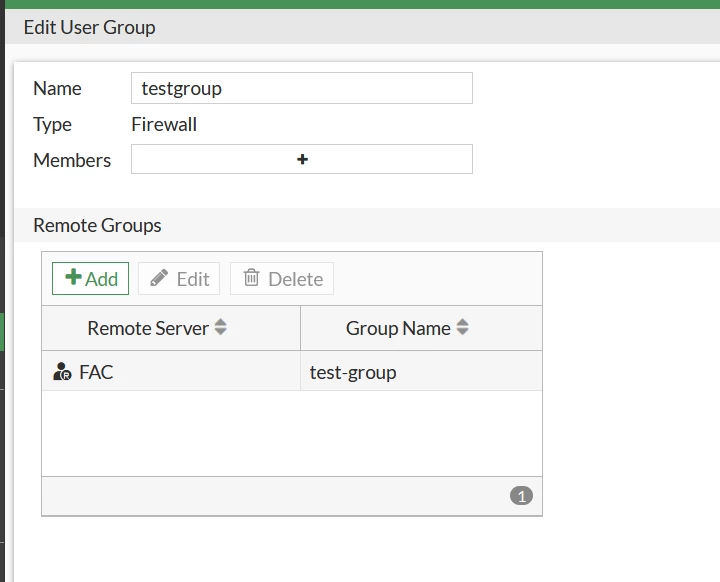
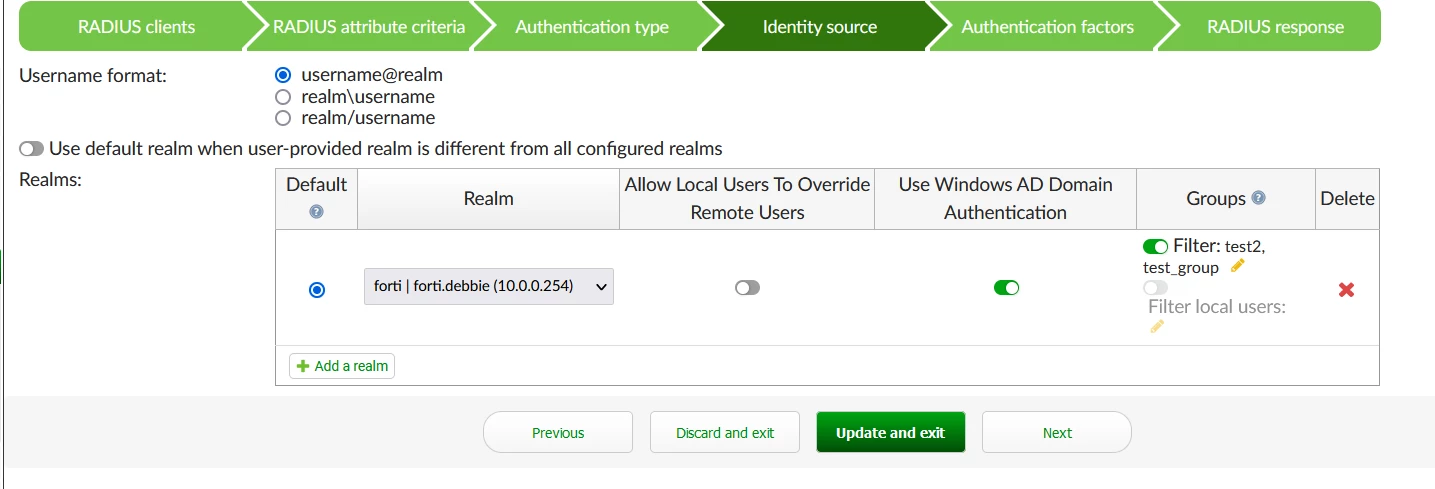
- you can filter the RADIUS authentication policy on specific groups so only those users can authenticate in the first place

- you can create groups on FortiGate, add in a RADIUS server and define a match:

Debbie_FTNT_1-1665140823921.png

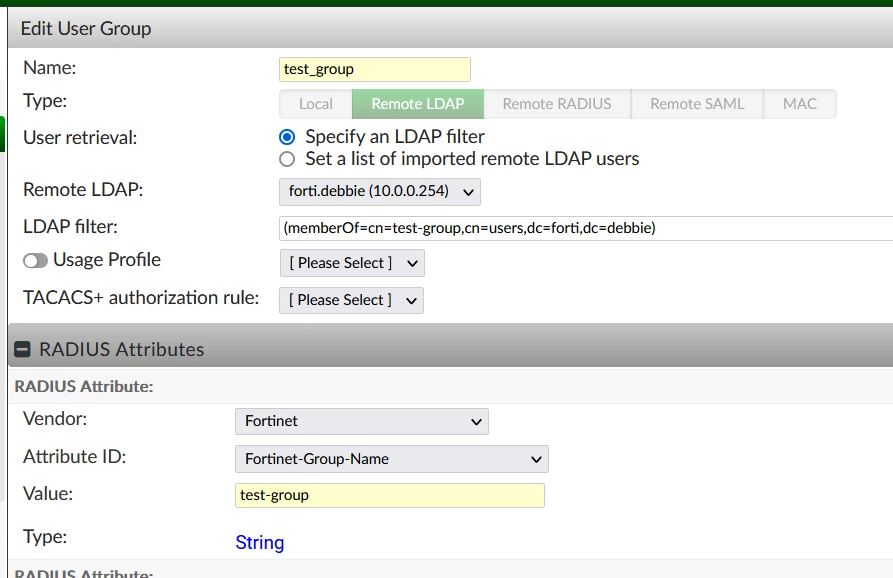
However, you need to ensure FortiAuthenticator sends along a RADIUS attribute to match this in FortiGate. FortiGate looks for the 'Fortinet-Group-Name' attribute, so you need to make a configuration like the following on FortiAuthenticator:
- add the attribute to the group

Debbie_FTNT_2-1665141207195.png

- filter on the group in FortiAuthenticator RADIUS policy

Debbie_FTNT_3-1665141352534.png

With that in place, FortiGate should receive the group attribute from FortiAuthenticator and match to the proper user groups on the FortiGate itself :)

7 replies

kiri
Staff & Editor
Staff & Editor
Oct 7, 2022 6:41 AM UTC

Hi ArifS,

If I understood correctly what you're after, then this article has the answer:

https://community.fortinet.com/t5/FortiAuthenticator/Technical-tip-How-to-fix-user-not-filtered-by-groups-error/ta-p/212763

Please check this and let me know.

Translate
ArifS
ArifSAuthor
New Member
Oct 7, 2022 10:44 AM UTC

Hi cchiriches

That's the settings I was looking for. I created group with only VPN user and now I can see in policy settings. Just need to test to see if it works.

Thanks

Translate
Debbie_FTNT
Staff & Editor
Staff & Editor
Oct 7, 2022 11:18 AM UTC

Hey Arif,

if you're looking to use groups from FortiAuthenticator in FortiGate VPN authentication, especially to restrict, you should also consider the following:

- you can filter the RADIUS authentication policy on specific groups so only those users can authenticate in the first place

- you can create groups on FortiGate, add in a RADIUS server and define a match:

Debbie_FTNT_1-1665140823921.png

However, you need to ensure FortiAuthenticator sends along a RADIUS attribute to match this in FortiGate. FortiGate looks for the 'Fortinet-Group-Name' attribute, so you need to make a configuration like the following on FortiAuthenticator:
- add the attribute to the group

Debbie_FTNT_2-1665141207195.png

- filter on the group in FortiAuthenticator RADIUS policy

Debbie_FTNT_3-1665141352534.png

With that in place, FortiGate should receive the group attribute from FortiAuthenticator and match to the proper user groups on the FortiGate itself :)

Translate
ArifS
ArifSAuthor
New Member
Oct 12, 2022 9:38 AM UTC

Hi Debbie

After creating group as per your instruction, resolves the issue and it only allows users to login who are member of the group however it still allows users to login with no Fortitoken assigned to that user. The Fortigate policy configured to user Mandatory Password & OTP but it still allows user without OTP. How do I deny access to the users who dont have fortitoken. I have same policy for RAS solution with same setting and it reject those users without fortitoken.


ArifS_0-1665567566701.png


Thanks

Translate
kiri
Staff & Editor
Staff & Editor
Oct 12, 2022 10:32 AM UTC


Hi @ArifS
Are you sure the auth is going thru the FAC, thru the same policy?
Do you have other policies that would allow it?
Take a look here, radius debug and check that:
https://<FACIP>/debug/radius/
Does the successful login without the token show up in the event logs on the FAC?
GUI -> Log Access -> Log Access > Logs
Is it possible that you have the LDAP server configured on the FGT and the auth goes thru it and not thru FAC bypassing the 2fa?
Run this debug on the firewall before connecting, you should see the group/auth server:

diag debug console timestamp enable
diag debug app fnbamd -1
diagnose debug enable
Once auth goest thru, type "di de di" to stop it.
Let us know how it goes.

Translate
ArifS
ArifSAuthor
New Member
Oct 12, 2022 10:46 PM UTC

I can see failed log for the test user I tried to login so it does rejrect users with no fortitoken. So there must another policy in Fortigate which allows connection. I will check Fortigate and find out.


ArifS_0-1665614771149.png


Translate
Risk and Resilience in the Age of AI. An OT Thought Leadership Summit for Houston's Critical Infrastructure Leaders. Date: Thursday, December 3, 2026. Time: 8:30 am - 1:30 pm (CT). Location: The Westin Houston, Memorial City | 945 Gessner Road, Houston, TX 77024