Question
How to Configure WAN2 to AT&T U-Verse RG?
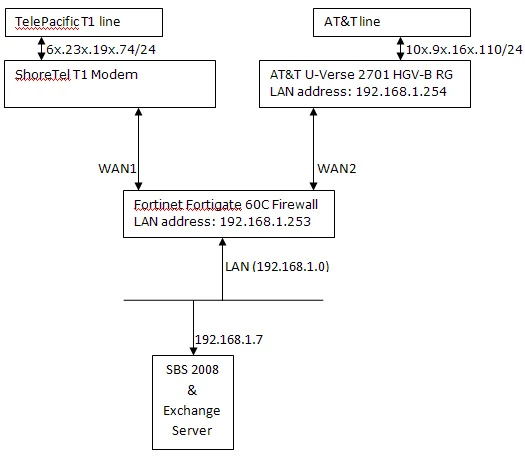
In my small business, I have a Fortigate 60C as the Firewall that is connected to two different ISPs as WAN1 and WAN2. This all worked fine until I moved to a new office and Comcast did not have service there, so I got static IPs from AT&T via their U-Verse service. But what was easy with Comcast and TelePacific seems hard now with the AT&T Residential Gateway (RG). Does anyone have the steps to configure the AT&T U-Verse 2701 HGV-B RG to connect to WAN2 on Fortigate 60C? The RG wants to discover the MAC addresses of all the machines on the local network, but I only want it to see the WAN2 port on the Fortigate 60C firewall and pass all traffic for all static IPs on to the firewall to process. I found the following post that seems related, but does not get me all the way to a working solution: http://www.ka9q.net/Uverse/static-ip.html Someone suggested I use VDOMs (http://docs.fortinet.cor/fgt/techdocs/fortigate-vlans-vdoms.pdf), but this does not seem to be useful, since the intention here is to use the Fortigate Firewall to have a live backup ISP connection for the business. The firewall detects if the primary interface (WAN1) is down and switches traffic to WAN2. This all worked fine until I moved to a new office and Comcast did not have service there, so I got static IPs from AT&T via their U-Verse service. But AT&Ts static IPs are not really static (see ttp://www.ka9q.net/Uverse/static-ip.html ) and their " Residential Gateway" (RG) does not seem to have been built with the notion of a firewall as its only connection point to the LAN. This was easy to configure with Comcast and with TelePacific modems, but what I need to do is convince the RG to pass all traffic to the firewall. I configure the RG by directly connecting to it. Is there a way to get to it through the firewall? I tried setting up a static route and a firewall policy to allow traffic to its fixed address of 192.168.1.254 (which there does not seem to be anyway to change.)