
Ti8M
New Member
Mar 18, 2025 9:37 AM UTC
Question

Free Forticlient Ios stopped working with IOS 18.3.2

We have received a message from our employees that the VPN client no longer works with IOS 18.3.2. It still works on older versions or Windows clients.


We use the VPN with our own IDP as 2FA.

As soon as the users confirm the 2FA, we get the message with URLSessionTask failed in the app. (See photo)
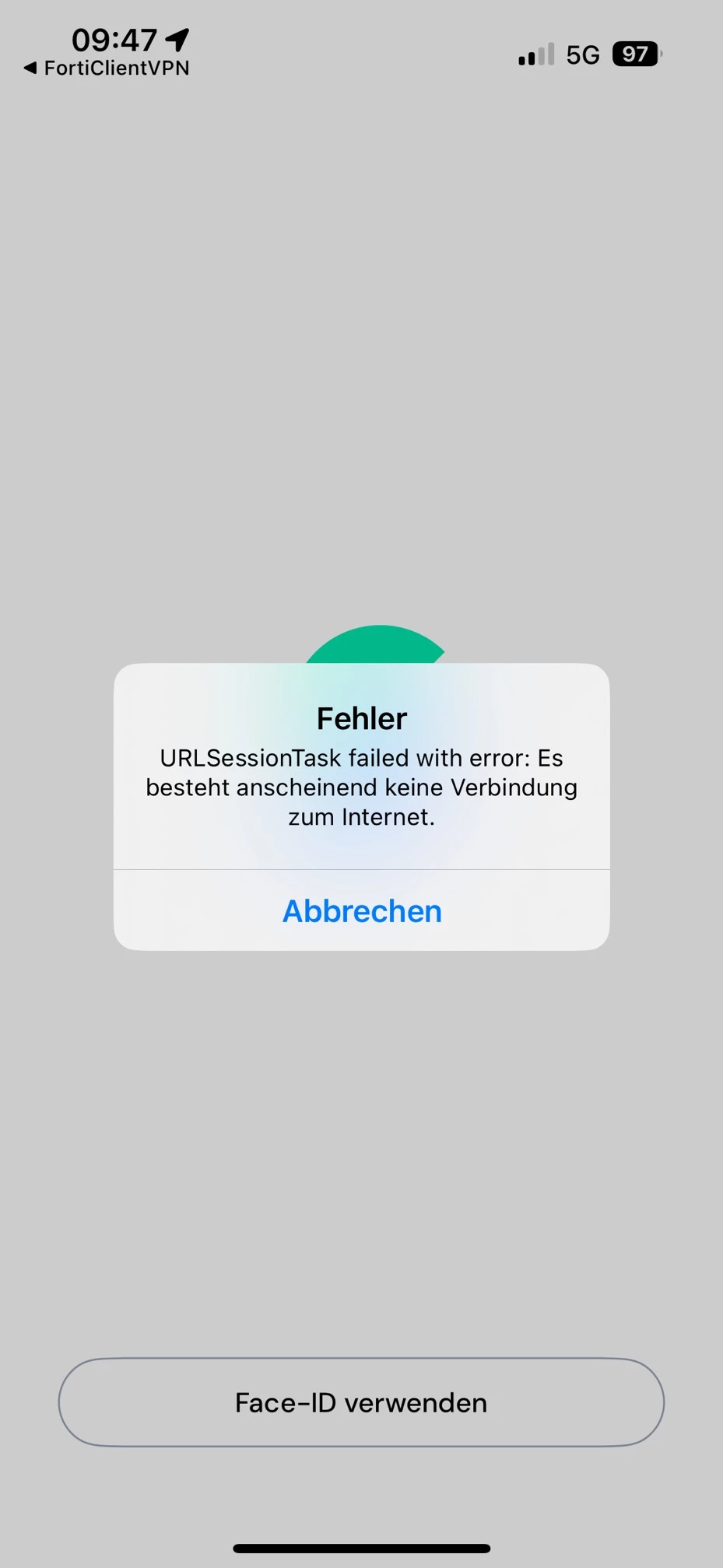
image.png


Anyone having similar Issues?

13 replies

Oak6t
Explorer
Mar 18, 2025 1:03 PM UTC

We are seeing this same issue specific to iOS Forticlient VPN version 7.4.5.0174. SSO is now broken. Fortinet needs to address this ASAP.

AEK
SuperUser
SuperUser
Mar 18, 2025 9:40 PM UTC

Hi Ti8m

Which FCT VPN version are you using? And from where did you download it?

AEK
Ti8M
Ti8MAuthor
New Member
Mar 19, 2025 12:02 PM UTC

Version is 7.4.5.0174

Downloaded from the app store.

Christian_89
Contributor III
Mar 19, 2025 6:20 AM UTC

This issue appears to be a compatibility bug introduced with iOS 18.3.2. The error "URLSessionTask failed" typically indicates that the FortiClient app is having trouble establishing or maintaining a network session during the VPN connection process—most notably after the 2FA confirmation via your IDP.

What you can do as workarounds:

Check for Updates: 
Verify if there is an updated version of FortiClient for iOS. Fortinet may release a fix that addresses compatibility issues with iOS 18.3.2.

Rollback Option:
If updating FortiClient is not immediately possible, consider temporarily reverting to an earlier iOS version where the VPN client is working correctly—if that option is available and acceptable for your environment.

Fortinet Support:
Since this issue affects multiple users and is specific to iOS 18.3.2, raising this with Fortinet TAC or checking their community forums might provide further insights or additional workarounds.

In summary, the "URLSessionTask failed" error on iOS 18.3.2 is likely due to changes in iOS that have impacted FortiClient's network handling, and until an official fix is released, one of the above workarounds may help maintain VPN connectivity.

Ti8M
Ti8MAuthor
New Member
Mar 19, 2025 10:08 AM UTC

We just got this reply from one of our Users:

For me the Version is 7.4.5.0174
What else I have observed:
After you press "Connect" in the FortiClient, the VPN icon appears at the top of the iPhone and at the same time you lose the Internet connection (regardless of whether it is WiFi or mobile). In this state, you cannot call up a website or use any other app with Internet access.
According to the iPhone settings, a VPN connection is already established at this moment although FortiClient still says "connecting".

AEK
SuperUser
SuperUser
Mar 19, 2025 6:52 PM UTC

Maybe I missed something but Fortinet release notes are saying the latest is 7.4.2.

https://docs.fortinet.com/document/forticlient/7.4.2/macos-release-notes/891416/introduction

Can you try the package from Fortinet?

https://www.fortinet.com/support/product-downloads#vpn


AEK
Ti8M
Ti8MAuthor
New Member
Mar 20, 2025 8:31 AM UTC

Thats MacOs, we are talking about Iphones which get the App from the Apple Store

AEK
SuperUser
SuperUser
Mar 20, 2025 12:32 PM UTC

Mea culpa, you are right.

AEK
mschlichter
New Member
Mar 21, 2025 10:17 AM UTC

We are seeing the same issue specific to iOS Forticlient VPN version 7.4.5.0174 but only with 2FA (Fortitoken).

Without 2FA it works.

Cinder
Explorer
Mar 23, 2025 8:00 PM UTC

I support a utility, and they're seeing the same thing -- iOS devices that are used for "on-call" access to critical systems are no longer working with Fortitoken Mobile 2FA, forcing us to shut it off, which is a major, major, problem. 

rforrister
New Member
Apr 15, 2025 3:43 PM UTC

I was checking https://apps.apple.com/us/app/forticlient-vpn/id1475674905?platform=iphone and it appears there is a newer version 7.4.6 which was released last week.  The notes just state -bug fixes.  Has anyone tried the newer version, yet?

Cinder
Explorer
Apr 22, 2025 12:32 AM UTC

Yup, we updated our iPads.  Still broken.  We tried full uninstalls and reinstalls of the new version, no go.  Fortinet's excuse of the client being "free" and thus unsupported is such and unprofessional cop-out for paying customers with completely up-to-date and subscribed firewalls.

rforrister
New Member
Apr 15, 2025 5:58 PM UTC

honekgo1,

I had a TAC case open and they stated that since it is a free product there was no support for it.

So, I closed it this morning.  I still haven't heard back from our employees who use it.  Guess they will call when they need it.


Risk and Resilience in the Age of AI. An OT Thought Leadership Summit for Houston's Critical Infrastructure Leaders. Date: Thursday, December 3, 2026. Time: 8:30 am - 1:30 pm (CT). Location: The Westin Houston, Memorial City | 945 Gessner Road, Houston, TX 77024
