
NeoRant
Explorer III
May 14, 2024 8:56 PM UTC
Solved

Forticlient EMS removable media access

Good day Fortinet Family,


I am use to Symantec Endpoint Protection (SEPM) and other security management endpoint applications where i can block USB/removable storage media excluding mouse, keyboard etc as it was easier, especially with SEPM. 


How can achieve this with Forticlient EMS 7.2?


In my Forticlient admin portal, I am at the section under MALWARE PROTECTION where you can block removable media, but some scary stuff here, when i select "block" it says that keyboard and mouse will be blocked as well LOL. I am also seeing some simple/regular expression fields to fill out some exclusions, I guess. 

Then i came upon this post.

https://www.reddit.com/r/fortinet/comments/mpdtcq/forticlient_ems_never_ever_block_default/


I created a test environment with a test policy, profile and OU, adding only one laptop to this and trust me, i applied the block option and NOTHING works on the laptop. 


Can someone tell me how to only block removable stage while allowing other important usb devices like the mouse and keyboard?

ozkanaltas
Valued Contributor III
May 17, 2024 7:59 AM UTC


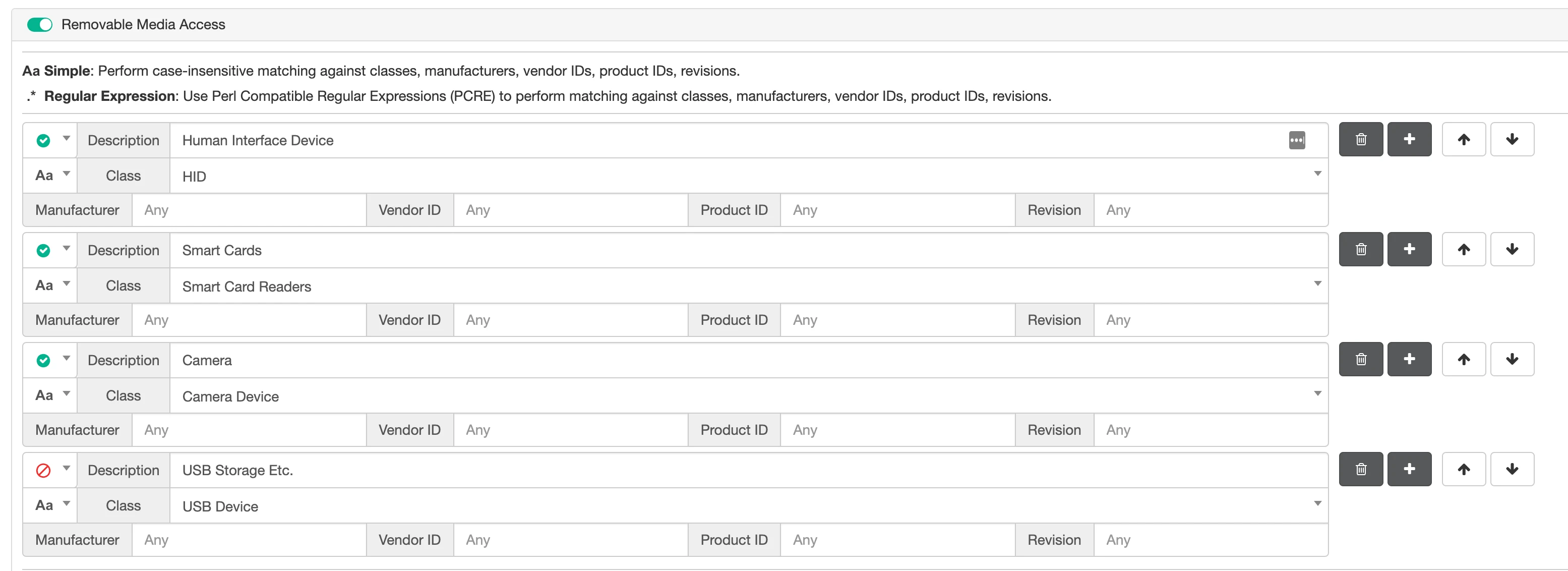
FortiClient EMS processes all rules like a firewall about removable media (Up to down). Firstly, you need to allow HID. You can use a class attribute for that. After that, you can configure rules for anything you want to block or allow. For example, you can use it like that.  It should be work that way.


image.png

3 replies

Anthony_E
Staff
Staff
May 17, 2024 7:26 AM UTC

Hello NeoRant,


Thank you for using the Community Forum. I will seek to get you an answer or help. We will reply to this thread with an update as soon as possible.


Thanks,

Translate
Best Regards
ozkanaltas
Valued Contributor III
May 17, 2024 7:59 AM UTC


FortiClient EMS processes all rules like a firewall about removable media (Up to down). Firstly, you need to allow HID. You can use a class attribute for that. After that, you can configure rules for anything you want to block or allow. For example, you can use it like that.  It should be work that way.


image.png

Translate
NeoRant
NeoRantAuthor
Explorer III
May 17, 2024 1:47 PM UTC

Thank you @ozkanaltas , I did exactly this before seeing this solution. God bless you, you are a master.

Translate
Risk and Resilience in the Age of AI. An OT Thought Leadership Summit for Houston's Critical Infrastructure Leaders. Date: Thursday, December 3, 2026. Time: 8:30 am - 1:30 pm (CT). Location: The Westin Houston, Memorial City | 945 Gessner Road, Houston, TX 77024
