

MartinDf121
New Member
Aug 11, 2024 11:16 AM UTC
Question

FortiAP FP431F 7.2 | WPA Enterprise - DHCP Not working

Dear team, our office has an issue with the Secure corporate WiFi in one of the Access points.

It appeared right after a power outage.

So basically anyone who tries to connect gets APIPA.

Mind that the Guest which is Running Fine - WPA Personal.

Here are some screen shots of the logs - FortiAP LogsFortiAP Logs
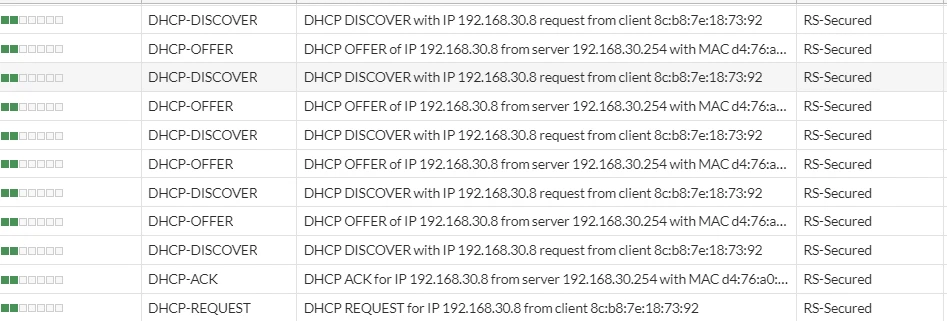
 

The AP is connected to a Switch which has proper config on the interface, in-fact the rest of the AP's are on the same switch and have the same config on the interface and they are all working fine.


*Two weeks ago I have encountered the same issue in a different office with the same FortiAP model and Firmware - Mind that firmware update did not fix it. 

18 replies

MartinDf121
New Member
Aug 11, 2024 11:18 AM UTC

Also pointing out that the DHCP scope has plenty of free IP addresses

Translate
ebilcari
Staff
Staff
Aug 11, 2024 1:32 PM UTC

Where is the DHCP server configured? Are these DHCP requests from a host in a working or a non working SSID?

If by 'Secure corporate WiFi' you mean another SSID that is doing dynamic VLAN assignment via RADIUS, make sure that the hosts are authenticated and are residing in the desired VLAN.

Translate
Emirjon
MartinDf121
New Member
Aug 11, 2024 1:36 PM UTC

1. DHCP is configured on Fortigate.

2. This SSID is fully active, its a WPA Enterprise based on credentials not a certificate.

3. All of the other configurations are fine - I know that for a fact since there are 3 other FortiAP's who are working flawlessly, as mentioned before the interface in the switch that this FAP is connected to is configured the same as the rest AP's.


P.S - its not the first time I am encountering this Issue as mentioned above

Translate
ebilcari
Staff
Staff
Aug 11, 2024 2:10 PM UTC

There are some cases when the authentication is not successful or the applied dynamic VLAN is different from what is expected. The authentication status and the applied VLAN can be checked with the command:

diagnose wireless-controller wlac -c sta


Have you isolated the problem being related only to DHCP? How was the issue solved in the past, rebooting the AP?

Translate
Emirjon
MartinDf121
New Member
Aug 12, 2024 7:59 AM UTC

Hey, it is not an auth issue since I can see on the RADIUS server that the auth is successful.

I have tried rebooting and even upgrading the Firmware but it did not help.

I can clearly see that they do connect to the network but are getting APIPA, they are even seen as a client under the AP's diagnostics but they have APIPA IP which is strange. 

Translate
MartinDf121
New Member
Aug 12, 2024 10:42 AM UTC

Hey, I'll give it a try and I'll update you with the results 

Translate
ndumaj
Staff
Staff
Aug 15, 2024 1:46 PM UTC

Hello @MartinDf121 
Did you try?

Waiting for your result?

BR

Translate
MartinDf121
New Member
Aug 15, 2024 2:09 PM UTC

Hey, I haven't had the chance yet, I'll try it on Sunday and I'll update you.

Translate
ndumaj
Staff
Staff
Aug 18, 2024 9:16 AM UTC

Hello @MartinDf121 
DHCP for vlan 100 is configured on FGT, correct? If the VLAN is assigned properly then the host should get the IP.
Did you try to manual disconnect the host from SSID and connect again does it get the proper IP from VLAN 100?


Check on FGT is it receiving DHCP packets, and what is replying?
PCAP on the host and FGT will provide more info why the host is not getting IP from DHCP server.

BR

Translate
MartinDf121
New Member
Aug 18, 2024 9:30 AM UTC

I have tried to connect the host to a different AP and it works.

I can see in the logs of the AP with the issue that it is receiving DHCP requests and sends offers but the host replies with more requests instead of accepting.

Mind that I have already checked the managed switch and the configuration of the interface that the AP is connected to is correct.

I have checked the Fortigate itself for the specific hostname and did not see DHCP packets regarding the VLAN

Translate
ndumaj
Staff
Staff
Aug 18, 2024 9:40 AM UTC

Hello @MartinDf121 
we need to compare the PCAP from both, working and non-working AP.

It looks like an issue with AP communication?!
I'm not sure if there is any issue with CoA, that's why I said, did you try to manually disconnect the host after successful authentication?

BR

Translate
ndumaj
Staff
Staff
Aug 18, 2024 2:08 PM UTC

Hello @ornaldo7 

Issue 0923964 is related to FAP - 43xF - "Clients won't ACK DHCP packet transmitted by AP"
Did you try to use the AP on version 7.2.0?
Also, try to disable 802.11ax.

BR

Translate
MartinDf121
New Member
Aug 18, 2024 2:35 PM UTC

Hi, We have found a solution (but we'll see for how long it lasts).

basically we have changed the build of the FortiGate's firmware from 7.2.8 to 7.4.4 and also upgraded to AP's to 7.4.3 and now it works

Translate
Risk and Resilience in the Age of AI. An OT Thought Leadership Summit for Houston's Critical Infrastructure Leaders. Date: Thursday, December 3, 2026. Time: 8:30 am - 1:30 pm (CT). Location: The Westin Houston, Memorial City | 945 Gessner Road, Houston, TX 77024