dadkeating
New Member
Jan 27, 2025 10:39 PM UTC
Solved

Forti OS history on unit

Is there a way either on the device or on the support pages to see the history of Forti OS updates applied to the device?

dingjerry_FTNT
Staff
Jan 28, 2025 1:50 AM UTC

Hi @dadkeating ,


1) You can run the following command to get the last two FortiOS applied to this device:


# diag sys flash list


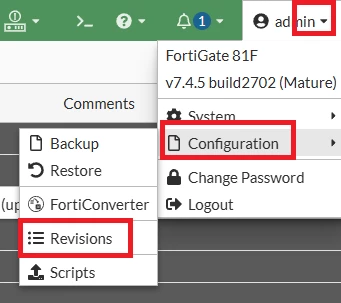
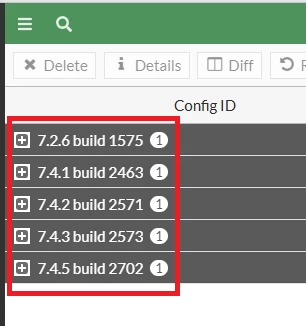
2) You can check the Revisions page to tell the firmware versions applied on this device:


You may use the following KB as a reference how to use Revisions on FGT:


https://community.fortinet.com/t5/FortiGate/Technical-Tip-Using-the-Revision-option-to-revert-to-a-previous/ta-p/194312


dingjerry_FTNT_0-1738029160892.png


dingjerry_FTNT_1-1738029209433.png


2 replies

dingjerry_FTNT
Staff
Staff
Jan 28, 2025 1:50 AM UTC

Hi @dadkeating ,


1) You can run the following command to get the last two FortiOS applied to this device:


# diag sys flash list


2) You can check the Revisions page to tell the firmware versions applied on this device:


You may use the following KB as a reference how to use Revisions on FGT:


https://community.fortinet.com/t5/FortiGate/Technical-Tip-Using-the-Revision-option-to-revert-to-a-previous/ta-p/194312


dingjerry_FTNT_0-1738029160892.png


dingjerry_FTNT_1-1738029209433.png


dadkeating
New Member
Jan 28, 2025 3:06 PM UTC

Thanks much.

Thought Leadership. Security Summit. Thursday, November 12th, PGA National Resort, Palm Beach Gardens, FL.
Security Operations Summit: Modernize SecOps. Operate AI-Native.AMER: November 4 | 9:00 AM PST. India and SAARC: November 5 | 10:00 AM IST. EMEA: November 5 | 10:30 AM CET. APAC: November 5 | 11:00 AM SGT