idharr1
New Member
Mar 12, 2025 7:54 AM UTC
Question

Block Instagram from App control is not working

Good day,


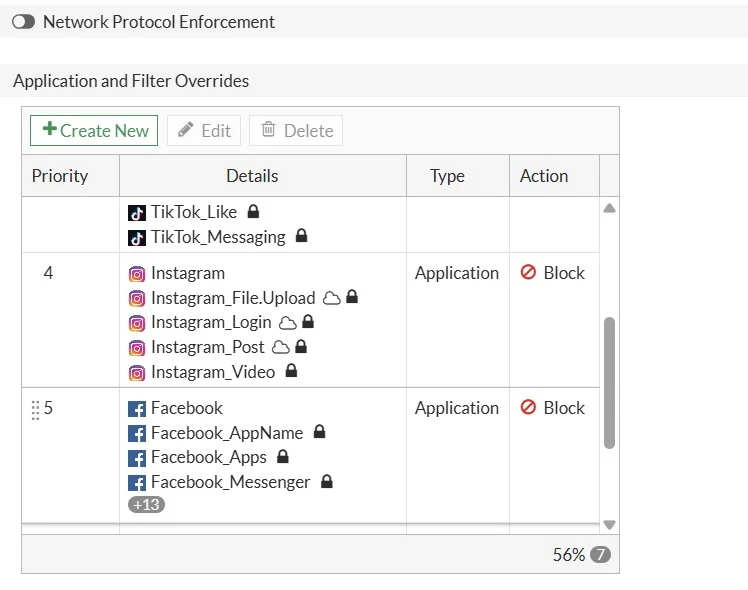
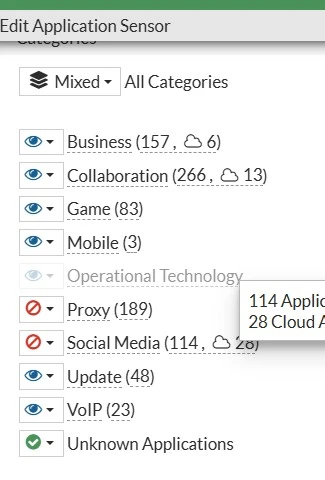
i have block instagram from application Control. it works in laptop or pc that connected through this network. but for user who using mobile phone with Wifi access, still able to access Instagram application smoothly. 

my question is, how to block instagram for user access from mobile phone Iphone or Android.


Thank you for Help


1.jpg2.jpg

5 replies

ebrlima
Staff
Staff
Mar 14, 2025 4:43 PM UTC

Hello @idharr1 


First thing to do is make sure that user traffic is matching the policy with the right application control profile.


Get the source IP and using the logs try to find if traffic is matching the expected policy when it goes to these apps.


Another way to block this is creating a policy to deny traffic to the ISDBs for Meta services. This way you can block it in the L3/L4 layers, instead of L7.


Translate
New Member
Jul 30, 2026 6:23 AM UTC

I was also facing the same issue in fortinet f40 but i did this.

Your FortiGate has the Internet Service Database (ISDB) entries for Meta. This gives us a much better solution than relying on Application Control.

Why Application Control is failing

Mobile apps are using:

  • QUIC (HTTP/3)
  • TLS 1.3
  • Certificate Pinning
  • Encrypted APIs

So FortiGate sees traffic like:


QUIC
SSL_TLSv1.3
HTTPS
 

instead of


Facebook
Instagram
 

Therefore the Application Control signature never matches.

Better Solution: Block Meta using ISDB

Create a deny firewall policy above your Internet allow policy.

Policy Configuration

Incoming Interface


School WiFi
 

Outgoing Interface


WAN
 

Source


School WiFi Subnet
 

Destination
Choose Internet Service and add:


Meta-Web
Meta-Instagram
Meta-Whatsapp
Meta-Other
 

You can even add all Meta services if you want.

Service


ALL
 

Action


DENY
 

Schedule


Always
 

Place this rule above your existing "School Campus" allow policy.

Why this works

Instead of asking

"Is this Facebook traffic?"

FortiGate asks

"Is this destination IP owned by Meta?"

If yes → Drop it immediately.

This works even if the application is:

  • QUIC
  • HTTP/3
  • TLS 1.3
  • Encrypted

because the decision is based on Meta's IP ranges, not application signatures.

I recommend adding these:


Meta-Web
Meta-Instagram
Meta-Whatsapp
Meta-Other
 

If Messenger should also be blocked, include the relevant Meta service that covers it (often Meta-Web and Meta-Other are sufficient).

After creating the rule

Open Facebook and Instagram on a phone.

The log should show something like:


Policy ID: <New Deny Policy>
Action: Deny
Destination Internet Service: Meta-Instagram


Translate
sjoshi
Staff
Staff
Jul 30, 2026 12:38 PM UTC

you  may need to use DPI and install cert on the android

btw is it working for wins pc?

Translate
Thanks, Salon
New Member
Aug 4, 2026 8:32 AM UTC

no you do not need to istall certificate in any device. it is working and i am enjoying this. I was also frustrated but doing this policy its working. Only keep this policy on the top of the policy order. 


Translate
New Member
Oct 12, 2026 8:35 AM UTC

Hi, it seem not working on my side


Translate
Risk and Resilience in the Age of AI. An OT Thought Leadership Summit for Houston's Critical Infrastructure Leaders. Date: Thursday, December 3, 2026. Time: 8:30 am - 1:30 pm (CT). Location: The Westin Houston, Memorial City | 945 Gessner Road, Houston, TX 77024