
Ankit1
New Member
Jun 28, 2023 7:03 AM UTC
Question

Application control block zoom app

Hi All,

We have Fortigate 100D model with 6.2.15 version, recently we are facing issue with zoom app while accessing it and getting the below error.
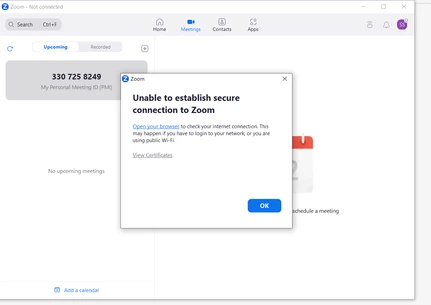


zoom_error.png


We have validate the certificate on fortinet, its not expired and valid as well. Tried to download the certificate which are we using security profile as 'certificate inspection' in policy and inspection mode is set to proxy mode and added this certificate to the browser as well but no luck. When we changed inspection mode to flow based it started working as expected. But we want it should work on proxy mode with security profile as "certificate inspection'.

Could you please provide the solution?

14 replies

AlexC-FTNT
Staff
Staff
Jun 28, 2023 7:11 AM UTC

You mention Certificate - why do you think this is the problem? Does the FortiGate logs this as a problem (denies traffic because certificate is wrong/expired/etc)? Enable logging on that policy to see if Fortigate blocks the connection.

Otherwise, need to know how Zoom operates. If it's using SIP protocol for signalling, make sure you did NOT disable SIP-ALG on the firewall

Ankit1
Ankit1Author
New Member
Jun 28, 2023 9:45 AM UTC

Hi,

We have not only facing the issue with zoom app but we 2 to 3 internal urls which we used and getting the same error for all this. Please find the below logs from FW.


Date    2023/06/27
Time    05:07:49
Duration    2s
Session ID    39341658
Virtual Domain    root
NAT Translation    Source


Source
IP    X.X.X.X
NAT IP    X.X.X.X
Source Port    60651
Country/Region    Reserved
Source Interface     Wireless Users
Device ID    FG100D3G16830465
User    


Destination
IP    170.114.52.2
Port    443
Country/Region    United States
Destination Interface     Internet Gateway (wan1)


Application Control
Application Name    HTTPS
Category    unscanned
Risk    undefined
Protocol    6
Service    HTTPS


Data
Received Bytes    3 kB
Sent Bytes    848 B
Sent Packets    10
LAN In    524 B
LAN Out    524 B
WAN In    4 kB
WAN Out    320 B


Action
Action    TCP reset from client
Security Action    Blocked
Policy    174
Policy UUID    fee49ddc-3d8e-51e8-1f90-df54824df03d
Policy Type    IPv4


Security
Level    


Cellular
Service    HTTPS


Other
ID    7249228209449861255
Time    2023-06-27 01:07:50
euid    3
epid    1262
dsteuid    3
dstepid    101
logflag    3
logver    602151378
Type    traffic
Sub Type    forward
Log ID    0000000013
Source Interface Role    lan
Destination Interface Role    wan
Log event original timestamp    1687842470289547000
Number of SSL logs    1
Timezone    +0000
dtime    2023-06-27 05:07:49
itime_t    1687842470

AlexC-FTNT
Staff
Staff
Jul 3, 2023 6:50 AM UTC

Zoom App and URL can only block access (both at the same time) if you misconfigured something. The logs actually tell a different story: "TCP reset from client" is actually telling you that the client actively reset the session. This is not something that can be fixed on Fortigate, but can happen if the destination does not like something about your connection (usually that is the IP). So check if your public IP is not blacklisted - that means the end firewall may block the connection (and you will see the reset).

Ankit1
Ankit1Author
New Member
Jul 3, 2023 6:07 AM UTC

Hi,

Someone could you please provide any solution on this as we have 2 to 3 internal urls (zoom,snowflake and logme123) which we used and getting the same error for all this. Also on firewall logs we see in ssl inspection logs getting "invalid/block cert" errorr.

AlexC-FTNT
Staff
Staff
Jul 3, 2023 6:52 AM UTC

"invalid/block cert" - different error, but pretty obvious. Wrong certificate being used. Do you have another firewall / proxy after the FortiGate which does deep-inspection (or changes the certificate)? 

Ankit1
Ankit1Author
New Member
Jul 3, 2023 7:26 AM UTC

Hi,

We don't have any other firewall/proxy after the fortigate, we have router after fortigate. 

Also attached some screenshot for the certificate error. Actually we have 2 certificate "Fortinet_CA_SSL" and "Fortinet_CA_Untrusted". I think these apps picking "Fortinet_CA_Untrusted".MicrosoftTeams-image (8).pngMicrosoftTeams-image (7).png


Fortinet_cert.PNG

sw2090
SuperUser
SuperUser
Jul 3, 2023 7:36 AM UTC

Looks like you use "Fortinet_CA_Untrusted" for DPI. So you will have to make your client trust this CA by installing it as trusted certificate authority. 

Ankit1
Ankit1Author
New Member
Jul 3, 2023 7:47 AM UTC

Hi,

You mean to say we need to download and add this certificate ("Fortinet_CA_Untrusted") from Firewall and we can go into the browser in the client system by going to "internet options" then add it in root certificate?

saneeshpv_FTNT
Staff
Staff
Jul 3, 2023 8:57 AM UTC

Hi,


Usually FGT uses Untrusted CA certificate if it is not able to successfully verify the actual Server certificate (Zoom Certificate).


https://community.fortinet.com/t5/FortiGate/Technical-Tip-How-FortiGate-handles-Untrusted-SSL-certificate/ta-p/218813 


For testing, you can manually download the Server certificate for Zoom and install in to FortiGate trusted CA list and try to access it again.


If the issue persist please share the section of relevant configuration and logs for checking further.


Regards,


sw2090
SuperUser
SuperUser
Jul 3, 2023 8:31 AM UTC

yes it needs to be installed into the certificate space "trusted certificate authorities" on your client(s).

Once this is achieved the browsers will trust that certificate because they will trust the CA.

That is because of basic functionallity of ssl deep inspection:

DPI is a man-in-the-middle thingy. The FGT will have to decrypt the encrypted https/ssl traffic to be able to inspect it with its filters. Afterwards it will have to re-encrypt it since the client expects encrypted traffic. Since it cannot do re-encryption using the original certificate - because it doesn't have the private key - it will use the CA you set in Deep Inspection Profile to create and sign a new certificate that has the original DN/SAN in it and use that to re-encrypt the traffic. Then if you haven't installed the CA as trusted CA the browswer on the client will not trust this certifcate for it is not signed by a trusted CA.

saneeshpv_FTNT
Staff
Staff
Jul 3, 2023 12:27 PM UTC

Hi Ankit,


A Quick update here,


CSB has been published for this issue. 
https://support.fortinet.com/Information/Bulletin.aspx
 
Customer Support Bulletin CSB-230629-1


Regards

Ankit1
Ankit1Author
New Member
Jul 3, 2023 12:53 PM UTC

Hi All,

Thanks for supporting. The got resolved now:)

Stephan3tha
New Member
Jul 3, 2023 2:25 PM UTC

To block the Zoom application on your computer, you can utilize application control or blocking features available in certain security software or parental control tools. The specific steps may vary depending on the software you are using, but here is a general guide to help you through the process. First, identify the software or tool you are using for application control or blocking. It could be a third-party security software or built-in parental control settings on your operating system. Open the software or access the settings panel where you can configure application control or blocking.

Next, look for an option that allows you to add or block specific applications. This feature might be labeled as "Application Control," "Program Blocking," or something similar. Locate this option within the software's interface. 

Dan_Eng52
Explorer III
Jul 10, 2023 10:17 AM UTC

Hi Ankit1, 


I hope you're well. 


You want to download the Fortinet_CA_SSL and install this on the endpoint not the Fortinet_CA_Untrusted you previously tried. I would clear the SSL cache on the device and then install that certificate and that will do the trick and resolve the certificate error


Regards, 

Dan. 


Thought Leadership. Security Summit. Thursday, November 12th, PGA National Resort, Palm Beach Gardens, FL.
Security Operations Summit: Modernize SecOps. Operate AI-Native.AMER: November 4 | 9:00 AM PST. India and SAARC: November 5 | 10:00 AM IST. EMEA: November 5 | 10:30 AM CET. APAC: November 5 | 11:00 AM SGT
