The administrator has an active license to integrate FortiWeb with FortiSandbox Cloud, but the status shows as 'disconnected'. 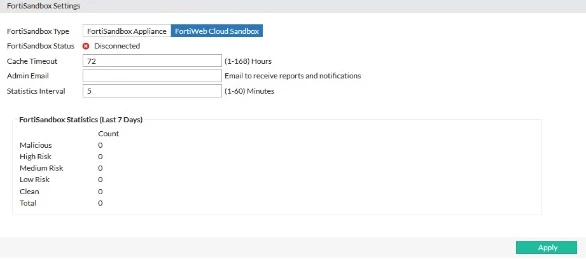 An administrator can run a debug to analyze connectivity issues.
diagnose debug timestamp enable
diagnose debug application fortisandbox 7
diagnose debug enable
The output of the debug could indicate there is a connectivity issue. [FSA][INFO](fsa_oftp.c:684): ============= BUILD CONNECTION ==============
[FSA][INFO](fsa_oftp.c:714): FortiSandbox IP: 208.91.113.207
[FSA][ERR](fsa_oftp.c:763): [115: Operation now in progress] fail to connect to server
The administrator must review that the FortiWeb IP address has full access to the next destination:
FortiSandbox DOMAIN : apt1.forticloud.com.
FortiSandbox IP : 208.91.113.207.
FortiSandbox port : 514.
In FortiWeb 7.6.7/8.0.4 and earlier, connection to FortiSandbox Cloud persisted as 'Disconnected' due to FDN and FortiSandbox Cloud updated its CA certificate.
Debugging output would generate similar message as below.
(__ssl_verify_cb : 539) Something is wrong with certificate or certificte revoked, errorno(19).
ssl_connect fails:error:0A000086:SSL routines::certificate verify failed
Workaround: Disable FDN anycast server in CLI.
config system fortiguard
set fortiguard-anycast disable
end
Bug fixed in 7.6.8/8.0.5 - BugID 1271269.
Note: FDN anycast server can be re-enabled after upgraded to fixed version.
If the diagnosis debug shows different results than above, open a ticket with Fortinet TAC and share all output results:
Technical Tip: How to create a ticket for Fortinet TAC Related document:
system fortisandbox - FortiWeb CLI reference forticloud-sandbox - FortiWeb CLI reference
Related article:
Technical Tip: FortiSandbox Cloud shows connection status as Unreachable or not authorized | 


