FortiWeb traffic logs can display both 'Client ID' and 'Custom Tracking ID'. These fields represent different tracking mechanisms and should not be considered interchangeable. Client ID: An identifier used by FortiWeb to track a client. In the example below, FortiWeb's 'cookiesession1' cookie is used to maintain client identification. Custom Tracking ID: An identifier generated according to the match conditions configured in a Custom Tracking policy. In this example, the tracking condition uses an application session cookie.
The following lab setup demonstrates the behavior:
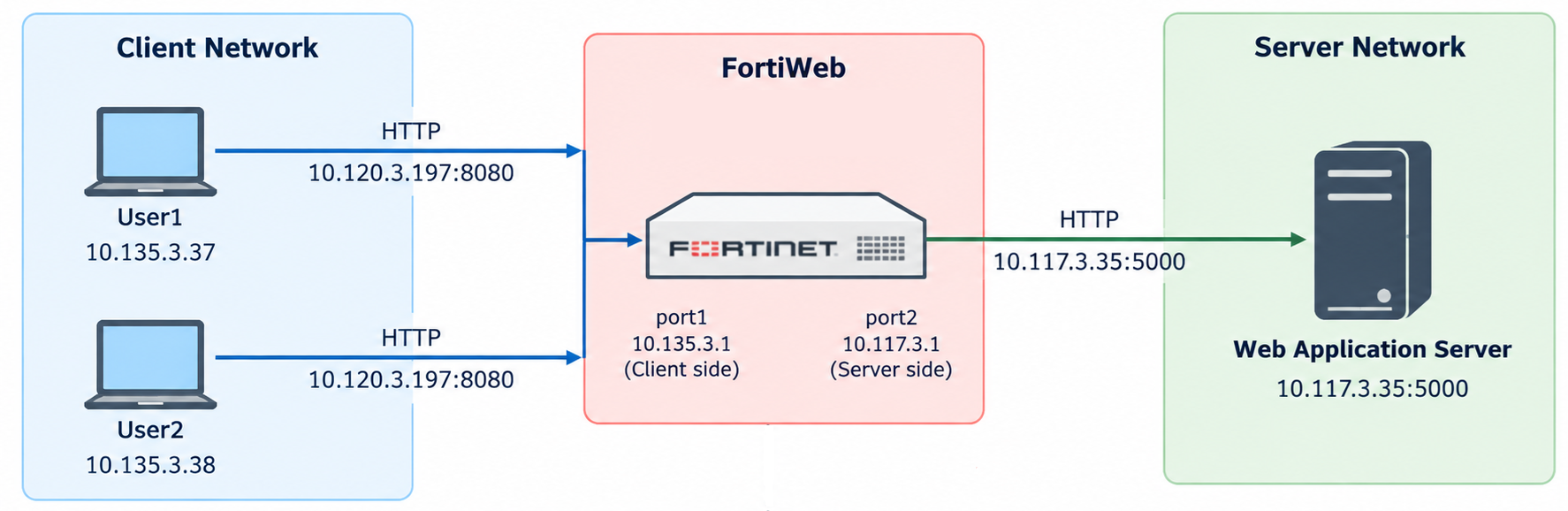
Configure Custom Tracking using an application session cookie.
The backend application uses a cookie named 'LABSESSION' to maintain authenticated sessions.
Configure a Custom Tracking policy to match this cookie:
config waf custom-tracking policy
    edit "1"
        set tracking-timeout 60
        config match-condition
            edit 1
                set match-target request-cookie
                set target-name LABSESSION
                set target-value-type regular
                set target-value-regex [A-Za-z0-9_-]+
            next
        end
    next
end
Associate the Custom Tracking policy with an inline Web Protection Profile:
config waf web-protection-profile inline-protection
    edit "LAB_WAF_Profile"
        set custom-tracking-policy 1
    next
end
Apply the profile to the existing server policy:
config server-policy policy
    edit "LAB_HTTP_Policy"
        set web-protection-profile LAB_WAF_Profile
    next
end
Verify traffic logs when both cookies are present.
In this LAB, two clients access a backend web application through FortiWeb operating in Reverse Proxy mode.
Both clients access the same authenticated application session using the same 'LABSESSION' cookie. The FortiWeb traffic logs show:
Original Source:     10.135.3.37
URL:                 /session-info
Client ID:           0840FB0BA6EE5A0B4C7CD360B76CF6B28F87
Custom Tracking ID:  EHjiAih09WJserhselmpL9Ow6CZIRwDmfqqUd9FNo9E=
Return Code:         200
Original Source:     10.135.3.38
URL:                 /session-info
Client ID:           0840FB0BA6EE5A0B4C7CD360B76CF6B28F87
Custom Tracking ID:  EHjiAih09WJserhselmpL9Ow6CZIRwDmfqqUd9FNo9E=
Return Code:         200
Both identifiers remain unchanged despite the different source IP addresses.
Verify traffic logs when the application session cookie is absent.
A subsequent request is sent with FortiWeb's 'cookiesession1' cookie but without the application's 'LABSESSION' cookie.
The traffic log shows:
Original Source:     10.135.3.38
URL:                 /session-info
Client ID:           0840FB0BA6EE5A0B4C7CD360B76CF6B28F87
Custom Tracking ID:  none
Return Code:         200
The Client ID remains unchanged, while the Custom Tracking ID is 'none' because the request does not match the configured Custom Tracking condition.
This confirms that a request can retain its FortiWeb Client ID independently of the configured Custom Tracking policy.
Compare the observed behavior.
Test scenario | Client ID | Custom Tracking ID |
|---|
Same application session cookie, different source IPs | Same | Same | Different application session cookies, same source IP | Different | Different | Same application session cookie, different User-Agents | Same | Same | FortiWeb 'cookiesession1' present, application session cookie absent | Retained | none |
Note: The 'Client ID' and 'Custom Tracking ID' fields represent different tracking mechanisms and should not be considered interchangeable.
A populated 'Client ID' does not necessarily indicate that a request matches the configured Custom Tracking policy. When the configured tracking condition is not matched, the 'Custom Tracking ID' field may display 'none' even though the 'Client ID' remains available.
| 


