jcastellanos
Staff
Staff
Dec 18, 2024 4:59 PM UTC

Technical Tip: How to verify the established time of a session in the FortiWeb

  • Apr 24, 2026 3:52 PM UTC
  • 0 replies
  • 297 views
  • Translate All
Description

This article describes how to verify how long a session has been set up for through FortiWeb.

Scope FortiWeb v7.0.x.
Solution

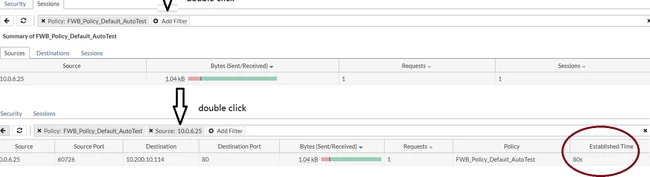
To validate if a session is still active in FortiWeb and how long ago, go to the Dashboard -> FortiView Server Policies -> Sessions.


1-session.png


It is possible to filter by Server Policy and Source IP address to monitor. In the column 'Established Time', find the time the session has been active.


2-established time.png

Risk and Resilience in the Age of AI. An OT Thought Leadership Summit for Houston's Critical Infrastructure Leaders. Date: Thursday, December 3, 2026. Time: 8:30 am - 1:30 pm (CT). Location: The Westin Houston, Memorial City | 945 Gessner Road, Houston, TX 77024