
Technical Tip: How to remove a directory from the URL using URL Rewritting
| Description | This article describes how to remove a certain directory from the URL, which can be helpful while migrating from testing to the production environment or vice versa. |
| Scope | FortiWeb. |
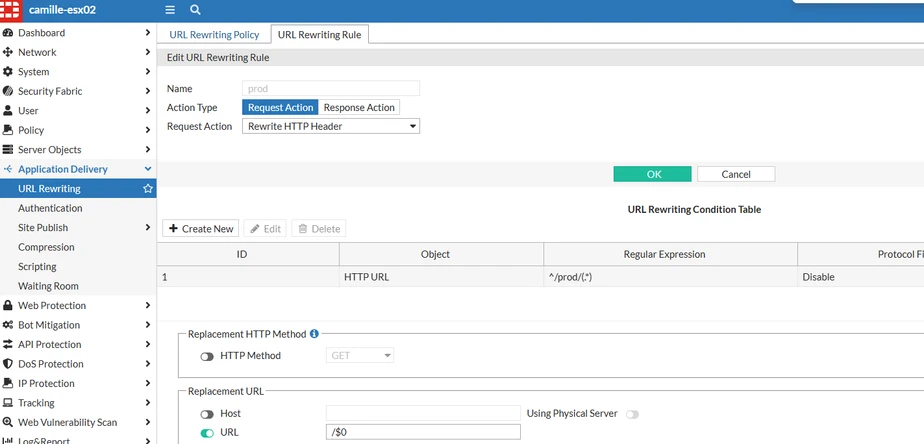
| Solution | In the following scenario, the FortiWeb administrator has been assigned a task to only remove /prod from the below URL and keep the rest:
www.Test.com/prod/XISOAPAdapter/MessageServlet?channel=HR_Cloud:WORKDAY:CC_HR_MasterData_SoapOut This can be achieved by using URL Rewriting with the following request action: rewrite HTTP Header & matching condition [HTTP URL: ^/prod/(.*)]
To configure this in the CLI instead, run the following:
config waf url-rewrite url-rewrite-rule
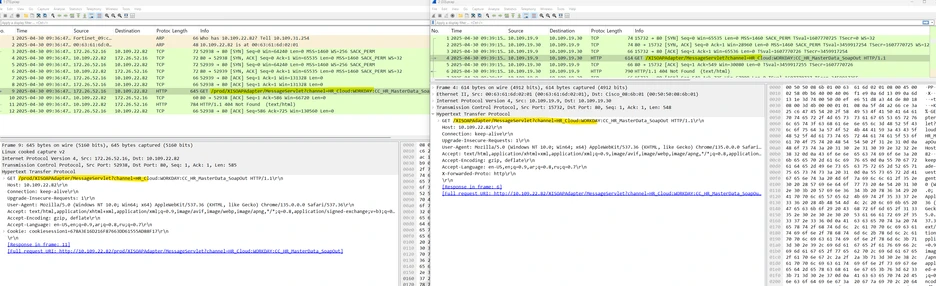
Result:
And on the right side, FortiWeb has removed /prod and kept the rest of the URL. |