Technical Tip: How to ensure FortiWeb will show matched pattern in attack logs
| Description | This article describes why some attack logs do not show the matched pattern in the attack logs and how to resolve the issue. |
| Scope | FortiWeb. |
| Solution | By default, FortiWeb will retain the first 4 KB of data from the offending HTTP request payload that triggered the log message and will truncate the rest. So, if the matched pattern is within the truncated excess, it will not be visible.
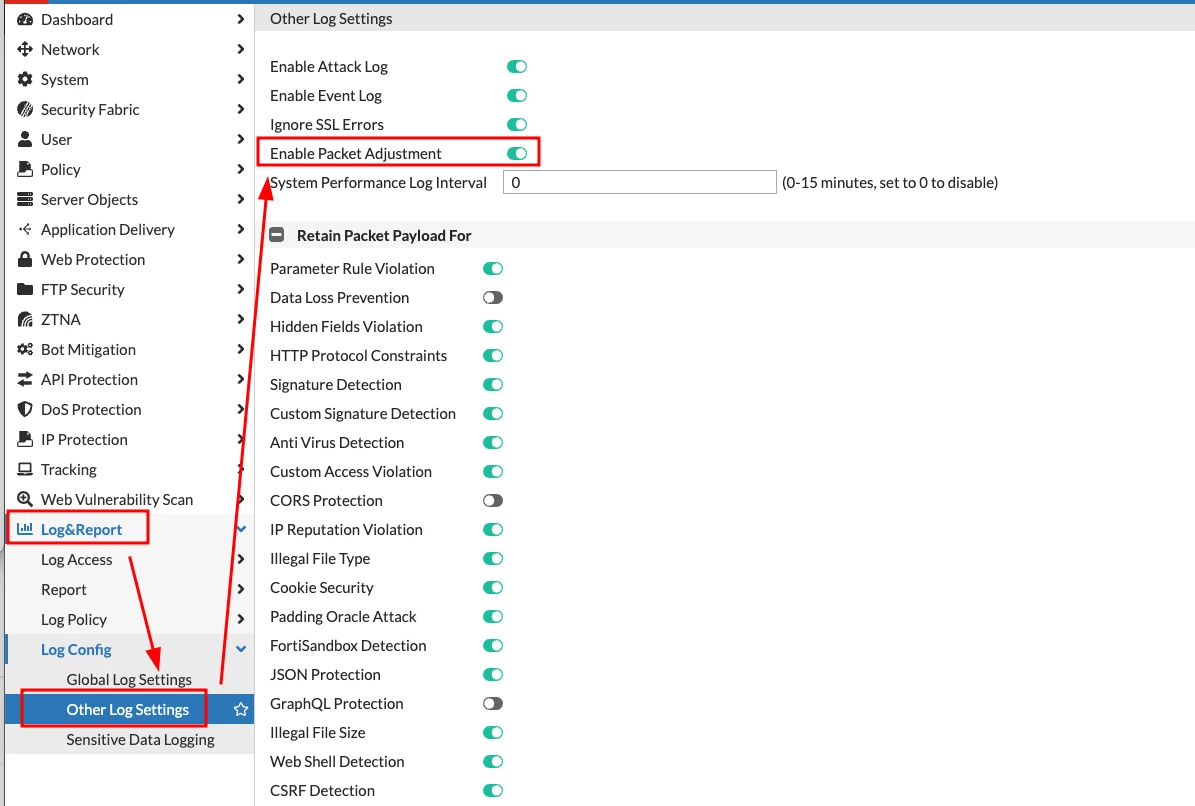
Packet Adjustment feature has been introduced in version 7.4 (and newer). When enabled, it will ensure that the matched attack pattern is consistently preserved.
To enable the option:
config log attack-log
For more information on logging on FortiWeb, visit the following document: Logging |