


Technical Tip: How to create custom signature to monitor user input information
Description
This article describes how to create a custom signature to monitor user input information.
Scope
FortiWeb.
Solution
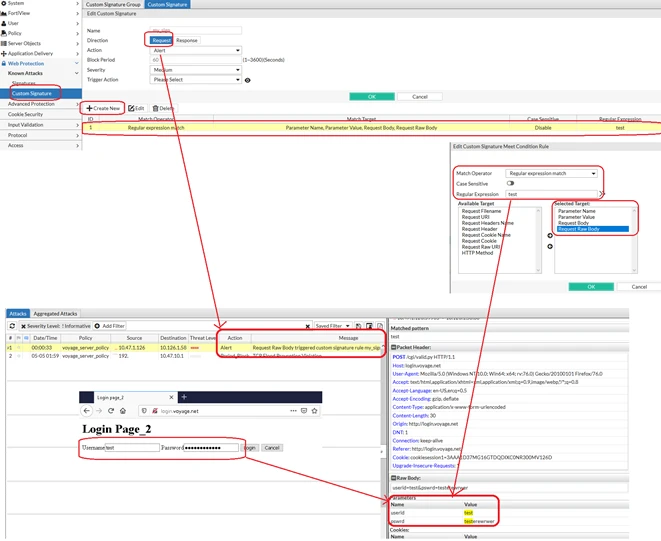
Navigate to Web Protection -> Custom Signature -> Custom Signature.
Configure an operator pattern value to match. For this example: test
Create a new custom signature to check to user’s Request with below target check list:
- Parameter Name.
- Parameter Value.
- Request Body.
- Request Raw Body.
Example:
To check user input username and password (HTTP form information):
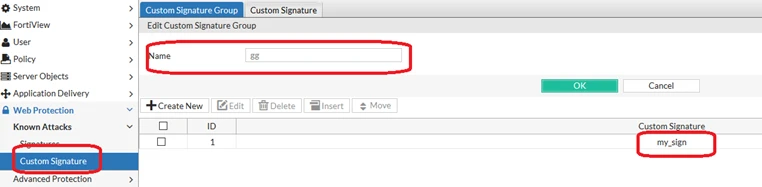
Create a custom signature group, and bind it with a custom signature that was created.
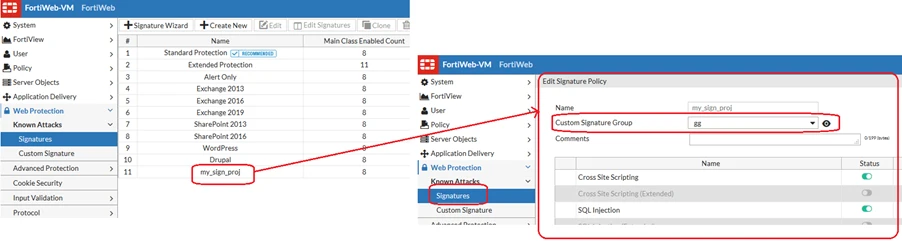
Assign custom signature group to preferred signature profile.
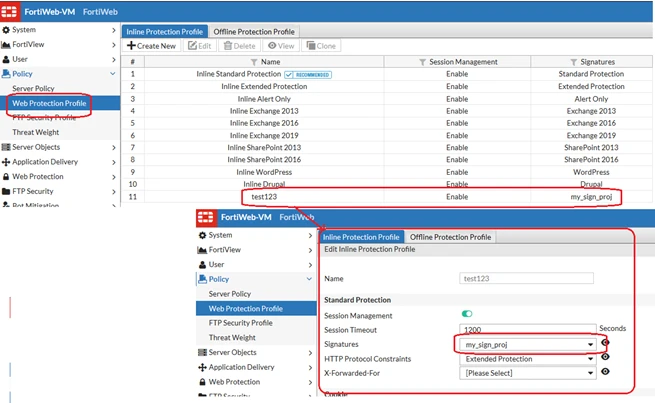
Assign the signature profile to the web protection profile.
Assign web protection profile to server policy.

Notes: The demonstration steps above were for a specific scenario i.e. HTTP form information.
However, similar scenarios will also work.
Related document:
Defining custom data leak & attack signatures - FortiWeb administration guide
