Solution | In some scenarios, switches have multiple trunk interfaces. For example: PO1 and PO6, and both the trunk interfaces will have different sets of VLANs: config switch interface
edit "PO6"
set allowed-vlans 23-24,26-27,29-31,34-35,40,45-54,56-57,59-60,62,67-70,72-74,79-80,84,86-87,89,91,93-94,96-98,100-106,151,153-154,157-158,161-168,173,176,800,811
set snmp-index 74
next
config switch interface
    edit "PO1"
        set allowed-vlans 10-12,18-19,21-24,26-31,34-37,40,45-60,62,67-70,72-77,79-81,84,86-87,89-91,93-94,96-98,100-106,141-142,150-158,161,166,168,173,176,207,800,811
        set snmp-index 69
    next
In the GUI, when both of the interfaces are selected and a new VLAN is added, like in the following example...
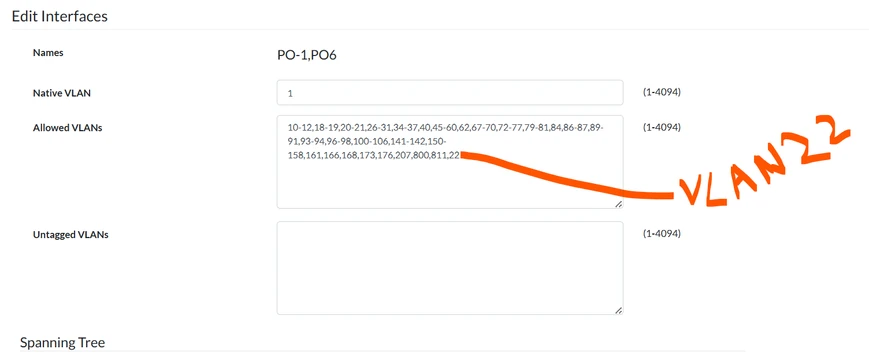
... The VLAN config of PO6 is overridden by the config of PO1, as shown below:
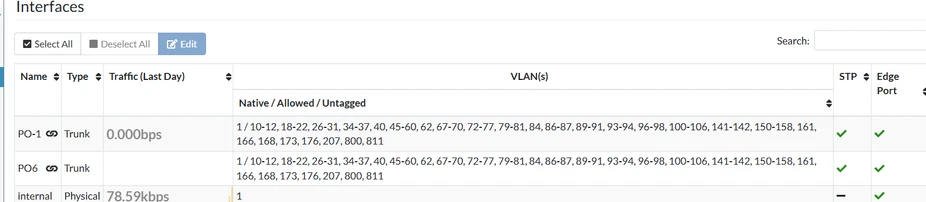 Therefore, while configuring VLANs on trunk interfaces, make sure that each trunk interface is selected individually and then add VLANs.
Selecting multiple trunk interfaces for adding VLANs is only supported when all the selected trunk interfaces have an identical set of VLANs configured.
Note: It is recommended to use notepad to copy the config and verify the allowed VLANs list, to ensure it will not cause any network outage.
Related article: Technical Tip: Interface Trunk on FortiSwitch |




