Technical Tip: How to Power Cycle/Reset a FortiSwitch-PoE Port (to reboot a connected device)
| Description | This article describes how to Power Cycle or reset a FortiSwitch-PoE port to reset a connected device. |
| Scope | FortiSwitch. |
| Solution | Sometimes, it is necessary to reset a connected device that is powered by a PoE (Power-Over-Ethernet) port on a FortSwitch.
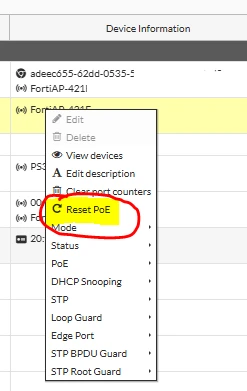
Perhaps the device has become unresponsive, or it simply requires a restart/reboot. Rather than physically disconnecting the cable to restart it, the port can be reset as follows:
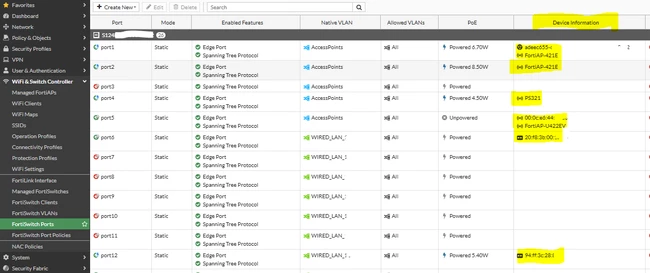
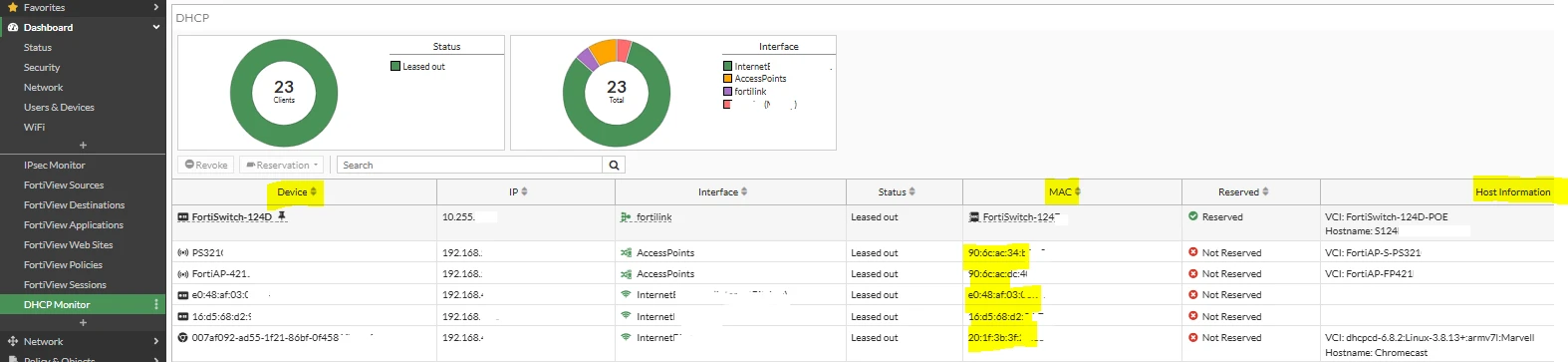
Another way to find the device is to look at the DHCP Monitor Dashboard (assuming the FortiGate is the DHCP server). Go To: Dashboard -> DHCP Dashboard. Find the device and its MAC Address, and search for this back in the Wi-Fi & Switch Controller -> FortiSwitch Ports (use the Host Information or Device columns).
execute switch-controller switch-action poe reset <switch> <port>
Related article: Troubleshooting Tip: Diagnosing a PoE fault on a FortiSwitch |