


Technical Tip: How to add FortiSwitch to FortiCloud
Description
This Article describes how to add FortSwitch to FortiCloud from FortiGate directly.
This can be done once FortiSwitch is authorized.
Scope
For version 6.4.2 and above.
Solution
To register the FortiSwitch from GUI:
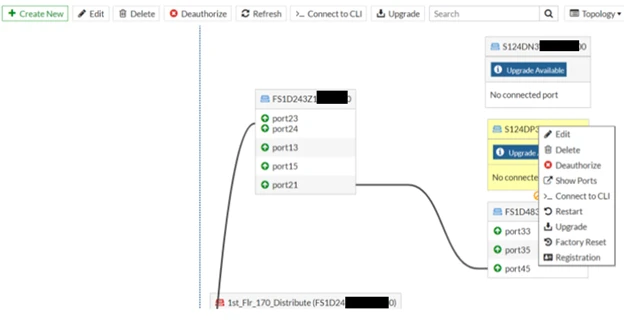
1) Go to WiFi & Switch Controller -> Managed FortiSwitch and ensure the 'Topology' view is selected.
2) In the 'Topology', select an unregistered unit and select 'Registration'.
This Article describes how to add FortSwitch to FortiCloud from FortiGate directly.
This can be done once FortiSwitch is authorized.
Scope
For version 6.4.2 and above.
Solution
To register the FortiSwitch from GUI:
1) Go to WiFi & Switch Controller -> Managed FortiSwitch and ensure the 'Topology' view is selected.
2) In the 'Topology', select an unregistered unit and select 'Registration'.
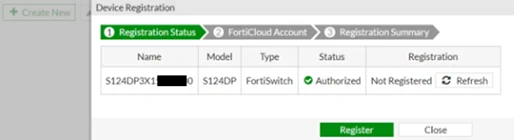
3) Complete the unit registration wizard:
- Select 'Register' to proceed.
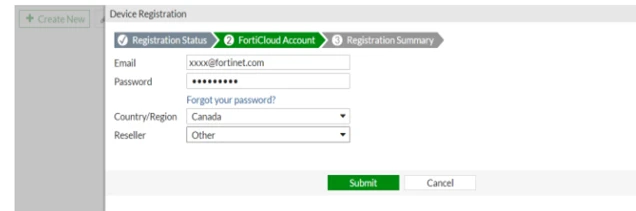
- Enter the FortiCloud account information and select 'Submit'.
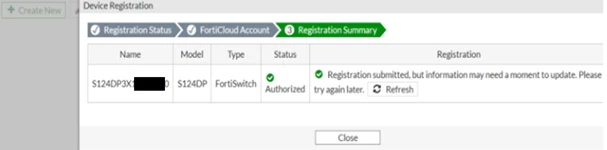
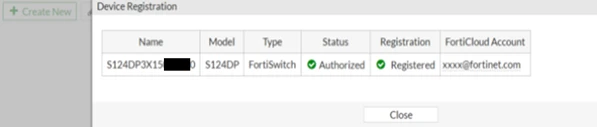
The registration information is submitted to FortiCare, and FortiOS attempts to collect the registration status from FortiGuard.
Since FortiGuard and FortiCare synchronize periodically, the registration status does not update immediately (it takes few hours).
Select 'Close'.
4) After a while, go back to WiFi & Switch Controller -> Managed FortiSwitch.
5) Select the unit and select 'Registration.'
The unit is shown as Registered to the corresponding FortiCloud account.
