Technical Tip: Collect FortiSwitch logs under CLI with custom filters
| Description | This article describes how to collect FortiSwitch logs under CLI using specific filters in managed or standalone mode. |
| Scope | FortiSwitch 7.2.x, 7.4.x, 7.6.x |
| Solution |
FSW # execute log display 79 logs found. 1: 2025-04-10 19:45:53 log_id=0105008254 tz=-0000 type=event subtype=spanning_tree pri=notice vd=root user="stp_daemon" action="state-change" unit="primary" switch.physical-port="port15" instanceid="0" event="state migration" oldstate="discarding" newstate="forwarding" status="None" msg="primary port port15 instance 0 changed state from discarding to forwarding" 2: 2025-04-10 19:45:50 log_id=0105008255 tz=-0000 type=event subtype=spanning_tree pri=notice vd=root user="stp_daemon" action="role-change" unit="primary" switch.physical-port="port15" instanceid="0" event="role migration" oldrole="disabled" newrole="designated" status="None" msg="primary port port15 instance 0 changed role from disabled to designated" 3: 2025-04-10 19:45:50 log_id=0100001400 tz=-0000 type=event subtype=link pri=notice vd=root action="port-up" user="ctrld" unit="primary" switch.physical-port="port15" status="up" msg="primary switch port port15 has come up" 4: 2025-04-10 19:45:47 log_id=0105008254 tz=-0000 type=event subtype=spanning_tree pri=notice vd=root user="stp_daemon" action="state-change" unit="primary" switch.physical-port="port13" instanceid="0" event="state migration" oldstate="forwarding" newstate="discarding" status="None" msg="primary port port13 instance 0 changed state from forwarding to discarding" 5: 2025-04-10 19:45:47 log_id=0105008255 tz=-0000 type=event subtype=spanning_tree pri=notice vd=root user="stp_daemon" action="role-change" unit="primary" switch.physical-port="port13" instanceid="0" event="role migration" oldrole="designated" newrole="disabled" status="None" msg="primary port port13 instance 0 changed role from designated to disabled" 6: 2025-04-10 19:45:47 log_id=0100001401 tz=-0000 type=event subtype=link pri=notice vd=root action="port-down" user="ctrld" unit="primary" switch.physical-port="port13" status="down" msg="primary switch port port13 has gone down" 7: 2025-04-10 19:45:44 log_id=0103042803 tz=-0000 type=event subtype=system pri=information vd="root" user="FortiLink" ui="httpsd" action=edit cfg_tid=43581550 cfg_path="switch.interface" cfg_obj="port15" cfg_attr="native-vlan[1->20]" msg="Edit switch.interface port15" 8: 2025-04-10 19:39:49 log_id=0103032001 tz=-0000 type=event subtype=system pri=notice vd=root sn=1744313989 user="admin" ui=ssh(10.241.51.193) method=ssh srcip=10.241.51.193 dstip=10.241.51.194 action=login status=success reason=none profile="super_admin" msg="Administrator admin logged in successfully from ssh(10.241.51.193)" 9: 2025-04-10 19:39:49 log_id=0103036255 tz=-0000 type=event subtype=system pri=notice vd=root user="ssh" msg="Accepted password for admin from 10.241.51.193 port 19813 ssh2" 10: 2025-04-10 19:39:01 log_id=0105008254 tz=-0000 type=event subtype=spanning_tree pri=notice vd=root user="stp_daemon" action="state-change" unit="primary" switch.physical-port="port13" instanceid="0" event="state migration" oldstate="discarding" newstate="forwarding" status="None" msg="primary port port13 instance 0 changed state from discarding to forwarding" 11: 2025-04-10 19:38:59 log_id=0105008255 tz=-0000 type=event subtype=spanning_tree pri=notice vd=root user="stp_daemon" action="role-change" unit="primary" switch.physical-port="port13" instanceid="0" event="role migration" oldrole="disabled" newrole="designated" status="None" msg="primary port port13 instance 0 changed role from disabled to designated" 12: 2025-04-10 19:38:59 log_id=0100001400 tz=-0000 type=event subtype=link pri=notice vd=root action="port-up" user="ctrld" unit="primary" switch.physical-port="port13" status="up" msg="primary switch port port13 has come up
FSW # execute log filter view-lines 500
Now, executing '# execute log display' will return 500 logs.
Example to monitor the port status:
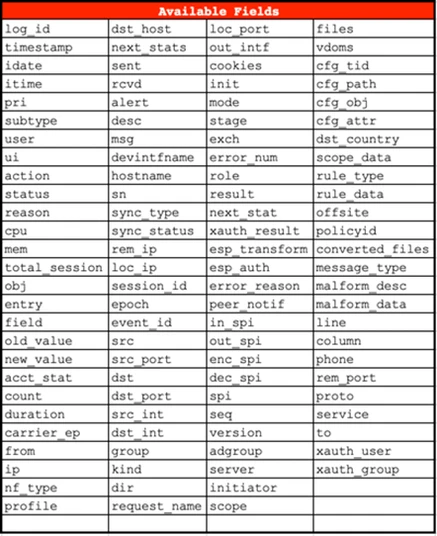
FSW # execute log filter field action port-up, port-down 3 logs found. 1: 2025-04-10 19:45:50 log_id=0100001400 tz=-0000 type=event subtype=link pri=notice vd=root action="port-up" user="ctrld" unit="primary" switch.physical-port="port15" status="up" msg="primary switch port port15 has come up" 2: 2025-04-10 19:45:47 log_id=0100001401 tz=-0000 type=event subtype=link pri=notice vd=root action="port-down" user="ctrld" unit="primary" switch.physical-port="port13" status="down" msg="primary switch port port13 has gone down" 3: 2025-04-10 19:38:59 log_id=0100001400 tz=-0000 type=event subtype=link pri=notice vd=root action="port-up" user="ctrld" unit="primary" switch.physical-port="port13" status="up" msg="primary switch port port13 has come up"
FSW # execute log filter field subtype spanning_tree 1: 2025-04-10 19:45:53 log_id=0105008254 tz=-0000 type=event subtype=spanning_tree pri=notice vd=root user="stp_daemon" action="state-change" unit="primary" switch.physical-port="port15" instanceid="0" event="state migration" oldstate="discarding" newstate="forwarding" status="None" msg="primary port port15 instance 0 changed state from discarding to forwarding" 2: 2025-04-10 19:45:50 log_id=0105008255 tz=-0000 type=event subtype=spanning_tree pri=notice vd=root user="stp_daemon" action="role-change" unit="primary" switch.physical-port="port15" instanceid="0" event="role migration" oldrole="disabled" newrole="designated" status="None" msg="primary port port15 instance 0 changed role from disabled to designated"
FSW # execute log filter dump
Related articles: |