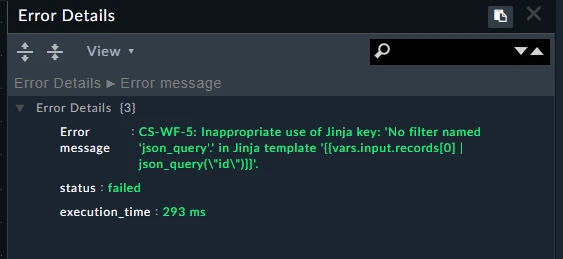
| Input the code below: - Have the root permission.
sudo su
- Input the code below to reset all the libraries in cyops-workflow:
sudo -u nginx /opt/cyops-workflow/.env/bin/pip install --force amqp==5.1.1 ansible==2.8.2 arrow==1.2.3 asgiref==3.6.0 attrs==22.2.0 bcrypt==4.0.1 billiard==3.6.4.0 bleach==4.1.0 cached-property==1.5.2 celery==5.1.2 certifi==2022.12.7 cffi==1.15.1 charset-normalizer==3.1.0 click==7.1.2 click-didyoumean==0.3.0 click-plugins==1.1.1 click-repl==0.2.0 coreapi==2.3.3 coreschema==0.0.4 cryptography==36.0.2 decorator==4.4.2 defusedxml==0.7.1 Django==3.2.14 django-celery-beat==2.2.1 django-celery-results==2.2.0 django-crispy-forms==1.13.0 django-extensions==3.1.5 django-filter==21.1 django-guardian==2.4.0 django-memoize==2.3.1 django-rest-swagger==2.2.0 django-timezone-field==4.2.3 django-url-filter==0.3.15 djangorestframework==3.13.1 dnspython==2.2.0 enum-compat==0.0.3 eventlet==0.33.0 flower==1.0.0 freezegun==1.1.0 future==0.18.3 greenlet==2.0.2 gunicorn==20.1.0 h11==0.14.0 html2text==2020.1.16 humanize==4.6.0 hvac==0.11.2 idna==3.4 IMAPClient==2.2.0 isodate==0.6.1 itypes==1.2.0 Jinja2==3.0.3 jmespath==0.10.0 json2html==1.3.0 jsonpatch==1.32 jsonpointer==2.3 kombu==5.1.0 lxml==4.9.2 MarkupSafe==2.1.2 netaddr==0.8.0 networkx==2.5.1 numpy==1.19.5 openapi-codec==1.3.2 packaging==23.0 paramiko==2.9.1 pbr==5.11.1 pem==21.2.0 pika==1.2.0 platformdirs==3.1.1 ply==3.11 prometheus-client==0.16.0 prompt-toolkit==3.0.38 psutil==5.9.0 py==1.11.0 pycparser==2.21 pycryptodome==3.14.1 PyNaCl==1.5.0 pyOpenSSL==22.0.0 python-crontab==2.7.1 python-dateutil==2.8.2 pytz==2022.7.1 PyYAML==5.4.1 requests==2.28.2 requests-file==1.5.1 requests-toolbelt==0.9.1 retry==0.9.2 sh==1.14.2 simplejson==3.18.4 six==1.16.0 SQLAlchemy==1.4.31 sqlparse==0.4.3 tabulate==0.8.9 textfsm==1.1.2 tornado==6.2 uritemplate==4.1.1 urllib3==1.26.15 uvicorn==0.16.0 uWSGI==2.0.20 validators==0.20.0 vine==5.0.0 voluptuous==0.12.2 wcwidth==0.2.6 webencodings==0.5.1 yaql==2.0.0 zeep==4.1.0
- Input the code below to reset ansible related functions:
sudo -u nginx /opt/cyops-workflow/.env/bin/pip uninstall ansible ansible-base ansible-core
- Input the code below to reinstall the libraries to install ansible, fsr-utilities related libraries once more
sudo -u nginx /opt/cyops-workflow/.env/bin/pip install --force ansible==2.8.2 jinja2==3.0.3 cryptography==36.0.2
- Restart the services
csadm services --restart
|