Troubleshooting Tip: How to Configure Redirect URIa in Azure for FortiSOAR Microsoft Sentinel Connector
| Description | This article describes step-by-step instructions to add a Redirect URI in Azure for configuring the Microsoft Sentinel Connector. |
| Scope | v7.6.x, v7.5.x, v7.4.x. |
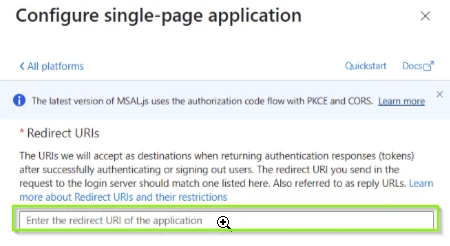
| Solution | Step 1: During the process of registering the application on Azure, navigate to App Registrations and open the registered application.
Step 2: Go to Manage -> Authentication. Select Add a platform -> Redirect URIs, and in the Redirect URIs textbox, enter:
Step 3: Select Configure to save the changes.
Related document: |