Mike17
Staff
Staff
Jul 30, 2025 12:21 PM UTC

Technical Tip: Download Unknown Raw Event logs from FortiSIEM GUI

  • Apr 16, 2026 1:27 PM UTC
  • 1 reply
  • 761 views
  • Translate All
Description This article describes how to download Unknown Raw Event logs on FortiSIEM GUI, this is useful when try to add new sources on FortiSIEM and for some reason FortiSIEM is not able to parse the received events
Scope FortiSIEM.
Solution

When FortiSIEM receives logs that do not match with a system parser or a custom event parser, then FortiSIEM stores the event as Unknown_EventType. Once indexed on the event database, it is possible to download these kinds of events to be able to check their content and perform parse testing.


To download the Unknown Event types, follow the next steps:

  1. Logging into FortiSIEM GUI with admin credentials
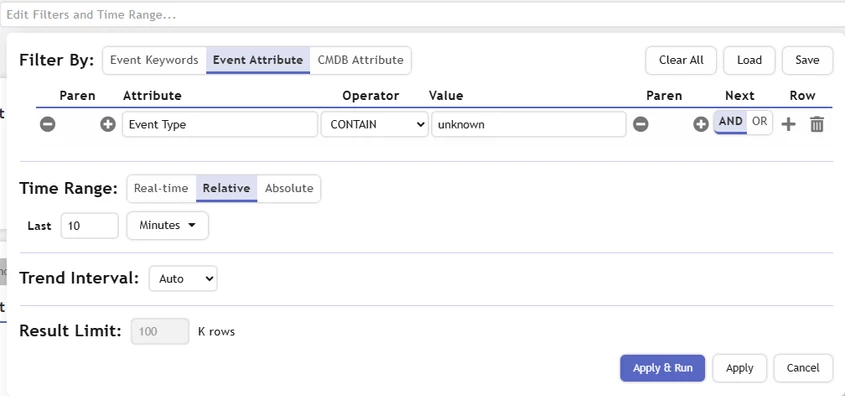
  2. Navigate to Analytics and create a new query by selecting the filter Criteria: Event Type CONTAIN unknown.


2025-07-29_16h46_38.png


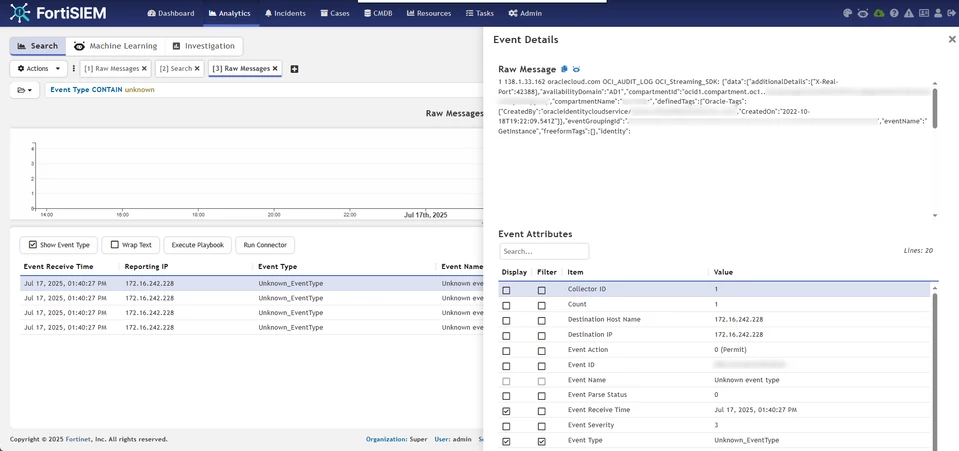
  1. Select 'Apply & Run, the unknown event types will be displayed as Results:


2025-07-29_16h40_50.png


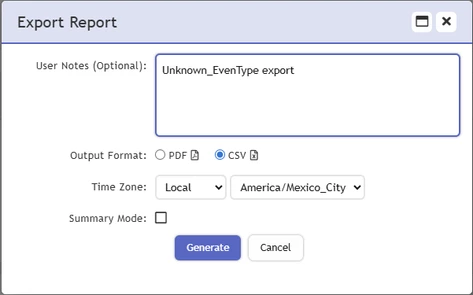
  1. Once displayed results with 'Unknown Event Types', export the results by selecting Actions -> Export Result -> CSV>Generate.


2025-07-29_16h56_53.png


After completing these steps, a compressed CSV file will be downloaded, then it is possible to check the content for these events to perform additional parsing tests

1 reply

maovalencia
Staff & Editor
Staff & Editor
Jul 30, 2025 10:22 PM UTC

Thank you Mike for this article. 

Translate
Risk and Resilience in the Age of AI. An OT Thought Leadership Summit for Houston's Critical Infrastructure Leaders. Date: Thursday, December 3, 2026. Time: 8:30 am - 1:30 pm (CT). Location: The Westin Houston, Memorial City | 945 Gessner Road, Houston, TX 77024