Technical Note: [Accelops KB] How to change 'From Address' in the Email notifications
Description
Summary of Topic
This article will explain how to make changes to the "From Address" in AO for Email Notifications.
There are legacy instructions as well as updated instructions, please read the entire article before making changes
Steps
For users on versions before 3.x:
- SSH into AO with the root user
- run the following command:
- psql -U phoenix phoenixdb -c "insert into ph_sys_conf (id, cust_org_id, property, category, value) values (4, 0, 'Notif_Email_Sender', 4, ‘your_alert_email_addr’)"
- [NOTE: you_alert_email_addr should be replaced by your actual email that you want alerts to go to.]
- You have just changed the From Address for email notifications
For all users on 3.x and after:
This process is simpler since we now have a GUI that incorporates this feature
- Log onto AO's web GUI
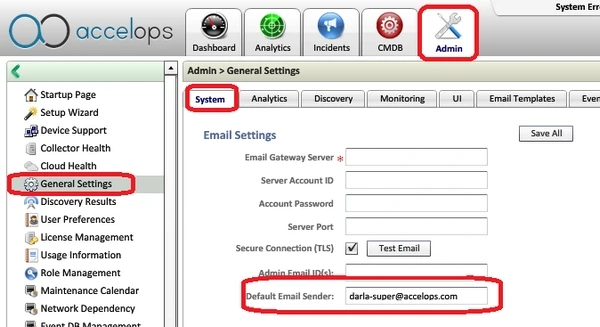
- Click on Admin >> General Settings >> System >> Default Email Sender
- Change the Default Email Sender value in the text box
- Click on Save All
Here's a ScreenShot: