
FortiSIEM CMDB Restore – Services Not Starting After Reboot
Hi Fortinet Team / Community,
I am currently working on a FortiSIEM CMDB restore and am facing an issue where the FortiSIEM services do not come back up after completing the documented CMDB restore procedure and rebooting the Supervisor.
I followed the procedure documented here:
FortiSIEM 7.6.0 – Backing Up and Restoring Databases
CMDB Restore Procedure Followed
I performed the following steps on the Supervisor:
systemctl stop phxctl
phtools -stop all
Waited approximately 20 seconds and then executed:
killall -9 java
killall -9 phMonitor
I then copied the latest phoenixdb_<timestamp> backup to /tmp and executed:
cd /opt/phoenix/deployment
db_restore /tmp/phoenixdb_<timestamp>
The restore process completed, after which I rebooted the Supervisor:
rebootIssue After Reboot
After the system came back up, most of the FortiSIEM services are still showing as DOWN.
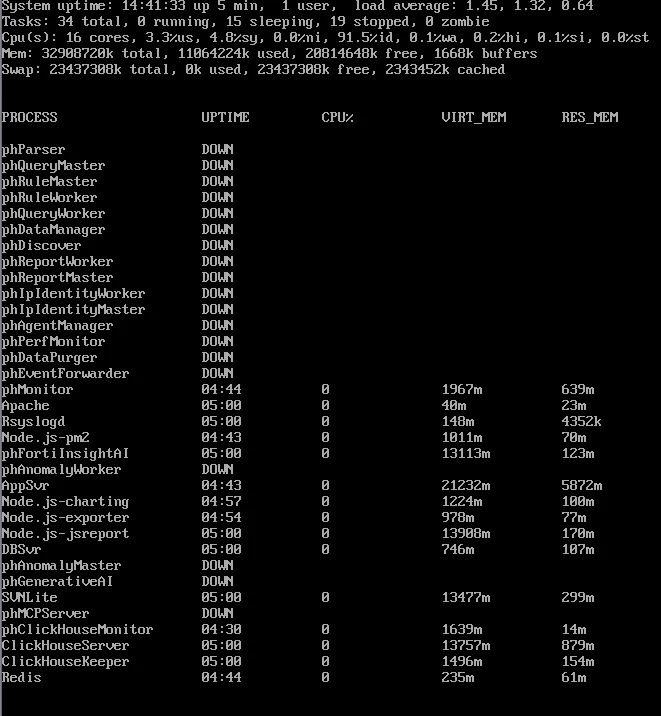
For example:
Only some supporting services such as phMonitor, Apache, Rsyslog, Redis, ClickHouseServer, etc. appear to be running.
I have attached the current process/service status for reference.
Environment
- FortiSIEM: 7.5.1
- Deployment: Supervisor
- Database: PostgreSQL / CMDB
- Restore:
phoenixdb_<timestamp>backup - Issue: FortiSIEM application services remain DOWN after reboot
