


Technical Tip: Best practices for upgrading the FortiSandbox cluster
Description
This article describes the best practices that need to be followed when upgrading FortiSandbox devices in a high availability cluster.
Scope
FortiSandbox.
Solution
Step 1: Understand the order of upgrade execution.
Follow/understand the order of upgrade execution as outlined in this document: upgrading-or-rebooting-a-cluster.
Step 2: Upgrade preparation.
Verify the upgrade path from OS release notes.
Ref: https://docs.fortinet.com/document/FortiSandbox/
Backup configuration files.
Verify HA cluster status prior to the upgrade.
Download target OS images from support portal.
Step 3: Upgrading the FortiSandbox nodes.
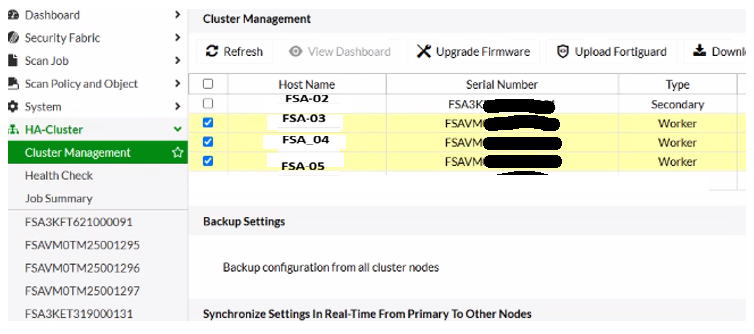
In this article, upgrading cluster nodes is performed through the primary unit's Cluster Management page.
Navigate to the primary unit's Cluster Management tab.
Upload an OS image on one of the worker nodes to upgrade that particular node.
Proceed with upgrading the remaining worker nodes.
If worker nodes are of the same model, and if scan load is relatively low, all worker nodes can be selected to upgrade together.
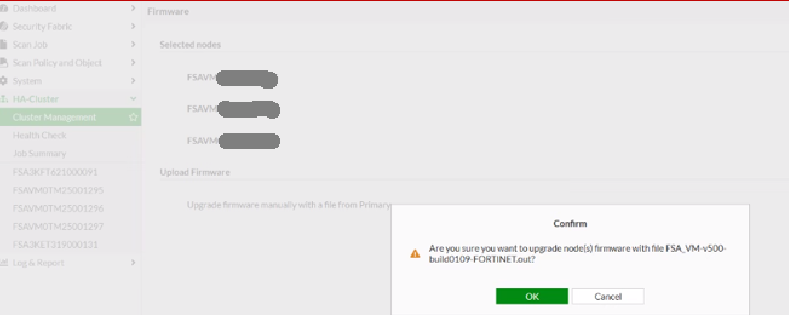
Verify the status of the worker nodes once the upgrade has completed.
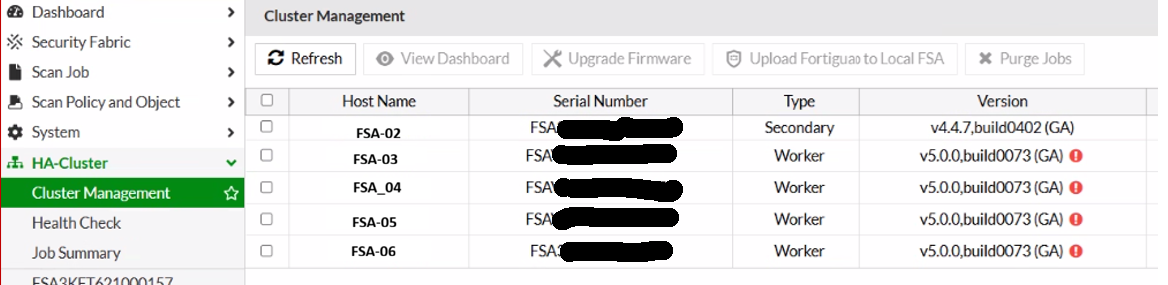
At this stage, the cluster management tab will show the OS versions do not match.
In the following example, all worker nodes are upgraded to 5.0.0 while the primary and secondary remain in the pre-upgrade OS version 4.4.7:
Upgrade the HA secondary node.
Proceed with primary node upgrade.
At this stage, the HA secondary node takes over the primary role.
The primary HA node will join the cluster in the secondary role after an OS upgrade.
Verify HA cluster status.
