Technical Tip: How to activate ZTNA control on the Secret
| Description | This article describes how to activate ZTNA control on the Secret. |
| Scope | FortiPAM, ZTNA. |
| Solution | Activate ZTNA under the Secret and GUI.
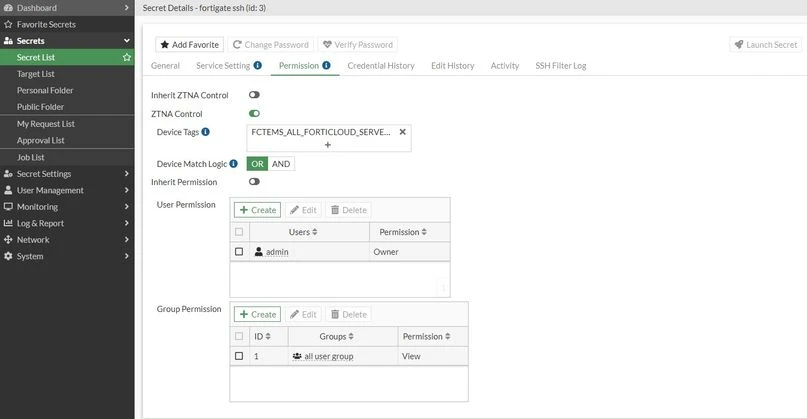
To activate ZTNA tags on the secret, edit the ZTNA Control under Permission. After activating ZTNA Control, select Device Tags. Only devices that have tags are allowed to launch the secret:
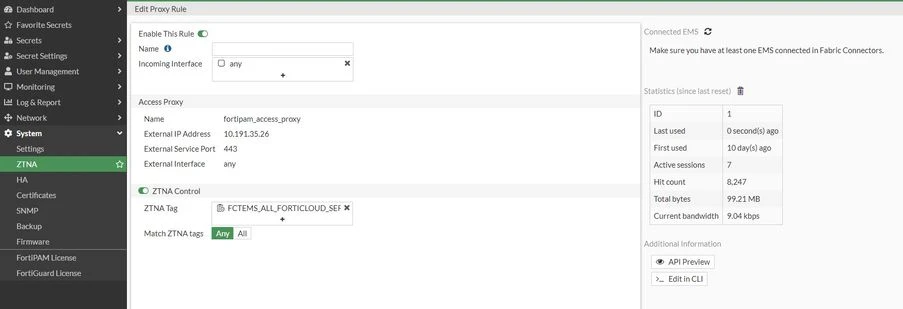
For ZTNA to work, ZTNA must be activated globally on the FortiPAM. This means that, in order to log in to the FortiPAM GUI, it will also need ZTNA tags. To configure the ZTNA on the GUI, enable ZTNA under System -> ZTNA and then create a Proxy Rule or edit the default. Under it, activate ZTNA control and add tags:
It is important to crosscheck this ZTNA Tag because this allows access to the GUI. It is possible to remove the user as an admin of the GUI if the wrong tags are added. |