This article describes how to troubleshoot a RADIUS Virtual Server in FortiNAC that cannot be deleted from the GUI. When attempting to delete the affected Virtual Server, the GUI may return "Server Error: 500 OK" and the browser Developer Tools may show an exception similar to "org.hibernate.exception.ConstraintViolationException".
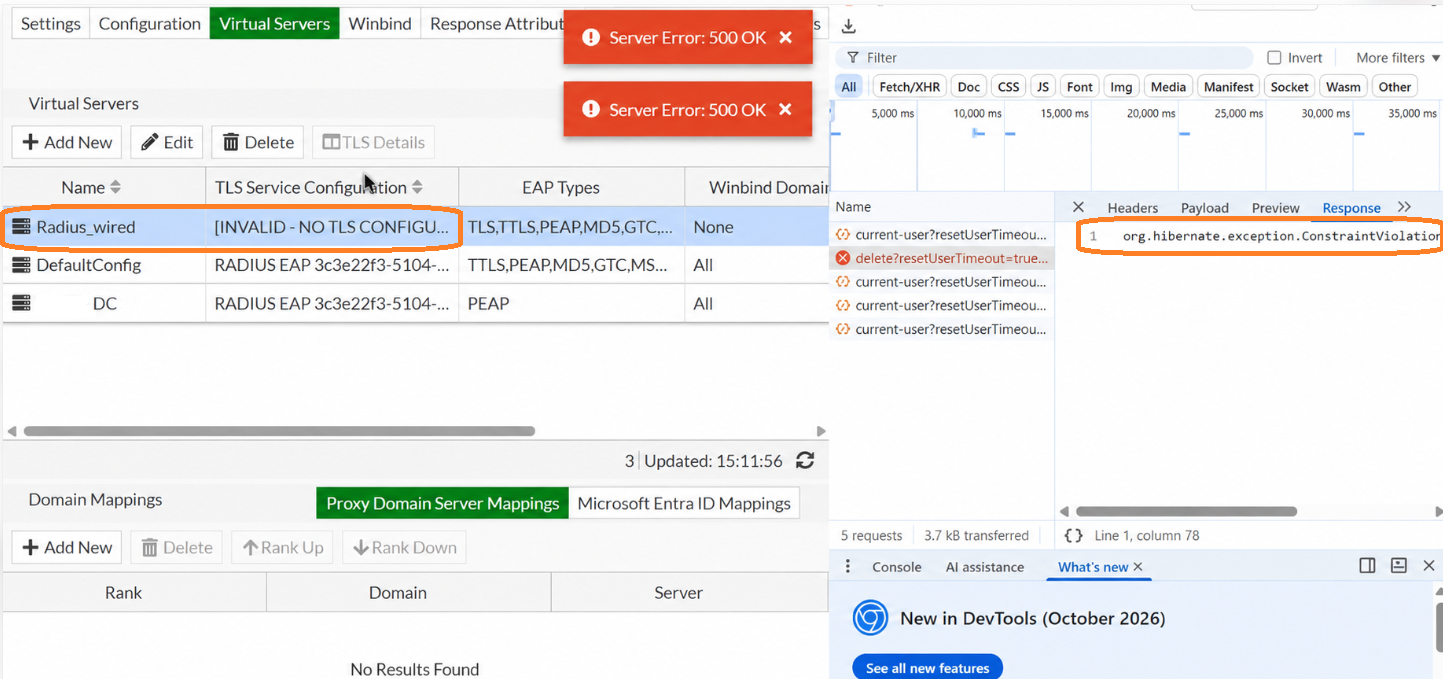
Identify the affected server from the database:
SELECT ID,name,type,tlsServiceConfiguration,LAST_MODIFIED_BY,LAST_MODIFIED_DATE FROM bsc.RadiusServerConfig WHERE name = 'Radius_wired';
+----+--------------+------+-------------------------+------------------+---------------------+
| ID | name         | type | tlsServiceConfiguration | LAST_MODIFIED_BY | LAST_MODIFIED_DATE  |
+----+--------------+------+-------------------------+------------------+---------------------+
| 3  | Radius_wired |    1 |          NULL           | admin            | 2026-10-07 14:08:39 |
+----+--------------+------+-------------------------+------------------+---------------------+
Confirm database deletion error:
DELETE FROM bsc.RadiusServerConfig WHERE ID=3 AND name ='Radius_wired';
Database returned error:
ERROR 1451 (23000): Cannot delete or update a parent row: a foreign key constraint fails
(`bsc`.`RadiusServerConfigWinbindConfigList`, CONSTRAINT `fk_rsc` FOREIGN KEY (`radiusServerConfig_id`) REFERENCES `RadiusServerConfig` (`ID`))
Check which tables reference the RadiusServerConfig:
SELECT
    k.TABLE_SCHEMA,
    k.TABLE_NAME,
    k.COLUMN_NAME,
    k.CONSTRAINT_NAME,
    r.DELETE_RULE,
    r.UPDATE_RULE
FROM information_schema.KEY_COLUMN_USAGE k
LEFT JOIN information_schema.REFERENTIAL_CONSTRAINTS r
       ON r.CONSTRAINT_SCHEMA = k.CONSTRAINT_SCHEMA
      AND r.CONSTRAINT_NAME = k.CONSTRAINT_NAME
WHERE k.REFERENCED_TABLE_SCHEMA = 'bsc'
  AND k.REFERENCED_TABLE_NAME = 'RadiusServerConfig'
  AND k.REFERENCED_COLUMN_NAME = 'ID'
ORDER BY k.TABLE_NAME, k.COLUMN_NAME;
The system shows one reference:

The RESTRICT rule prevents a RadiusServerConfig record from being deleted while another record still references it.
Identify the dependent mapping:
SELECT * FROM bsc.RadiusServerConfigWinbindConfigList WHERE radiusServerConfig_id = 3;
In this example, it is returned:
+-----------------------+------------------+
| radiusServerConfig_id | winbindConfig_id |
+-----------------------+------------------+
| 3                     | 5                |
+-----------------------+------------------+
Remove only the association between the affected Virtual Server and the Winbind configuration. Do not delete the Winbind configuration itself:
DELETE FROM bsc.RadiusServerConfigWinbindConfigList WHERE radiusServerConfig_id = 3 AND winbindConfig_id=5;
This deletes one row from the mapping table RadiusServerConfigWinbindConfigList. It does not delete Winbind configuration ID 5.
Delete the obsolete Virtual Server:
After the mapping is removed, proceed with deletion:
DELETE FROM bsc.RadiusServerConfig WHEREID=3 AND name ='Radius_wired';
Note:
Direct database modifications should only be performed after taking a current database backup and preferably during a maintenance window under Fortinet Support guidance. | 


