


Troubleshooting Tip: RADIUS (802.1X PEAP) authentication failures on Windows hosts
Description
This article describes an authentication issue that affects Windows hosts authenticated through 802.1X PEAP-MS-CHAPv2 to FortiNAC using Winbind, or any other Active-Directory integrated RADIUS server.
Scope
Windows hosts performing 802.1X PEAP-MS-CHAPv2 authentication with FortiNAC or other RADIUS servers.
Solution
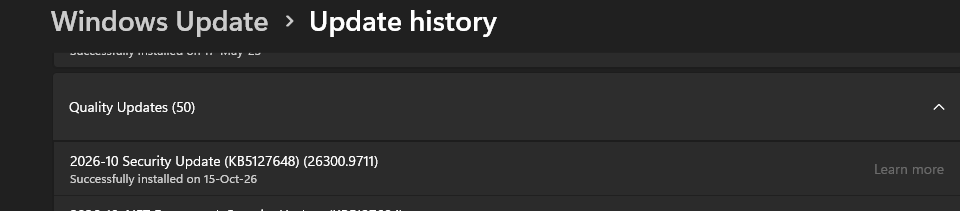
Following the installation of Windows update KB5127648 (released on 13 October 2026), authentication attempts using cached credentials are failing. The affected endpoints report Event ID 12014: OneX Held State Timeout.
This issue is not specific to FortiNAC; it also impacts configurations using other RADIUS servers, and it is triggered by the update on the Windows endpoints.
This will impact any 802.1X authentication using a cached username/password. This includes many WiFi deployments using WPA2-Enterprise or WPA3-Enterprise, as well as VPN connections using NTLMv1-derived credentials and PEAP-MS-CHAPv2. Deployments using client certificate authentication rather than username/password are unaffected.
This occurs because the Windows update changes the default behavior when the 'BlockNTLMv1SSO' registry value is not set. Configuring the BlockNtlmv1SSO registry key to use Audit mode (value 0) restores the authentication behavior to the behavior before the update was applied.
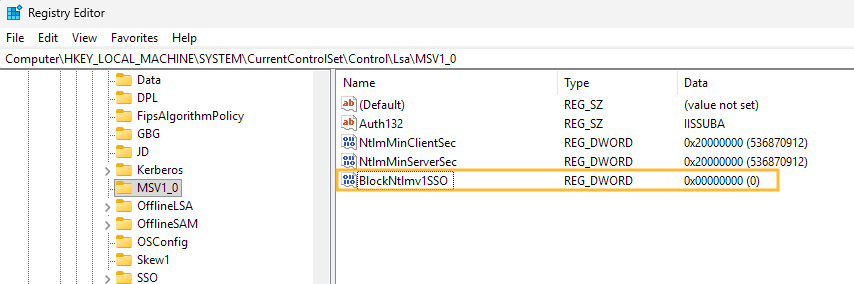
Registry location: HKEY_LOCAL_MACHINE\SYSTEM\currentcontrolset\control\lsa\msv1_0
Value: BlockNtlmv1SSO
Type: REG_DWORD
After making this change, the host should be able to authenticate successfully using its cached domain SSO credentials without requiring a reboot. In an Active Directory environment, this configuration can also be deployed centrally through a Group Policy Object (GPO).
Uninstalling Windows Update KB5127648 has also been confirmed to resolve the authentication failures.
To check whether the Windows update is currently installed on the machine, refer to Microsoft's Windows Update: FAQ.
Note: If the user credentials are entered each time manually, authentication will succeed even when the security update is installed and the registry change has not been applied. This Microsoft change affects only scenarios where SSO credentials (Automatically use my Windows logon name and password) are configured in the supplicant settings.
Related external documentation:
KB5127648 breaks WPA2-Enterprise (802.1X PEAP) Wi‑Fi authentication on Windows 11
Upcoming changes to NTLMv1 in Windows 11, version 24H2 and Windows Server 2025
Related articles:

