Staff & Editor
Oct 8, 2026 3:13 PM UTC

Troubleshooting Tip: How to import an LDAP user to FortiNAC manually and assign it to a host

Description

This article describes how to manually import an LDAP user to FortiNAC and assign it to a host in the Hosts view.

Scope

FortiNAC-F.

Solution

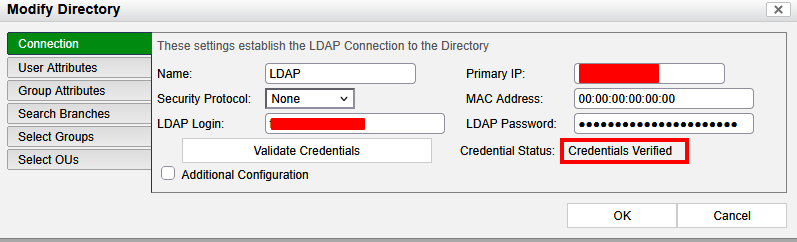
  1. Make sure LDAP connection exists between FortiNAC and LDAP server. There is no need to import the user group to read the user, FortiNAC needs to be able to read the user DN.


22683f9b.png


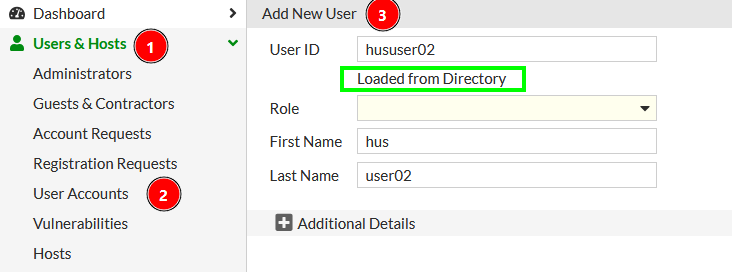
  1. To import an existing host from LDAP server to FortiNAC, navigate to Users & Hosts -> User Accounts -> Select 'Add New; enter the LDAP user account example 'aduser1'. After entering the username, click anywhere else on the page: a message will appear stating it was 'Loaded from Directory'.


298985ee.png


  1. Assign the user account a Role and select Ok.


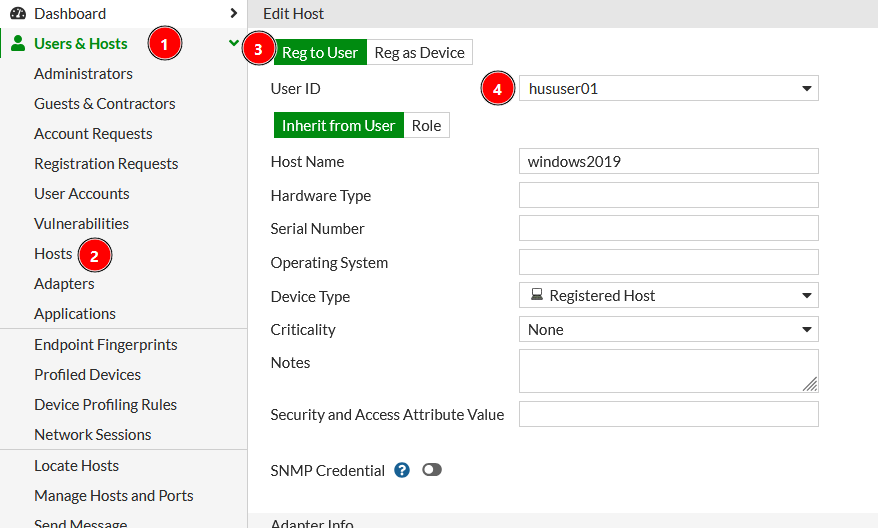
  1. Navigate to Users & Hosts -> Hosts and edit the host.


b1cb1d9b.png

Risk and Resilience in the Age of AI. An OT Thought Leadership Summit for Houston's Critical Infrastructure Leaders. Date: Thursday, December 3, 2026. Time: 8:30 am - 1:30 pm (CT). Location: The Westin Houston, Memorial City | 945 Gessner Road, Houston, TX 77024