Verify the Role rank configuration.
The error adjustRanks() failed - Role does not necessarily indicate duplicate Role ranks.
Connect to the affected FortiNAC-F managed server and enter the database shell and check the number of Roles and rank distribution:
execute db-shell

SELECT
    COUNT(*) AS total_roles,
    COUNT(DISTINCT `RANK`) AS distinct_ranks,
    MIN(`RANK`) AS min_rank,
    MAX(`RANK`) AS max_rank
FROM `Role`;
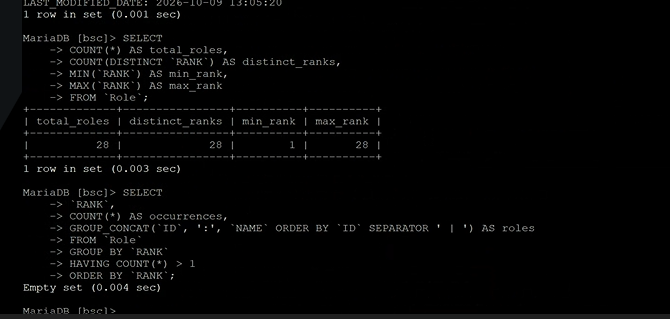
In the investigated environment, the result was:
total_roles    = 28
distinct_ranks = 28
min_rank       = 1
max_rank       = 28
Check whether any duplicate ranks exist:
SELECT
    `RANK`,
    COUNT(*) AS occurrences,
    GROUP_CONCAT(
        `ID`, ':', `NAME`
        ORDER BY `ID`
        SEPARATOR ' | '
    ) AS roles
FROM `Role`
GROUP BY `RANK`
HAVING COUNT(*) > 1
ORDER BY `RANK`;
Result:
Empty set
The Role ranks were unique and sequential. Therefore, duplicate ranks were not identified as the cause of this failure.
Compare globally synchronized Roles between the Manager and the managed server.
Run the following query on both the Manager and affected CA:
SELECT
    `ID`,
    `RANK`,
    `NAME`,
    `guid`,
    `globalModifiedDate`,
    `LAST_MODIFIED_DATE`,
    `LAST_MODIFIED_BY`
FROM `Role`
WHERE `guid` IS NOT NULL
  AND `guid` <> -1
ORDER BY `RANK`, `NAME`;
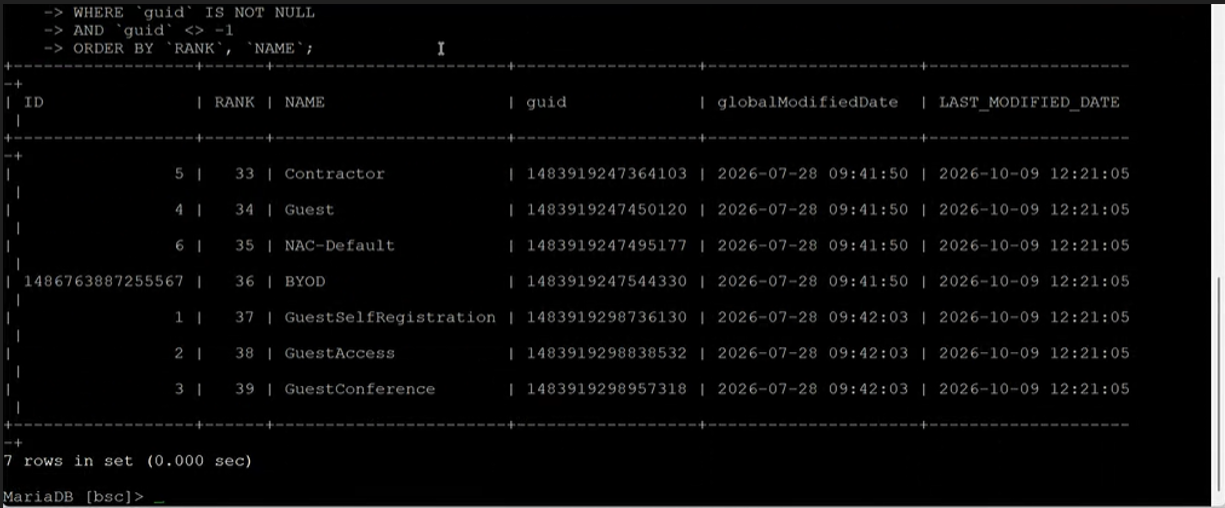
The Manager contained seven globally synchronized Roles:

On the affected CA, these same seven Roles were present with matching global GUIDs, but their local ranks were 21 through 27:

In addition, running comparisons revealed that there was also an additional Role on the affected CA which did not exist in Manager:
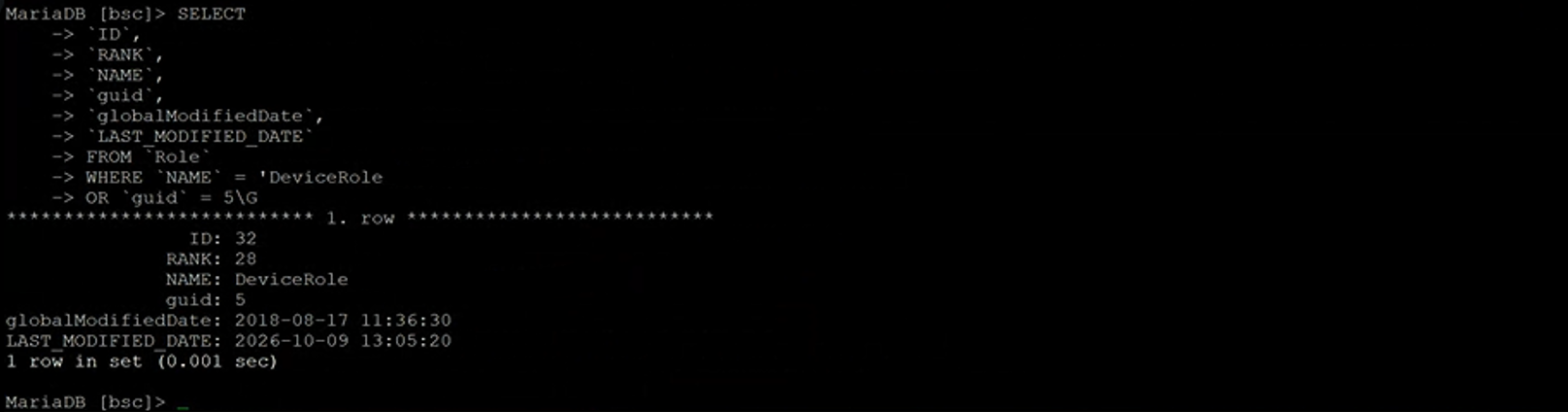
Verify if Role or GUID exists in the Manager.
SELECT
    `ID`,
    `RANK`,
    `NAME`,
    `guid`,
    `globalModifiedDate`,
    `LAST_MODIFIED_DATE`
FROM `Role`
WHERE `NAME` = 'DeviceRole'
   OR `guid` = 5\G
If it does not exist in the Manager, it means that this Role is a stale synchronization entry.
Compare Role ranks with a successfully synchronizing CA.
Global Roles can have different local rank numbers across managed servers. Another working CA showing the same seven Global Roles at a different local rank positions:
Correct the stale Role and reset the synchronization.
For the investigated record, the correction was:
UPDATE `Role`
SET `guid` = -1
WHERE `ID` = 32
  AND `NAME` = 'DeviceRole'
  AND `RANK` = 28
  AND `guid` = 5;
Verify the affected row count:
SELECT ROW_COUNT() AS changed_rows;
Verify the Role:
SELECT
    `ID`,
    `RANK`,
    `NAME`,
    `guid`,
    `globalModifiedDate`,
    `LAST_MODIFIED_DATE`
FROM `Role`
WHERE `ID` = 32\G
If correction is applied successfully, the Role will show the expected GUID of -1 .
This particular SQL correction remains specific to the investigated case.
Synchronize the affected CA.
Note:
Role ordering affects policy precedence. Do not delete Roles or renumber the entire Role table when troubleshooting this error without establishing a separate rank-integrity problem. Direct database modifications should only be performed after taking a current database backup and preferably during a maintenance window under Fortinet Support guidance.
| 


