Technical Tip: Uploading the secondary node certificate from the primary GUI in FortiNAC v7.6.3
| Description | This article describes that starting from FortiNAC v7.6.3, the secondary Node certificate can now be uploaded directly from the Primary GUI, without requiring CLI access or a failover operation. |
| Scope | FortiNAC-F v7.6.3 or above. |
| Solution | In previous FortiNAC versions, uploading a certificate to the Secondary node required either performing the task through the CLI or triggering a failover to access the Secondary node GUI.
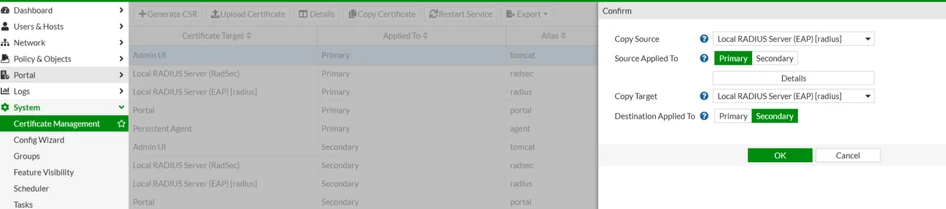
Starting from FortiNAC v7.6.3, this process has been simplified. The Secondary Node certificate can now be uploaded directly from the Primary GUI without requiring CLI access or failover. This will streamline the certificate management across the cluster.
To upload the certificate from the Primary GUI:
Once completed, the selected certificate will be automatically transferred and applied to the Secondary node, without any need for manual CLI operations or triggering failure.
Related documents: Secondary Certificates lost after upgrade from v F7.6.3 or v F7.6.4 |